
Every faceless YouTube channel runs into the same three bottlenecks: a voice that doesn’t sound robotic, video footage without hiring a camera crew, and a steady stream of ideas that doesn’t run dry after episode ten. Hiring separately for all three used to mean a voice actor, a video editor, and a scriptwriter on every single upload. We’ve spent this year testing AI tools for faceless YouTube channels that collapse that into a one-person operation, and this roundup covers the four that actually held up under real use — not just the ones with the flashiest sales page.
- How We Picked These
- AI Voice & Dubbing: ElevenLabs
- All-in-One AI Video: Higgsfield AI
- One-Prompt AI Video: ClawVID
- Video Ideas & Prompts: Motion Prompts
- Tools We Didn’t Include (and Why)
- A Simple Faceless-Channel Workflow
- Pricing at a Glance
- FAQ
How We Picked These
We didn’t start from a “top 10 AI tools” template and fill in names. Every tool on this list has its own full, in-depth review on ToolInsight Pro — we read the actual pricing pages, checked the claims against the fine print, and wrote down what didn’t match the marketing. If a tool didn’t hold up to that process, it’s not here. That’s also why this shortlist of AI tools for faceless YouTube channels is four tools long instead of twenty: we’d rather point you to four that work than pad it with names we haven’t actually checked.
AI Voice & Dubbing: ElevenLabs
ElevenLabs is the one tool on this list that’s become close to an industry default for AI voiceover — and for faceless channels specifically, its dubbing feature (part of the ElevenCreative suite) is arguably more useful than the voice generator itself: it can take a video you’ve already made and dub it into 90+ languages while keeping the original speaker’s voice character intact, which is how channels multiply one video into a dozen markets without re-recording anything.
Where it’s strongest: natural-sounding narration for tutorial and voiceover-style content, per-speaker voice cloning if you’re dubbing a multi-person video, and a free tier that’s genuinely usable for testing before you commit budget. Where it falls short: dubbing doesn’t include lip sync, so it’s a better fit for voiceover-driven content than tight talking-head shots.
- Full ElevenLabs Review
- How the ElevenLabs Voice Generator Works
- How to Translate YouTube Videos With AI Dubbing
Affiliate disclosure: this section contains an affiliate link. If you sign up through it, ToolInsight Pro may earn a commission at no extra cost to you.
All-in-One AI Video: Higgsfield AI
Higgsfield AI’s pitch is different from most video generators: instead of building one model and hoping it’s good enough, it packages nearly every major AI video/image model on the market — Sora 2, Kling, Veo, Flux — alongside its own cinematic tools (Genjutsu, Soul) inside one credit-based dashboard. For a faceless channel, that means you’re not locked into whichever single model a smaller tool happens to license; if one model handles a particular shot badly, you can switch models without switching platforms.
The tradeoff is the credit system takes some getting used to, and the sheer number of models/tools inside one dashboard has a real learning curve compared to a single-purpose generator. Worth it if you’re producing enough video that model flexibility actually matters; overkill if you just need one or two consistent shot types.
Affiliate disclosure: this section contains an affiliate link. If you sign up through it, ToolInsight Pro may earn a commission at no extra cost to you.
One-Prompt AI Video: ClawVID
ClawVID sits at the opposite end from Higgsfield: instead of a multi-model dashboard, it’s a single-prompt tool that turns one line of text into a 5-to-30-minute AI video. For a faceless channel that needs to publish fast and doesn’t need frame-by-frame creative control, that speed is the whole appeal — you’re trading fine-grained control for turnaround time.
Our full review digs into where the $17 headline price and the actual cost once you’re past the entry tier don’t quite line up — worth reading before you buy so the pricing doesn’t surprise you.
Video Ideas & Prompts: Motion Prompts
Motion Prompts isn’t a generator itself — it’s a pack of 189 ready-to-use video prompts with PLR (private label rights), meant to plug directly into whichever AI video tool you’re already using. The real bottleneck on most faceless channels isn’t the tool, it’s staring at a blank prompt box trying to describe a shot — this exists specifically to skip that step.
Affiliate disclosure: this section contains an affiliate link. If you buy through it, ToolInsight Pro may earn a commission at no extra cost to you.
Tools We Didn’t Include (and Why)
Most “AI tools for YouTube” roundups also list a scriptwriting assistant and a caption/editing tool. ChatGPT and Claude are the usual picks for scripting and CapCut for final edits — but we haven’t put either through the same in-depth review process as the four tools above, so we’re not going to pretend we have. If you’re assembling a full faceless-channel stack, those two categories are worth researching separately; this list is specifically the voice, video-generation, and idea-sourcing layer, which is where we’ve actually done the work.
A Simple Faceless-Channel Workflow
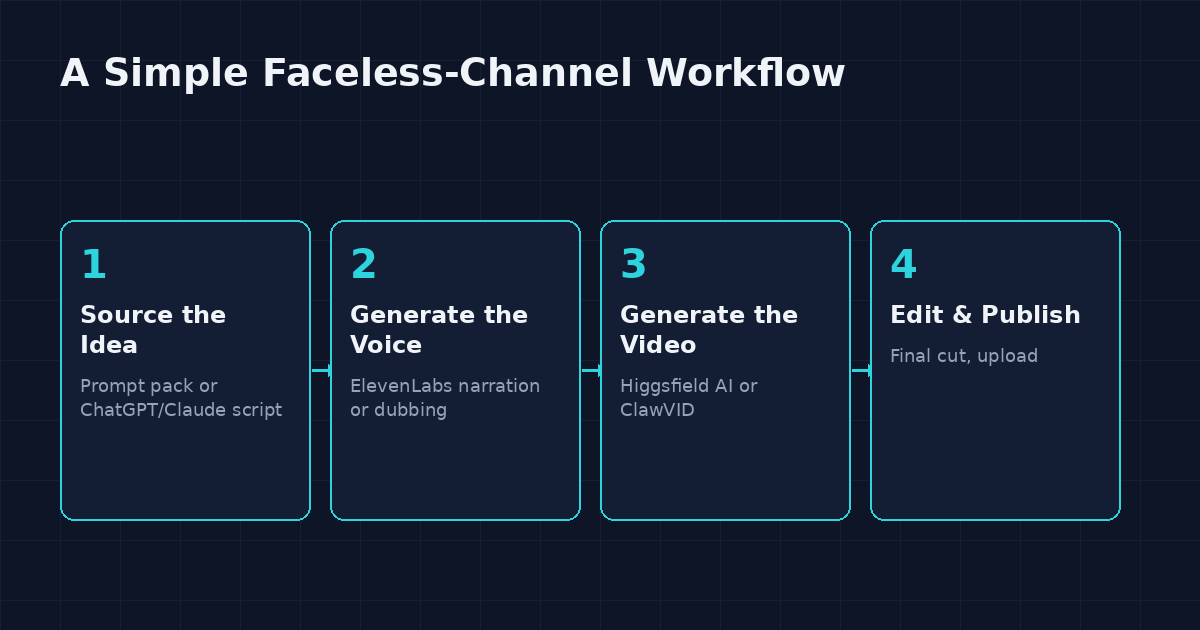
- Source the idea. Pull a prompt from a pack like Motion Prompts, or write your own script with ChatGPT/Claude.
- Generate the voice. Run the script through ElevenLabs for narration, or dub an existing video into another language if you’re expanding to new markets.
- Generate the video. Use Higgsfield AI if you need flexibility across multiple AI models, or ClawVID if you just need a fast one-prompt draft.
- Edit and publish. Assemble the final cut in a standard editor and upload — the AI layer above replaces the voice actor, camera crew, and idea-generation bottleneck, not the final polish.
Pricing at a Glance
| Tool | Category | Entry Price | Free Option |
|---|---|---|---|
| ElevenLabs | Voice & Dubbing | Free tier, paid plans scale by usage | Yes (watermarked on dubbing) |
| Higgsfield AI | Multi-model Video | Credit-based, varies by plan | Limited trial credits |
| ClawVID | One-Prompt Video | $17 headline (see review for full breakdown) | No |
| Motion Prompts | Prompt Pack (PLR) | One-time pack purchase | No |
Exact current pricing is best confirmed on each tool’s own site since these change — the individual reviews linked above break down what’s actually included at each tier, not just the headline number.
FAQ
Do I need all four of these tools to run a faceless channel?
No. Most channels only need one voice tool and one video tool — Motion Prompts is optional if you’re already comfortable writing your own prompts. Start with ElevenLabs for voice and either Higgsfield AI or ClawVID for video, depending on whether you want model flexibility or speed.
Which is better for a beginner, Higgsfield AI or ClawVID?
ClawVID’s one-prompt workflow has a lower learning curve. Higgsfield AI’s multi-model dashboard is more powerful once you understand it, but the credit system and model choices take longer to get comfortable with.
Can these tools replace hiring a video editor entirely?
They replace the voice actor and raw footage generation, not final editing. Most creators still assemble the final cut themselves in a standard video editor before publishing.
Why isn’t [tool X] on this list?
We only list tools we’ve put through our own full review process. If a tool isn’t here, it’s usually because we haven’t reviewed it yet, not because we ruled it out — check back, this list gets updated as we review more tools.
Related Reading
That’s the current shortlist of AI tools for faceless YouTube channels we’ve personally tested and verified — we’ll keep updating this page as we review more tools for creators building a one-person channel.

