
This is the first review on this site written from actually using the product. Everything else here is desk research against vendor documentation, and says so. This one is different: I built a real book in AIWriteBook, measured what it cost in credits, and opened the exported file to check whether it was properly made.
Disclosure first. AIWriteBook gave me a full-access account for this review after I asked for one. I told them in writing that I would publish what I found either way, and they agreed. They have not seen this article, had no approval over it, and did not pay for it. The affiliate links here go to AppSumo and work the same as on any other page. You will find things below that AIWriteBook would rather I had left out.
Prefer to watch? We filmed the whole test, the build, the credit meter, the export checks and the caveat, as an 11-minute walkthrough.
The short version
- It produced a complete, publishable book. Ten chapters, roughly 29,000 words, typeset to 96 pages, for 365 credits.
- The writing is genuinely good. Not filler. It built arguments, tables and frameworks I would not be embarrassed to read.
- Translation is excellent and cheap, 180 credits for a whole book, 37 languages, with Spanish, Portuguese and French split by region.
- One real caveat: it invents figures and does not flag them. My test chapter quoted revenue splits and cost ranges as fact with nothing behind them. Check the numbers before you publish, that is the whole of it.
- The audiobook is the expensive part, 3,937 credits during the beta, 15,748 after. Eleven times the cost of the book itself.
- Formatting costs an extra 200 credits per book on top of writing it. DOCX export is free; EPUB and print-ready PDF are not.
- The EPUB and the print PDF are both properly built. I unzipped the EPUB and opened the PDF to check. The print file carries the structural markers a printer needs.
- You can bring your own OpenRouter key and write with 100+ other models without spending AIWriteBook credits at all. For a lifetime-deal buyer, this is the most important feature on the page and almost nobody mentions it.
What I actually did
I wrote a non-fiction book called Before You Stack: The No-Hype Guide to Buying Software Lifetime Deals. I picked that subject deliberately, it is a topic I can fact-check, so I could judge the output rather than just admire it.
From a 707-character description, AIWriteBook proposed the title above, chose Business & Entrepreneurship and Instructional Guide as genres, and wrote a target-audience paragraph that named real buyer behaviour, “software subscription fatigue”, money “wasted on abandoned tools, shiny-object hype, or shelfware”. That is a good start from very little input.
At the structure step it did something I did not expect: it offered two competing ways to organise the book, a chronological “Buyer Lifecycle Sequence” and a “Risk-First Framework”, each with its own ten-chapter breakdown grouped into parts. That is a real editorial decision handed back to the author rather than a single take-it-or-leave-it outline.
Then I generated all ten chapters, measured the credit balance before and after each step, and exported the finished book. The result was roughly 29,000 words across ten chapters, typeset to 96 pages. Total cost: 365 credits, measured against a starting balance of 10,100.
What it costs in credits
These are the prices shown inside the app, which I have not seen published anywhere else:
| Action | Cost |
|---|---|
| Generate a 10-chapter outline | 30 credits |
| Write a chapter with Gemini, “best quality, follows instructions well” | 15 credits |
| Write a chapter with Claude, “best writing prose quality” | 30 credits |
| Write with any other model via your own OpenRouter key | No credits |
| Unlock formatting (EPUB, print PDF, covers), per book | 200 credits |
| DOCX export | Free |
| Translate the whole book into any of 37 languages | 180 credits |
| Audiobook of the same book, beta price | 3,937 credits |
| Audiobook at full price, once beta ends | 15,748 credits |
So a finished, publishable 10-chapter book is roughly 380 credits on Gemini (30 outline + 150 writing + 200 formatting) or 530 on Claude. Model choice is per chapter, so you can mix them, draft on Gemini, rewrite the chapters that matter on Claude.
One honesty note on my own measurements: my balance fell by 45 credits across an outline and two chapters, where the posted prices add up to 60. It charged less than advertised, not more, but the figures did not reconcile cleanly in my test. Budget using the posted prices above, not mine.
The writing quality
Chapter 1 came back at 3,234 words against a 2,400-word target, 35% over, which is unusual; most tools undershoot. Chapter 2 ran 2,803 words. Each took roughly 60 to 90 seconds.
The quality surprised me. Chapter 1 was not padded. It built a real argument about why lifetime-deal software decays, produced a cost table, a three-vector scoring matrix with a scored index, and a purchase-decision protocol with numbered rules. It reads like a chapter from a book someone would finish, not like generated text stretched to a word count.
The problem you need to know about
Here is the part that matters most, and the reason I would not hand this tool to someone who does not already know their subject.
The output is full of confident, specific figures that carry no sources. From that single chapter:
- “marketplace platforms routinely claim between 50% and 70% of gross sales revenue”
- “the vendor receives between $18 and $24 per code sold”
- a cost table quoting annual ranges of “$12.00 to $36.00”, “$18.00 to $60.00”, “$15.00 to $45.00”
- “a lifetime deal user becomes a net financial liability to the vendor by month fourteen”
Every one of those is plausible. Not one is attributable to anything. And the outline step had explicitly promised that each chapter would include “relevant reference material excerpts”, no citations appeared in the generated text at all.
The prose quality is what makes this dangerous rather than merely annoying. Writing this fluent reads as researched. If you publish it to Kindle Direct Publishing under your own name, those are now your financial claims, made to your readers, with nothing behind them. The tool does not pretend to fact-check, but it also does not flag which numbers it made up, and the better the sentences, the easier it is to stop checking.
Treat every figure it produces as a draft that needs a source. That is not a reason to avoid the tool. It is a reason not to use it for subjects you cannot personally verify.
Update, 13 October 2026: there is a citations system, and I had not switched it on
After publishing this I asked AIWriteBook directly whether “References & citations” is a manual tool or something the AI does unprompted. The co-founder’s answer, in his words: “It is a mix of both: you bring the sources, the AI does the citing.”
How he describes it working:
- On the Details step of a new non-fiction book there is a Reference Files section. You upload your own sources, PDF, DOCX, EPUB, TXT, Markdown and a few others, up to ten files.
- Once at least one file is there, an Include Citations toggle appears.
- The outline then pulls exact excerpts from your files into each chapter plan, those are the “reference material excerpts” the outline promised me.
- The written chapters cite those excerpts inline and build a References box under each chapter, which you can edit. The EPUB, PDF and DOCX exports carry a reference list per chapter.
Critically: it does not search the web and does not invent sources. With no files uploaded the toggle never appears, chapters come out with no citations, and that is exactly what happened in my test, I uploaded nothing.
So the section above is incomplete as originally written, and I would rather say so than leave it. The feature exists and I did not use it.
What does not change: with no sources supplied, the tool still produced specific revenue splits, cost ranges and a break-even month, stated as fact. A system that knows it has no sources could decline to state figures at all. This one wrote them confidently anyway, and nothing on screen marked them as invented. That is still the thing to guard against, and it is still the reason not to publish on a subject you cannot personally verify.
Not yet retested. I have not rerun the book with reference files uploaded, so everything in this update is the vendor’s description rather than something I have watched work. I will retest and update again, and note here which it is. Chapters written before the toggle is switched on keep no citations until they are regenerated.
Export: the part that genuinely impressed me
Formatting sits behind a second paywall, 200 credits, described as “once, forever” for that book, with files regenerable as often as you like. DOCX is free if you would rather format elsewhere.
When I unlocked it, the preflight refused to generate and told me why:
“Your book is 18 pages. Amazon KDP prints between 24 and 828 pages (IngramSpark allows 18 to 1200). Change the trim size or body text size on the Layout tab.”
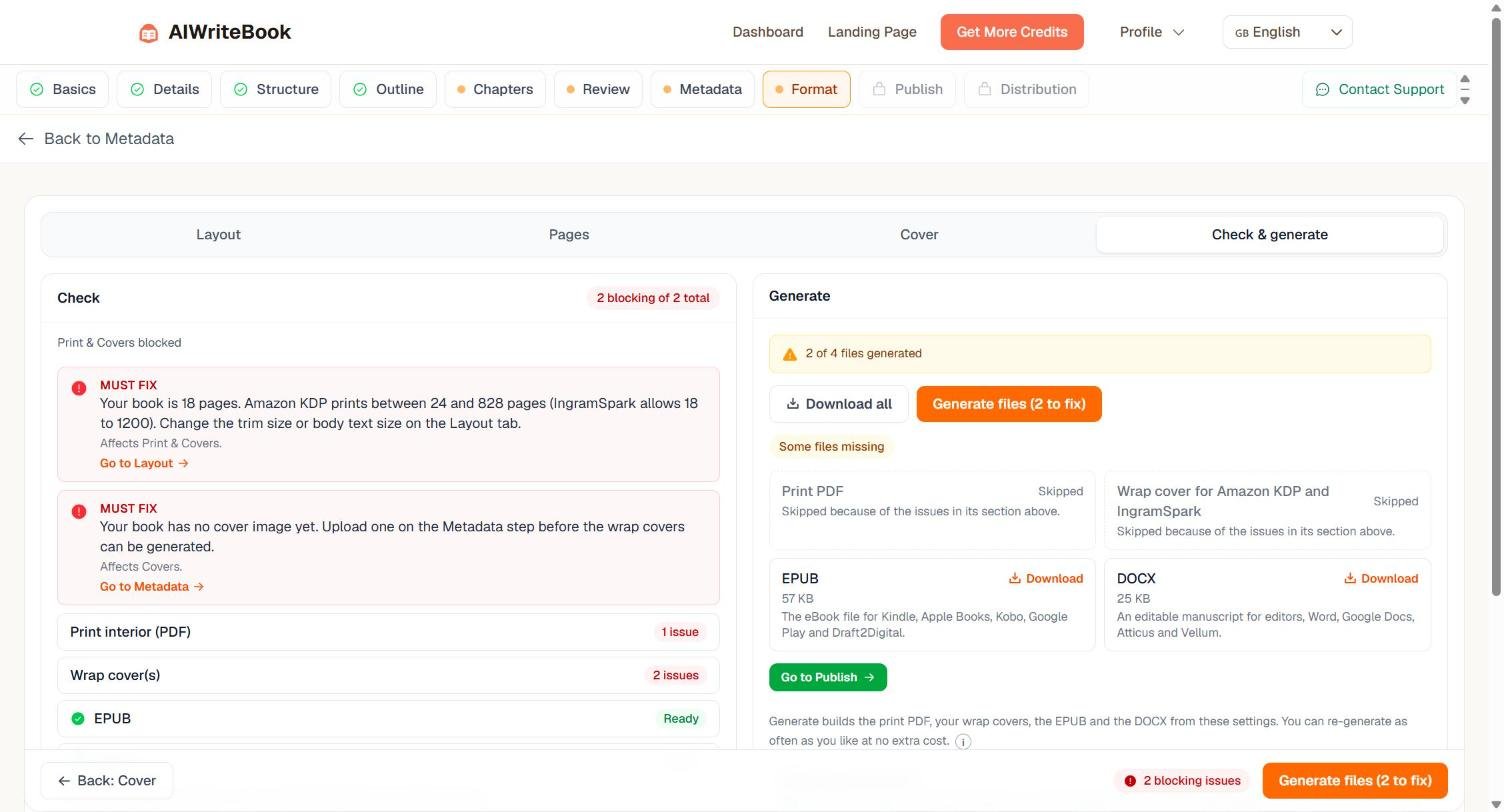
It also blocked the cover because I had not uploaded a cover image. Both are real constraints that would have got an upload rejected by KDP after I had wasted the time. It then generated what it could and skipped what it could not, two of four files, rather than handing me broken output. That is the right behaviour and it is rarer than it should be.
I downloaded the EPUB and unzipped it to see whether it was properly made. It was:
- The first file in the archive is
mimetype, which the EPUB spec requires and sloppy generators get wrong META-INF/container.xmlandOEBPS/content.opfboth present and correct- Declared as
package version="3.0", EPUB 3 - Ships both
nav.xhtml(EPUB 3) andtoc.ncx(EPUB 2), so older readers still get a table of contents - Metadata includes a proper
urn:uuididentifier, language, description, and the author tagged with amarc:relatorsrole ofaut, a level of care most tools skip entirely - A real book structure: title page, copyright, table of contents, then the chapters
That is a better EPUB than many produced by hand.
The print PDF
Once all ten chapters were written the page-count error cleared and the print interior generated: 2.2 MB, 96 pages typeset. I opened the file and checked its structure against what PDF/X-1a:2001 actually requires:
- A PDF 1.3 header. PDF/X-1a:2001 requires exactly that version, and almost nothing writes 1.3 any more. This is the detail that tells you the claim is real rather than decorative.
- OutputIntents present, the colour-profile declaration a printer reads.
- TrimBox defined, the boundary the printer cuts to.
- 28 embedded font files across 56 font references, so nothing gets substituted at the printer.
The structural markers check out. I could not read the conformance string or the FOGRA39 profile name directly because they sit inside compressed object streams, so I am not claiming I validated the file against the full specification, that needs a preflight tool like Acrobat. What I can say is that the file is built the way a PDF/X-1a file is built, which is more than most tools at this price manage.
One more thing worth crediting: when I edited a chapter after generating the files, the app marked the EPUB and DOCX “Out of date” and told me to regenerate before publishing. Regenerating costs nothing, I confirmed that against the credit balance. The 200 credits buy the formatting for that book once, not per export.
Translation: the most underrated thing here
The Book Translator takes a finished book into any of 37 languages for 180 credits, 15 per chapter plus 30 for the cover, blurb and metadata. It creates a separate title in your library rather than overwriting the original, so you keep both.
For anyone publishing into Europe, the list is the point. Spanish is split into Spain and Latin America, Portuguese into Brazil and Portugal, French into France and Canada, and English into UK, Australian and Indian variants, which matters more than a raw language count, because a Spanish edition aimed at Madrid reads wrong in Mexico City. Beyond those: German, Italian, Dutch, Polish, Swedish, Danish, Norwegian, Finnish, Czech, Greek, Romanian, Hungarian, Ukrainian, Turkish and Catalan.
I ran the full book through it and read the result closely in a language I speak natively, because a translation you cannot personally judge is worth nothing as a test. Four things it got right, all of which cheap translation gets wrong:
- It left technical terms alone. API, OAuth2, CSV, JSON, WHOIS and product names like HubSpot and ClickUp stayed in English, where a translated version would have been worse than useless.
- It glossed unfamiliar jargon rather than transliterating it. Terms like “SaaS fatigue” and “arbitrage trade” arrived with a short plain-language explanation attached, which is what a human translator does and a machine usually does not.
- It localised the numbers, not just the words, prices, percentages and every figure inside the tables.
- Nothing was dropped. The cost table, the three-vector scoring matrix and the numbered decision protocol all came through intact, and the chapter landed within 2% of the original word count.
The only fault I could find was one heading translated too literally, an idiom that should have been swapped for a local equivalent. That is the level of nitpick I was reduced to.
At 180 credits a language, a book written once can be on Amazon’s German, Spanish, French and Italian stores for about 720 credits total. Those are far less crowded markets than the English KDP store. If you publish seriously, this is a stronger argument for the product than the writing is.
The audiobook is where the credits go
Audiobook Studio is in beta and narrates with Eleven v3, ElevenLabs’ most expressive engine, and the reason for what comes next.
My book is 196,830 characters. Narrating it is quoted at 3,937 credits, and that is the beta price. The full price shown struck through beside it is 15,748.
Put that next to everything else. Writing and formatting the entire book cost 365 credits. One audiobook of it costs eleven times that during the beta, and forty-three times once the beta ends. If you are buying a lifetime deal with a fixed credit balance, this single feature is what will empty it.
Credit where due on the details: it charges per chapter as each one generates, so you do not need the full balance up front; emotion tags cost nothing extra beyond the characters they add; per-character voice casting is a declared +20%; and every voice is multilingual, narrating in whatever language the book is written in. There is a free sample button before you commit.
I did not generate the audiobook. I had the engine, the price and the options, and spending nearly 4,000 credits of a vendor-supplied balance to confirm that ElevenLabs sounds like ElevenLabs would not have told you anything. If I buy a deal myself I will come back and do it.
The feature that changes the maths
Under the model picker sits “All other models”, connect your own OpenRouter key and write with any of 100+ models, without spending AIWriteBook credits.
If you are buying a lifetime deal, this is the feature that decides whether your purchase still works in two years. A one-time credit balance runs out. An editor, formatter and EPUB pipeline that you can keep feeding with your own model access does not. Almost no coverage of this product mentions it.
Lifetime or subscription? The ceiling decides
AIWriteBook sells the same product two ways, and almost every article about it only covers one. The AppSumo licence is a one-time payment; aiwritebook.com sells monthly plans. Both give you credits that refill every month, the lifetime deal is not a fixed pot you burn through, which is the thing most people get wrong about it.
Line the two ladders up by credit allowance and the decision makes itself:
| Credits per month | AppSumo lifetime | Subscription | Roughly how many 96-page books |
|---|---|---|---|
| 500 | $79 once (Tier 1) | N/A | 1 a month |
| 1,000 | $159 once (Tier 2) | Plus | 2–3 a month |
| 2,500 | $319 once (Tier 3) | N/A | 6 a month |
| 5,000 | $519 once (Tier 4) | Pro | 13 a month |
| 25,000 | Not available | Ultra, $120/month, or $1,440 a year | 68 a month |
So: up to 5,000 credits a month, the lifetime deal wins outright. Tier 4 at $519 once buys the same monthly allowance as the Pro subscription, forever. There is no argument for paying monthly at or below that line, and I am not going to invent one.
Above it, the lifetime ladder simply stops. Ultra’s 25,000 credits a month has no AppSumo equivalent at any price. If you need that much, a subscription is not the worse option, it is the only option.
Two situations actually reach that ceiling:
- You publish at volume. Thirteen books a month is the Tier 4 limit. Past that you are a publishing operation, which is exactly who Ultra is sold to.
- You want audiobooks regularly. This is the one that catches people. My book cost 365 credits to write; the audiobook was quoted at 15,748 credits once the beta pricing ends. On Tier 4’s 5,000 a month you cannot produce a single post-beta audiobook inside a month, you would be saving credits for three months per title. Inside one Ultra month it fits with room to spare.
If neither applies to you, buy the AppSumo licence and stop reading this section.
If one of them does, AIWriteBook gave me a discount code to pass on: TOOLINSIGHT15 takes 15% off your first payment on any subscription plan, typed at checkout on aiwritebook.com. It is an affiliate code, a sale made with it is credited to this site, and it applies to the first payment only, not to every renewal. I am putting it here rather than at the top of the article because this is the one place on the page where a subscription is honestly the better recommendation.
What I did not test
- Book Formatter, AI Content Detector and the other 40-odd author tools in the sidebar
- What happens when a one-time credit balance runs out
- How a human editor would rate the book end to end, I checked facts and structure, not literary merit
I would rather list these than imply I covered them. This page will be updated as I work through them.
One more thing worth saying: my account showed the book at “60% complete” with two of ten chapters written. The progress bar counts setup steps rather than chapters, which flatters how far along you are.
Who it suits
- Someone who already knows their subject and wants the drafting and production work taken off their hands. This is the best fit by a distance, you will catch the invented figures because you know the material.
- Anyone who needs real EPUB and print files. The formatting and preflight are the strongest part of the product, not the writing.
- Not someone planning to publish on a subject they cannot check. The unsourced numbers go out under your name, not AIWriteBook’s.
Frequently asked questions
Does AIWriteBook write a whole book by itself?
It will generate every chapter, yes. Whether the result is publishable depends entirely on whether you check the facts. In my test it produced 3,234 words of well-argued chapter containing several confident figures I could not trace to any source.
Can I export to EPUB and KDP print files?
Yes, after unlocking formatting for 200 credits on that book. The EPUB I generated was correctly built and would open anywhere. DOCX export is free without unlocking anything.
Which model should I pick?
Gemini at 15 credits a chapter is the default and produced the output described above. Claude costs double and is labelled as better prose. Since the choice is per chapter, drafting on Gemini and rewriting the chapters that matter on Claude is the sensible approach.
What happens when my credits run out?
I have not reached that point, so I cannot tell you from experience. What I can tell you is that connecting your own OpenRouter key lets you keep writing without AIWriteBook credits, which is the obvious answer for a lifetime-deal buyer.
Does it add citations to non-fiction?
The outline step said chapters would include “relevant reference material excerpts”. No citations appeared in the text it generated for me. Assume you are sourcing the book yourself.
Verdict
AIWriteBook is a better production tool than it is a research tool, and that is the opposite of how products like this usually get sold. The EPUB pipeline, the KDP preflight and the willingness to refuse rather than ship broken files are all genuinely good engineering. The writing is strong enough to work with.
The one thing it will not do is keep you honest. It writes unsourced figures in a confident voice and leaves the checking to you, and the better the prose gets the more tempting it is to skip that. For anyone who knows their subject that is a normal editing job, you would fact-check a human ghostwriter too, and it is a small price for the drafting, translation and production work it takes off your hands.
So: worth buying if you write about things you understand, and worth buying twice over if you publish in more than one language. The part to budget carefully for is the audiobook, not the writing.
Check the current AIWriteBook deal and tiers on AppSumo, prices and limits change, and the figures above were correct in October 2026.
Related reading
- How AIWriteBook works, the workflow step by step
- AIWriteBook alternatives
- AIWriteBook FAQ
- Writecream AI image generator, another AppSumo writing tool, researched rather than tested
How this was researched: unlike the rest of this site, this review is based on hands-on use. I built a book, generated chapters, measured credit consumption against the balance shown in the app, unlocked formatting, and unzipped the resulting EPUB to inspect its structure directly. Testing was done on 8 October 2026 on an account AIWriteBook provided. Claims I could not verify myself, the print PDF output, translation and audiobook features, are labelled as theirs. See our review methodology and editorial policy.
Disclosure: AppSumo links in this article are affiliate links. Your price is unchanged and ToolInsight Pro may earn a commission. AIWriteBook provided a free full-access account for testing and had no editorial input, no advance sight of this article, and no approval over it.
Comparing deals? See all 14 AppSumo tools we have checked tier by tier, with the one thing each listing does not make obvious.