

AppSumo runs dozens of lifetime deals at once, and the listings are written to sell. They tell you what a tier includes. They are much quieter about what it leaves out — and on a one-time payment, what a tier leaves out is the part you cannot fix later without buying another code.
This page collects the 14 AppSumo tools we have reviewed tier by tier, and for each one gives the single thing the listing does not make obvious. Every figure here was checked against the vendor’s own documentation or the live AppSumo listing in October 2026. Deals and tiers change often, so check the current listing before you buy.
How we check these
We read the vendor’s own pricing page and documentation and compare it line by line against the AppSumo tier table, then write down where they disagree. That is deliberately different from most lifetime-deal roundups, which summarise the listing back to you.
To be straight about the limits of that: these are research-led reviews, not hands-on tests, with one exception — AIWriteBook, which we used to generate a full 96-page book before writing about it. Every article says plainly which claims we verified and which we could not. Where a vendor’s own site and its AppSumo listing contradict each other, we follow the vendor’s site and tell you both numbers.
The 14 tools at a glance
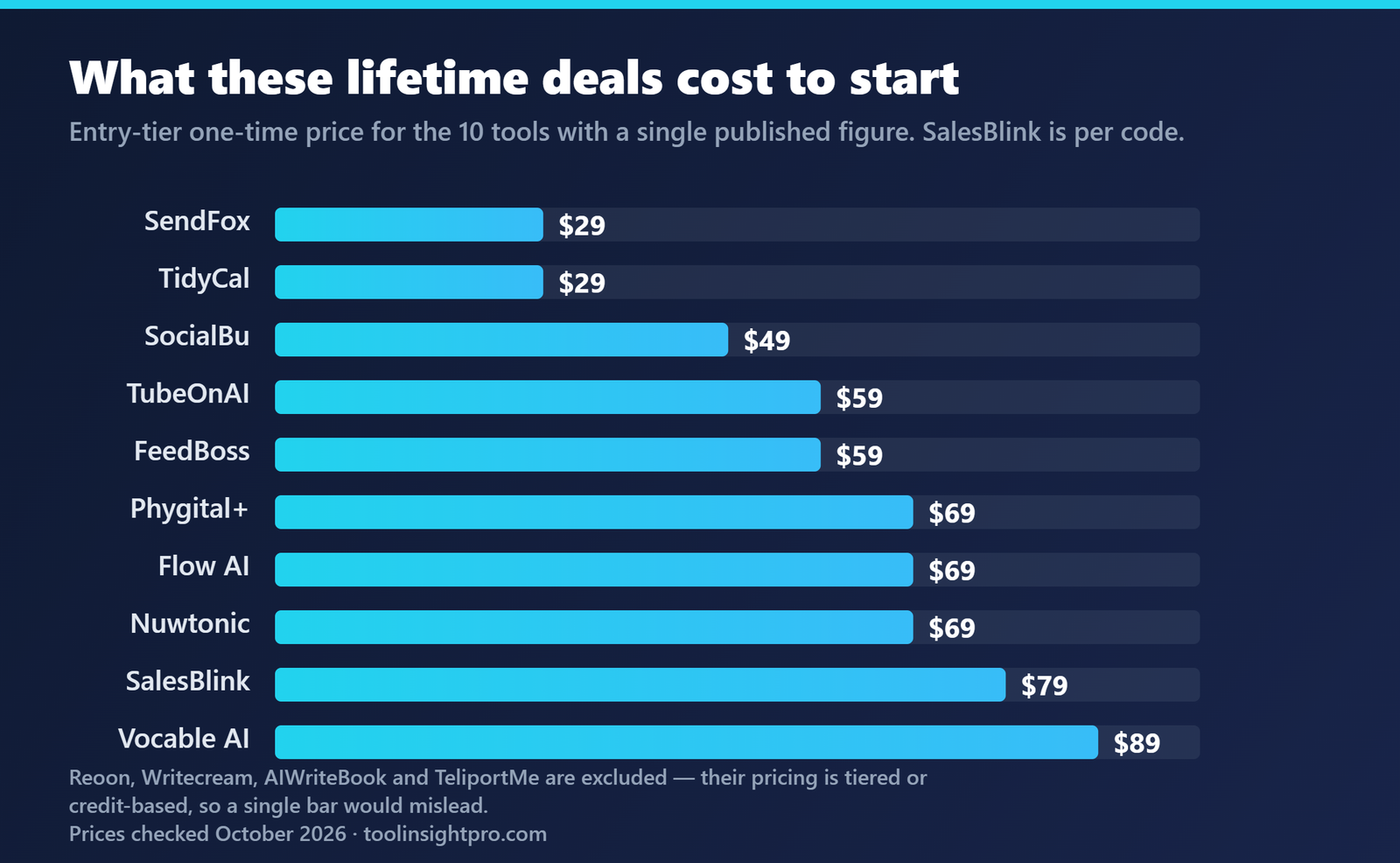
| Tool | What it does | Lifetime price | The thing to know |
|---|---|---|---|
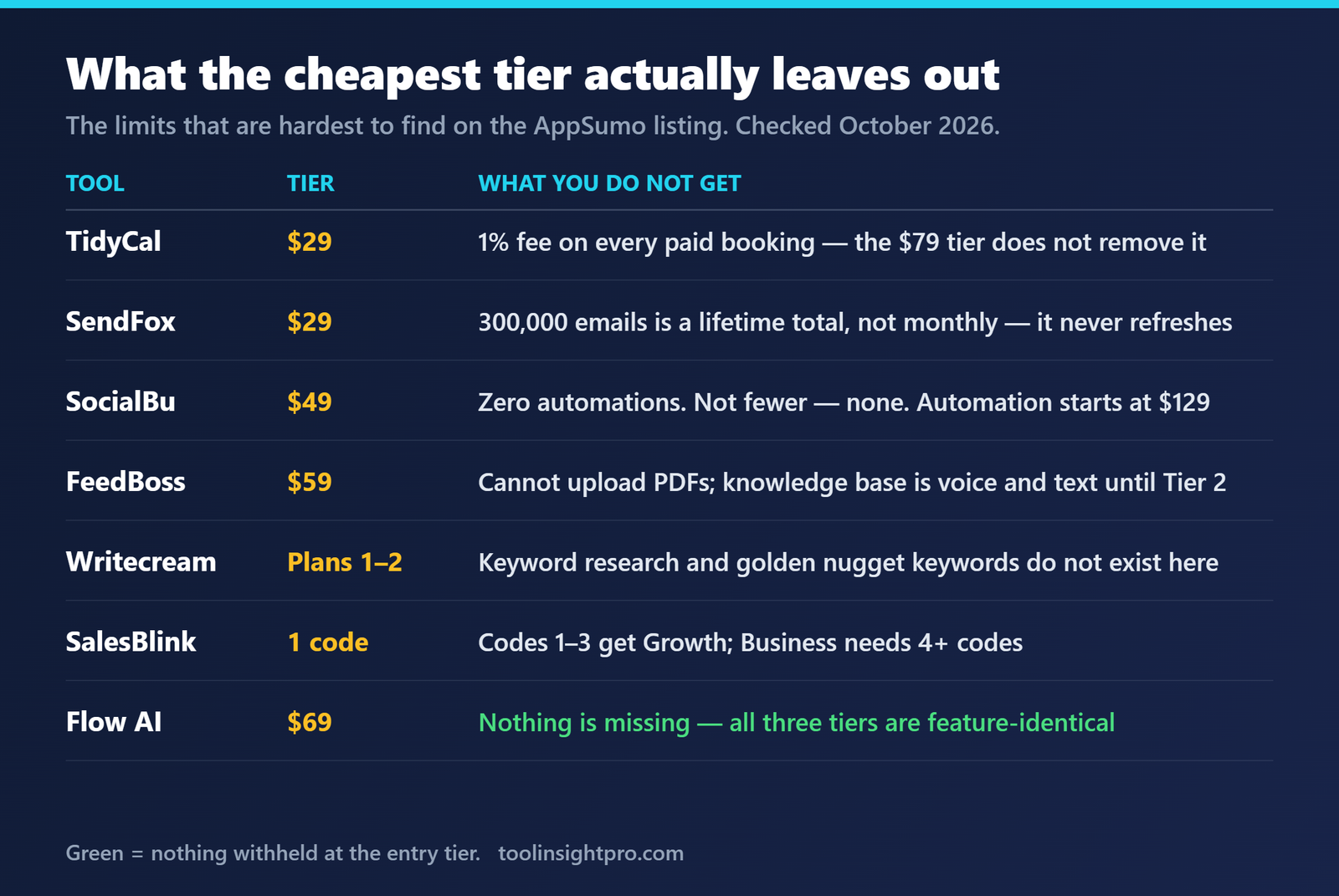
| TidyCal | Booking pages | $29 / $79 | The 1% fee on paid bookings survives both tiers |
| SendFox | Email marketing | $29 | 300,000-email cap that never refreshes |
| Reoon | Email verification | 5 tiers | Daily credits reset forever; the bonus block is spent once |
| SocialBu | Social scheduling | $49+ | The $49 tier has zero automations |
| Writecream | AI writing + SEO | 5 tiers | Keyword research does not exist on Plans 1–2 |
| AIWriteBook | AI book writing | Credit tiers | Lifetime wins below roughly 5,000 credits a month |
| Flow AI | LinkedIn outreach | $69+ | All three tiers are feature-identical |
| FeedBoss | LinkedIn content AI | $59+ | Tier 1 cannot upload PDFs |
| Nuwtonic | AI search visibility | $69+ | It is a GEO tool, not a rank tracker |
| SalesBlink | Cold email outreach | $79 per code | Codes 1–3 get Growth, 4–10 get Business |
| TubeOnAI | Content repurposing | $59 | Built for summarising video, podcasts and articles |
| Vocable AI | Multi-channel content | $89 | Generates 30-day campaigns, not single posts |
| Phygital+ | AI design suite | $69 | 30+ tools in one — compare against what you already pay for |
| TeliportMe | 360° virtual tours | See review | No-code; works from a phone or DSLR |
Booking and scheduling
TidyCal — $29 or $79 lifetime
A booking page that replaces Calendly for most solo users. Unlimited booking types, calendar connections, and paid bookings on both lifetime tiers.
What the listing does not make obvious: TidyCal takes 1% of every paid booking, and that fee survives both lifetime tiers — buying the $79 code does not remove it. Only the $99/year Pro subscription does. That means if you take more than roughly $8,900 a year in paid bookings, the annual subscription is cheaper than the lifetime deal. For most people taking free bookings, the $29 code is excellent value.
Read the full TidyCal review · TidyCal vs Calendly · Pricing breakdown
SendFox — $29 lifetime
Email marketing for creators: newsletters, automations, landing pages. Widely quoted at $49; it is $29.
What the listing does not make obvious: the lifetime deal caps you at 300,000 emails sent, and that cap never refreshes. It is a total, not a monthly allowance. With a 2,000-person list mailing weekly, that is roughly three years before you need to buy more.
Read the full SendFox review · SendFox vs Mailchimp
Reoon Email Verifier — 5 lifetime tiers
Bulk email verification with a large, established user base on AppSumo.
What the listing does not make obvious: there are two different credit types and people conflate them. The daily allowance resets forever; the headline bonus block is spent once. So “100K credits” is not a yearly figure. On the lower tiers, cleaning a very large list burns the bonus block and then crawls at the daily rate. We could not independently verify the 99% accuracy claim and did not repeat it as fact.
Read the full Reoon review · Reoon vs ZeroBounce
Social media
SocialBu — from $49 lifetime
Scheduling and publishing across 12+ social platforms. At $49 for ten accounts and 600 posts a month, it is genuinely cheap for scheduling.
What the listing does not make obvious: the $49 tier has zero automations — not a smaller limit, none at all. Social inbox, Listen and content curation are also absent. All of that starts at $129. Buy $49 for scheduling and you will not be disappointed; buy it expecting automation and you will be.
Read the full SocialBu review · Alternatives
Flow AI — from $69 lifetime
LinkedIn outreach automation.
What the listing does not make obvious: all three tiers have identical features. The only thing that changes is how many LinkedIn accounts you can connect (1 / 3 / 10). We think that is a point in its favour — nothing is held back from the entry tier — but most people assume paying more unlocks features, so buy the tier that matches your account count and nothing more. Worth knowing the company was founded in April 2026, which is a consideration on any lifetime purchase.
Read the full Flow AI review · How it works
FeedBoss — from $59 lifetime
An AI assistant that monitors your LinkedIn feed and helps you post consistently.
What the listing does not make obvious: Tier 1 cannot upload PDFs — the knowledge base is voice and text only until Tier 2 — and it connects a single LinkedIn profile. If your plan was to feed it a library of documents, Tier 1 is not the tier.
Writing and content
Writecream — 5 lifetime tiers
AI writing across long-form articles, ad copy, image generation and an SEO toolset.
What the listing does not make obvious: if you are buying it for SEO, golden nugget keywords and unlimited keyword research do not exist on Plans 1 and 2 at all. Plan 3 is the real entry point for the SEO side. We also could not pin down Writecream’s regular subscription pricing — six different figures are quoted across review sites — so we did not print a number we could not verify.
Read the full Writecream review · The image generator
AIWriteBook — credit-based tiers
Generates full-length books. This is the one tool on this page we tested hands-on — we used it to produce a complete 96-page book before writing the review.
What the listing does not make obvious: the lifetime deal is the better buy below roughly 5,000 credits a month. Above that, the subscription works out cheaper. Which side of that line you fall on depends entirely on how many books you actually intend to produce, and most people overestimate.
Read the full AIWriteBook review · How it works
Vocable AI — $89 lifetime
An end-to-end content engine rather than a single-post generator: it builds 30-day multi-channel campaigns across blog, LinkedIn, X and email. Useful if your bottleneck is planning and volume rather than writing one good post.
Read the full Vocable AI review
SEO and AI search
Nuwtonic — from $69 lifetime
What the listing does not make obvious: Nuwtonic is not a rank tracker. It is a GEO tool — it tracks whether AI assistants mention your brand, across a named set of models rather than all of them. Arrive expecting classic keyword rank tracking and you will be disappointed for the wrong reasons. The $69 tier also shows N/A for the AI monthly task.
Outreach, video and design
SalesBlink — $79 per code
Cold email outreach and sequencing, sold as a one-time payment through AppSumo (it is a subscription elsewhere).
What the listing does not make obvious: which plan you end up on depends on how many codes you stack — codes 1 to 3 get Growth plan updates, codes 4 to 10 get Business. Buying one code and expecting Business features is the common mistake.
Read the full SalesBlink review · Pricing
TubeOnAI — $59 lifetime
Summarises and repurposes videos, podcasts and articles. The use case is research time: finding the insight worth writing about without watching the whole thing.
Read the full TubeOnAI review · Comparison
Phygital+ — $69 lifetime
More than 30 AI design tools in one workspace. The honest question before buying is not whether the tools work — it is whether they replace something you already pay for, or just add a thirty-first tool you will not open.
Read the full Phygital+ review
TeliportMe — 360° virtual tours
Builds walkthrough virtual tours for property listings, hotel rooms and retail spaces — panorama upload, hotspots, floorplans and a 3D dollhouse view, with no code and no specialist hardware. Shoot from a phone or a DSLR.
Read the full TeliportMe review · How it works
How to decide before you buy
- Name the one job you are buying the tool for, then check that job is in the tier you can afford — not in the product.
- Look for the recurring cost that survives the lifetime deal. TidyCal’s 1% is the clearest example on this page, but transaction fees and per-seat add-ons are common.
- Check whether a cap is monthly or total. SendFox’s 300,000 emails is a lifetime total; people read it as monthly.
- Work out your real monthly volume before choosing lifetime over subscription. For credit-based tools there is usually a crossover point, and most people overestimate their usage.
- Buy for the work you are doing this month, not the work you imagine doing next year.
Frequently asked questions
Are AppSumo lifetime deals actually worth it?
Sometimes. A lifetime deal is worth it when the tool solves a problem you already have today and the tier you can afford includes the feature you need. It is a bad buy when you are purchasing a tier that excludes the one thing you wanted, which is the most common mistake and the reason every entry on this page leads with what the tier leaves out rather than what it includes.
What happens to my lifetime deal if the company shuts down?
You lose the tool. That is the real risk of a one-time payment, and it is worth weighing how established a company is before buying. Some tools on this page have thousands of users and years of history; at least one was founded in 2026. Neither is disqualifying, but they are not the same bet.
Can I get a refund if the tool is not what I expected?
AppSumo publishes a refund window on each listing. Check it on the deal page before buying, and test the specific feature you bought the tool for inside that window rather than at the end of it.
Should I stack multiple codes?
Only if you have read what the extra codes actually unlock. On some tools stacking raises limits; on others it changes which plan you are on entirely. SalesBlink is the clearest example here, where codes 1 to 3 and codes 4 to 10 land you on different plans.
Do you test every tool you review?
No, and we say so on every article. These are research-led reviews built by comparing the vendor’s own documentation against the AppSumo listing. The exception is AIWriteBook, which we used hands-on to produce a full book. Where we could not verify a vendor claim, we leave it out rather than repeat it.
Affiliate disclosure: some links on this page are affiliate links, which means we may earn a commission if you buy through them at no extra cost to you. That does not change what we write — every limitation listed above is there because we found it, not because it helped. See our affiliate disclosure and review methodology.
Further reading on lifetime deal terms
- What AppSumo Listings Leave Out — nine limits found in vendor documentation rather than on the deal page, including the fees and add-ons that survive a one-time purchase.
- Subscription vs One-Time License — how to work out the real break-even month, using the cheapest realistic alternative instead of the struck-through price.
- The Economics of SaaS Lifetime Deals — why vendors sell them, and which product types can sustain generous terms.
All prices and tier details checked October 2026. AppSumo deals change and expire — confirm the current listing before buying.

