
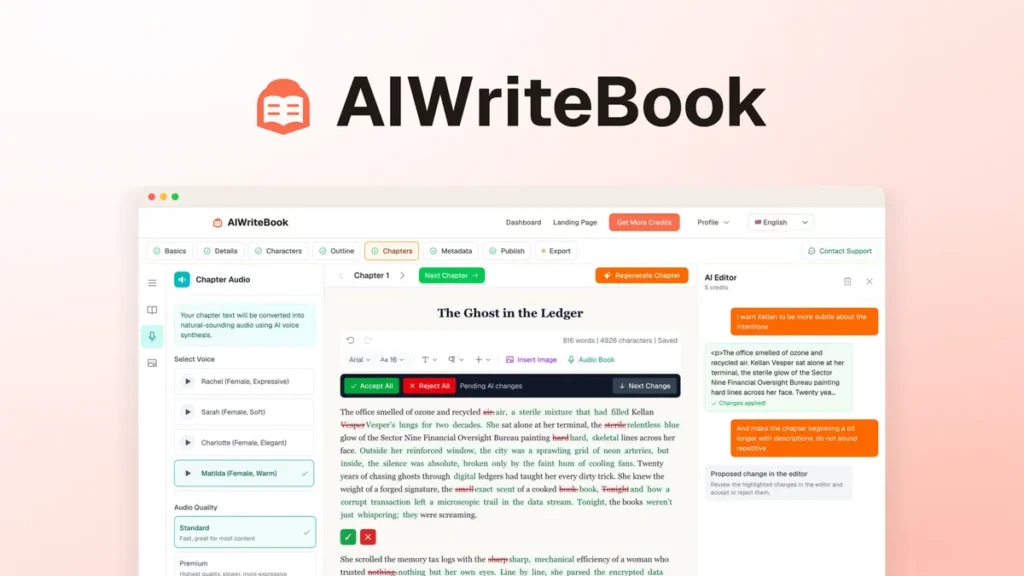
AIWriteBook is designed to take you from a book idea to a KDP-ready manuscript without leaving one workspace. Here’s how the process works, from initial setup to exporting a file you can upload directly to Amazon Kindle Direct Publishing.
We built a real 96-page book in AIWriteBook and measured every credit it cost. Watch the 11-minute hands-on test on YouTube, or read the full written review.
Step 1: Set Up Your Book Project
After logging in, you create a new book project. You give it a title, define the genre and target audience, and write a brief description of what the book covers. This context shapes how the AI generates content throughout the project, the more specific you are here, the more relevant the output.
Disclosure: This article contains affiliate links. If you buy through one of them, ToolInsight Pro may earn a commission at no extra cost to you. See our Affiliate Disclosure for details.
Step 2: Train AIWriteBook on Your Writing Style
This is the feature that separates AIWriteBook from a basic AI writing prompt. You upload samples of your existing writing, blog posts, previous books, emails, articles, and AIWriteBook analyzes your vocabulary, sentence structure, tone, and voice. Subsequent AI generation attempts to match this style rather than producing generic AI text.
The more samples you provide, the better the voice matching. A minimum of 2,000–5,000 words of your own writing gives the tool enough to work with.
Step 3: Import Existing Drafts (Optional)
If you’ve already started a book or have notes, outlines, or partial chapters, you can import them into the workspace. AIWriteBook will incorporate your existing content alongside AI-generated additions, useful if you’re completing a project rather than starting from scratch.
Step 4: Generate Chapters
With your book setup and writing samples in place, you generate chapters using the AI. You can provide a chapter outline or brief and let the AI expand it into a full chapter draft. The output comes in your trained voice, though it will still require editing, AIWriteBook produces drafts, not finished manuscripts.
Each chapter is generated separately, giving you control over the direction of each section before moving to the next.
Step 5: Design Your Cover
AIWriteBook includes a cover designer inside the same workspace. You don’t need Canva or a separate design tool, you can create a book cover that meets KDP’s size and resolution requirements directly in the platform. The cover designer works from templates and AI-generated imagery.
Step 6: Export for KDP
When your manuscript is ready, AIWriteBook exports a KDP-ready file in EPUB or PDF format, formatted to Amazon’s publishing standards. You upload this file directly to Kindle Direct Publishing without needing Vellum, Atticus, or a separate formatter.
What AIWriteBook Doesn’t Do
Being accurate about the tool’s limits is important. AIWriteBook:
- Does not write a publishable book without editing, the AI output is a draft
- Is not ideal for complex fiction requiring plot consistency and character continuity
- Requires you to provide quality writing samples for voice matching to work well
- Doesn’t replace a human editor for final polish
Getting Access to AIWriteBook
AIWriteBook is available on AppSumo as a $79 lifetime deal, one payment, no subscription. AppSumo includes a 60-day money-back guarantee, so you can take it through a full book project before deciding whether to keep it.
See the full AIWriteBook review, or check the AIWriteBook FAQ for quick answers.