
This Flow AI review covers what the tool actually does, how it compares to subscription alternatives like Lemlist and HeyReach, and who it’s genuinely worth buying for. If you’re sending LinkedIn connection requests and messages manually every day and still not booking enough meetings, Flow AI, currently on AppSumo as a one-time $69 lifetime deal, is worth a serious look.
Disclosure: This article contains affiliate links. If you buy through one of them, ToolInsight Pro may earn a commission at no extra cost to you. See our Affiliate Disclosure for details.
What Is Flow AI?
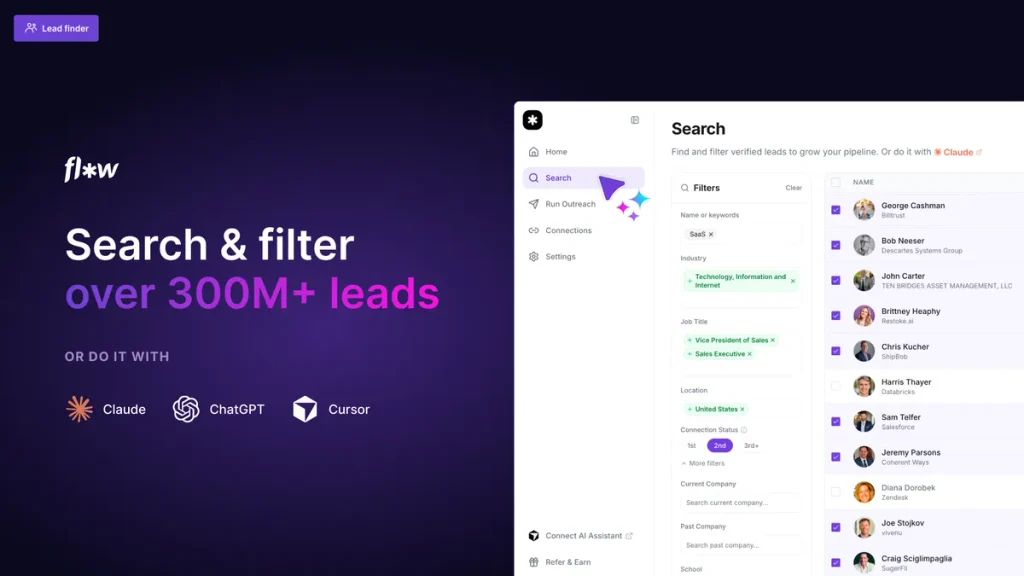
Flow AI is a LinkedIn outreach and lead-generation platform built for people who rely on LinkedIn to book meetings, sales managers, recruiters, and marketing agencies. It gives you access to a database of 300M+ LinkedIn profiles, lets you build targeted lead lists, launches automated outreach sequences, and centralizes every reply from every connected LinkedIn account into one shared inbox. If you’d rather compare it against other options first, see our Flow AI alternatives breakdown.
The product is built by the team behind chooseflow.ai and is positioned as a direct alternative to Lemlist, HeyReach, and Dripify, tools that typically run $50–$150 per month per seat.
Key Features
- Lead finder, search and filter 300M+ LinkedIn profiles to build targeted prospect lists
- Automated outreach sequences, launch multi-step LinkedIn campaigns (connection requests, follow-ups, messages) in minutes
- Human-like behavior protection, outreach that visits profiles, likes posts, and sends connection requests in a pattern designed to avoid LinkedIn account restrictions
- Shared team inbox, centralize replies from multiple LinkedIn accounts in one place
- Built-in CRM, track reply status, lead ownership, and follow-up timing so prospects don’t fall through the cracks
- Claude and ChatGPT integration via MCP, connect Flow AI’s Model Context Protocol server to Claude or ChatGPT and run outreach workflows from a single prompt
- GTM stack integration, connect Flow AI to your existing go-to-market tools rather than replacing them
Flow AI Pricing on AppSumo
Flow AI is listed at $960/year normally. AppSumo’s lifetime deal cuts that to a one-time payment, with three license tiers:
| Tier | Price | Accounts | Multiple Senders / Rotate Accounts | Priority Support |
|---|---|---|---|---|
| Tier 1 | $69 once | 1 | No | No |
| Tier 2 (Recommended) | $149 once | 3 | Yes | Yes |
| Tier 3 | $279 once | 10 | Yes | Yes |
All tiers include the lead finder, auto-pilot outreach, co-pilot, message scheduling, and the built-in CRM. The difference between tiers is account capacity and whether you can rotate outreach across multiple LinkedIn accounts, which matters mainly for agencies managing several client accounts.
Flow AI vs Lemlist vs HeyReach
Lemlist and HeyReach are the two tools Flow AI is most often compared to. Both are subscription-based, typically running $59–$99/month per seat depending on the plan, which adds up to $700–$1,200+ per year for a single user.
Where Flow AI stands out is the MCP integration with Claude and ChatGPT, letting you run outreach tasks conversationally rather than through a traditional dashboard, a feature neither Lemlist nor HeyReach currently offers in the same way. Where the subscription tools may still have an edge is in the maturity of their deliverability infrastructure and years of refinement, since Flow AI is a newer, AppSumo Launchpad-selected product.
Who Should Buy Flow AI
Flow AI is a strong fit for:
- Sales managers and SDRs who rely on LinkedIn as a primary outbound channel
- Recruiters sourcing candidates at scale through LinkedIn
- Marketing agencies running LinkedIn outreach for multiple clients (Tier 2 or 3 for account rotation)
- Teams already using Claude or ChatGPT who want outreach folded into their existing AI workflow
It’s less suited to businesses that don’t use LinkedIn as a primary channel, or solo users who only need to send a handful of connection requests a week, in that case, LinkedIn’s own free tools may be enough.
The Verdict
At $69 one-time versus $960/year at regular price, the AppSumo deal represents a genuine discount rather than an inflated “was” price designed to make the deal look better than it is. For anyone running consistent LinkedIn outreach, Tier 1 pays for itself within the first month compared to equivalent subscription tools. Tier 2 is worth the extra $80 if you’re managing more than one LinkedIn account.
The deal includes AppSumo’s standard 60-day refund window, so it’s reasonable to test the outreach automation and reply inbox on real campaigns before deciding to keep it. For the exact setup steps, see how Flow AI works, or browse more AI tools reviews on ToolInsight Pro.
Flow AI lifetime pricing: all three tiers
Deal terms and plan limits checked: October 2026, from the current AppSumo listing.
| Tier 1 | Tier 2 | Tier 3 | |
|---|---|---|---|
| Price | $69 | $149 | $279 |
| LinkedIn accounts | 1 | 3 | 10 |
| Multiple senders | Yes | Yes | Yes |
| Rotate accounts | Yes | Yes | Yes |
| Lead finder | Yes | Yes | Yes |
| Auto-pilot | Yes | Yes | Yes |
| Co-pilot | Yes | Yes | Yes |
| Schedule messages | Yes | Yes | Yes |
| CRM | Yes | Yes | Yes |
| Unified inbox | Yes | Yes | Yes |
| Analytics | Yes | Yes | Yes |
| Integrations and LinkedIn MCP | Yes | Yes | Yes |
| Priority support | Yes | Yes | Yes |
All three are one-time payments with lifetime access and AppSumo’s 60-day money-back guarantee. AppSumo marks Tier 2 as its recommended option.
The tiers differ on one thing only
This is unusually simple, and worth saying plainly: every feature is identical across all three tiers. Lead finder, auto-pilot, co-pilot, CRM, unified inbox, analytics, rotation, scheduling, MCP integration and priority support are all included at $69.
What changes is the number of LinkedIn accounts you can connect: 1, 3 or 10.
| Tier | Price | Accounts | Cost per account |
|---|---|---|---|
| Tier 1 | $69 | 1 | $69.00 |
| Tier 2 | $149 | 3 | $49.67 |
| Tier 3 | $279 | 10 | $27.90 |
Cost-per-account figures are our own calculation from the published prices.
What this means: there is no feature you unlock by paying more, so the decision is purely arithmetic. If you run one profile, Tier 1 gives you the complete product. If you run an agency handling ten clients, Tier 3 works out at under $28 per account for the same software.
It also means there is no reason to buy up “just in case”. Nothing is withheld from the entry tier.
Which tier should you buy?
| Your situation | Tier | Why |
|---|---|---|
| Your own LinkedIn profile only | Tier 1 ($69) | Full feature set, one account |
| You and two colleagues, or 3 client profiles | Tier 2 ($149) | 3 accounts at about $50 each |
| Agency running outreach for several clients | Tier 3 ($279) | 10 accounts at about $28 each |
| You are unsure how many you will need | Tier 1 | Nothing is feature-gated, so start small |
What to weigh before buying
- LinkedIn automation carries account risk. LinkedIn restricts automated activity, and aggressive use can get a profile limited or banned. That risk belongs to any tool in this category, not Flow AI specifically, but it is your account on the line, so pace your sending.
- The company is new. The deal page lists Flow AI as founded in April 2026, bootstrapped, 1-10 staff, based in Louisiana. A lifetime deal is a bet on the vendor still being there, a young company is a bigger bet.
- 93 reviews on AppSumo, a reasonable sample for a recent deal, but not a long track record.
- We have not tested deliverability or the auto-pilot behaviour. For an outreach tool that is the whole product. Use the 60-day window to check how the messages read and whether the automation behaves sensibly before you scale up.
Frequently asked questions
How much does Flow AI cost?
Three one-time tiers on AppSumo: $69, $149 and $279, all with lifetime access and a 60-day money-back guarantee.
What is the difference between the Flow AI tiers?
Only the number of LinkedIn accounts you can connect, 1, 3 or 10. Every feature is included on all three tiers.
Does the $69 tier include the lead finder and auto-pilot?
Yes. Lead finder, auto-pilot, co-pilot, CRM, unified inbox, analytics, account rotation, message scheduling, integrations, LinkedIn MCP and priority support are all on Tier 1.
Can I connect more than one LinkedIn account?
Not on Tier 1. Tier 2 allows 3 accounts and Tier 3 allows 10.
Is Flow AI safe to use with LinkedIn?
LinkedIn limits automated activity, and no third-party tool can guarantee your account will not be restricted. Treat volume conservatively and test within the refund window.
Related Reading
Comparing deals? See all 14 AppSumo tools we have checked tier by tier, with the one thing each listing does not make obvious.