

Most people looking for a TidyCal alternative are looking for one of three things: an integration TidyCal does not have, a team larger than four, or a free plan that does more. This comparison was built by reading each vendor’s own pricing page in October 2026 rather than by repeating what other round-ups say, and it turned up one finding that changes the usual advice.
Cal.com’s free plan is more capable than TidyCal’s $29 licence for a single user. It allows unlimited event types, unlimited calendar connections, more than a hundred app integrations, and Stripe and PayPal payments, all at $0. That is not a small detail, and almost no TidyCal comparison mentions it. The catch is branding, which Cal.com only removes on a paid team plan.
Below are six alternatives with their real prices, what each is actually for, and the specific case where it beats TidyCal.
All six compared
| Tool | Free plan | Entry paid price | Team price | Best for |
|---|---|---|---|---|
| TidyCal | Unlimited bookings and booking types, 1 calendar, no auto meeting links, 1% fee on paid bookings | $29 one-time (1% booking fee still applies) | $79 one-time, 4 members | Paying once and never again |
| Cal.com | 1 user, unlimited event types and calendars, 100+ integrations, payments | $0 | $12 per user/month, billed yearly | Solo users who want depth for nothing |
| Calendly | 1 event type, 1 calendar connection | $10 per seat/month | $16 per seat/month | Sales teams and CRM routing |
| SavvyCal | None, trial only | $10 per user/month | $17 per user/month | Overlaying your calendar on the invitee’s |
| Acuity Scheduling | None, 7-day trial | $16/month billed annually ($20 monthly), 1 calendar | $27/month, up to 6 calendars | Salons, clinics and multi-staff booking |
| Zoho Bookings | 1 user, two-way calendar sync | $6 per user/month billed annually ($8 monthly) | $9 per user/month billed annually ($12 monthly) | Teams already inside Zoho |
| Doodle | 1 group poll, 1 booking page, 1 one-to-one | Not published on the pricing page | Not published | Finding a slot that suits ten people |
1. Cal.com, the free plan that beats a paid licence
Cal.com is open source and its individual plan is free forever for one user. What that free plan includes is the surprise: unlimited event types, unlimited calendar connections, more than a hundred app integrations, email and SMS notifications, a mobile app and browser extension, Stripe and PayPal payments, two-way Salesforce and HubSpot sync, and one-click import from Calendly.
Compare that line by line with TidyCal’s $29 licence. TidyCal gives you ten calendars; Cal.com gives you unlimited. TidyCal’s integration list is calendars plus Zoom, Teams and Zapier; Cal.com’s free tier has over a hundred. And TidyCal charges a 1% platform fee on paid bookings that neither lifetime licence removes, only its $12-a-month Pro plan does, where Cal.com’s free plan takes payments with no platform fee of its own.
Where TidyCal still wins: branding. Cal.com only removes its branding on the $12-per-user Teams plan, so a free Cal.com booking page says Cal.com on it. TidyCal’s $29 licence reduces the branding. If a clean-looking page matters to you and you are not paying monthly for anything, that is the trade.
Paid tiers: Teams is $12 per user per month billed yearly and adds round-robin, collective event types, routing forms, booking analytics and branding removal. Organizations is $28 per user per month and adds SAML SSO, SCIM, sub-teams and compliance certifications. Enterprise is custom.
Pick Cal.com if you are one person, you want depth rather than a short feature list, and you can live with a branded page. It is the strongest free offer in this category by a wide margin.
2. Calendly, the one TidyCal is priced against
Calendly is the category default and the comparison most readers actually want. Its free plan is restrictive in a way that is easy to underestimate: one event type and one calendar connection. One event type means you can publish a thirty-minute call or a discovery call, not both.
Standard is $10 per seat per month billed yearly and lifts that to unlimited event types, six calendar connections, automated reminders, HubSpot and Mailchimp connections, and Stripe and PayPal payments. Teams is $16 per seat per month and adds round-robin, lead routing, centrally managed event types, Salesforce meeting sync and admin controls. Enterprise starts at $15,000 a year with a fifty-seat minimum.
Pick Calendly if scheduling is part of a sales process. Routing a lead to the right rep based on form answers, writing the meeting back into Salesforce, enforcing event types across a team, none of that exists in TidyCal at any price. Our full TidyCal vs Calendly comparison goes deeper.
3. SavvyCal, for people who hate sending availability
SavvyCal’s differentiator is the invitee experience: the recipient can overlay their own calendar on your booking page, so they see their commitments and yours at once instead of guessing. For high-value meetings with busy people, that reduces the back-and-forth more than any feature on this page.
Basic is $10 per user per month and includes unlimited calendars, scheduling links, meeting polls and team scheduling, with collective, round-robin and group modes. Premium is $17 per user per month and adds delegated access for an assistant, custom domains, custom sending domains, branding removal and paid bookings.
Two things to note. Paid bookings are a Premium feature, so if you charge for sessions the real price is $17, not $10. And there is no free plan at all, only a trial with a thirty-day money-back guarantee.
Pick SavvyCal if you book meetings with executives or clients whose time is expensive and the scheduling friction is costing you deals.
4. Acuity Scheduling, built for businesses with staff rotas
Acuity, owned by Squarespace, is the only tool here designed around a service business rather than a knowledge worker. Its plans are priced by number of calendars, where a calendar means a staff member, a room or a location.
Starter is $16 a month billed annually, or $20 billed monthly, and covers one calendar. Standard is $27 a month annually and covers up to six. Premium is $49 a month annually and covers up to thirty-six. There is no free plan, only a seven-day trial with no card required.
Pick Acuity if you run a salon, clinic, studio or any business where several people take appointments in parallel and each needs their own schedule, services and hours. TidyCal’s four-member Agency licence is not built for a rota of twelve stylists; Acuity is.
5. Zoho Bookings, the cheapest real subscription
Zoho Bookings has a forever-free plan for one user with two-way calendar sync to Zoho, Google and Microsoft 365. Basic is $6 per user per month billed annually ($8 billed monthly) and Premium is $9 per user per month annually ($12 monthly).
At $6 per user, Zoho is the cheapest ongoing subscription in this comparison, roughly 40% below Calendly Standard. The trade is scope: Basic is limited to one workspace, and the deeper value appears when you are already using Zoho CRM, SalesIQ or Bigin, where the integrations are native rather than bolted on through Zapier.
Pick Zoho Bookings if your business already runs on Zoho, or if you need several seats and want the lowest monthly figure available without buying a lifetime licence.
6. Doodle, a different job entirely
Doodle is not really a TidyCal competitor. Its core feature is the group poll: send a set of candidate times to ten people, let them tick what works, pick the winner. Booking pages are a secondary feature.
The free plan allows one group poll, one booking page and one one-to-one link. Doodle does not publish its Pro and Team prices on the pricing page itself, so we are not going to quote a figure we have not read.
Pick Doodle if your problem is coordinating a group, not publishing a link. For one-to-one booking it is the weakest option here.
What three years actually costs
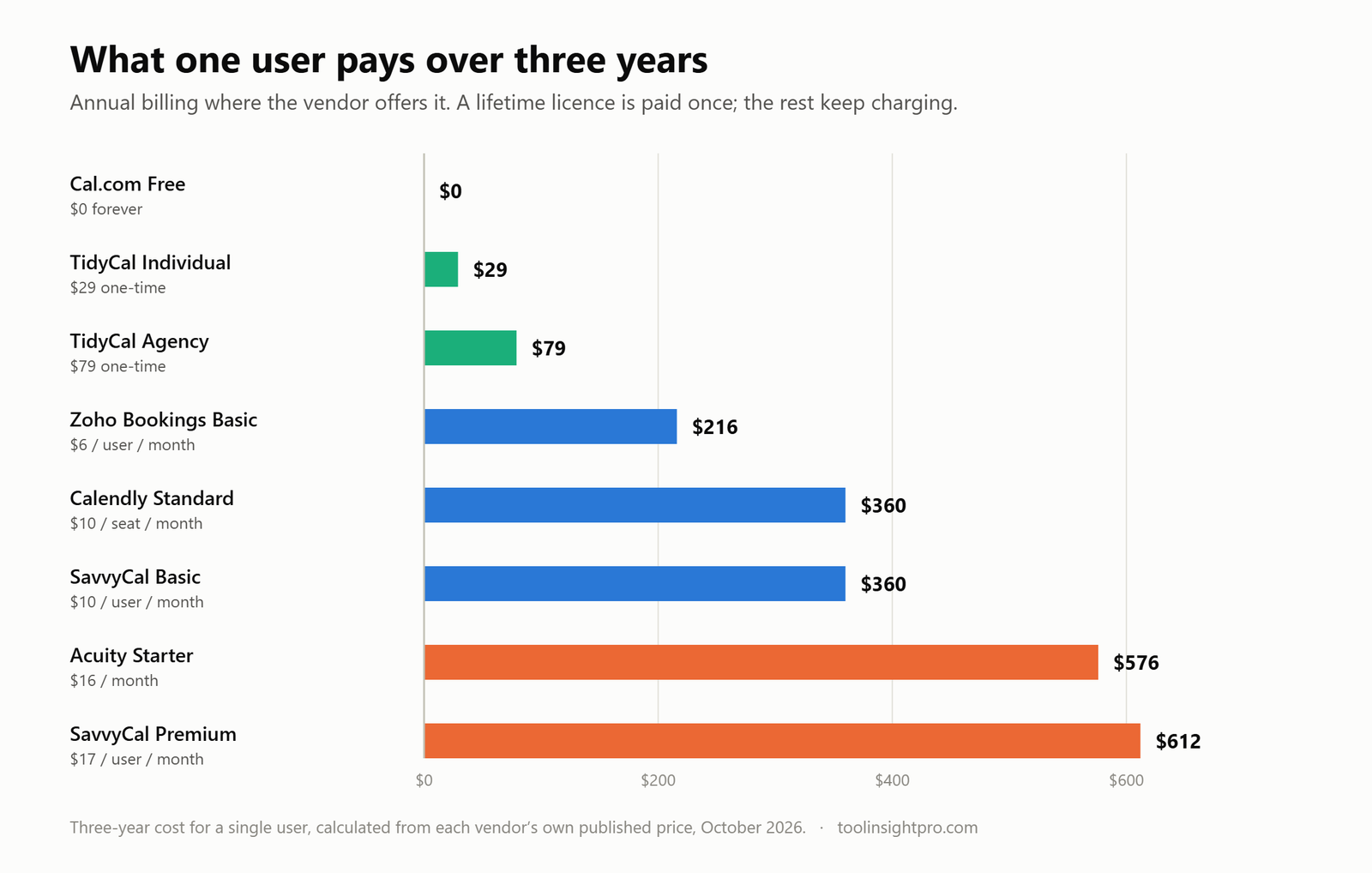
Scheduling software is bought once and used for years, so the honest comparison is cumulative rather than monthly. Over thirty-six months for a single user, the spread between the cheapest and most expensive option on this page is more than $600, for tools that all do the same core job.
Two things stand out. Cal.com’s free plan costs nothing over three years and still does more than most paid tiers. And the gap between TidyCal at $29 and Acuity at $576 is not a quality gap of that size; it is a pricing-model gap. Acuity is not twenty times better. It is sold differently and aimed at a business with staff rotas rather than a person with a calendar.
How to choose in four questions
- Are you one person who can live with branding on the page? Use Cal.com free. Nothing else here gives you that much for $0.
- Do you want a reduced-branding page and no recurring bill? TidyCal’s $29 licence, but check first how much you take in paid bookings, because its 1% fee survives the lifetime purchase and overtakes the $99-a-year subscription at around $8,900 a year.
- Does scheduling feed a sales pipeline? Calendly. Lead routing and CRM write-back do not exist in the cheap options at any price.
- Do several staff take appointments in parallel? Acuity, priced by calendar, or Zoho Bookings if cost per seat is the binding constraint.
When TidyCal is still the right answer
Switching has a cost that comparison tables never show: re-creating your booking types, updating every link in your email signature, website, proposals and calendar invitations, and accepting that old links break. That is worth doing to escape a $17-a-month subscription. It is rarely worth doing to escape a $29 licence you already own.
If TidyCal is handling your bookings today and the only complaint is that the integration list is short, the useful question is whether the missing integration is actually blocking you or just absent. Read our full TidyCal review for what the licence does and does not cover, and the AppSumo tier breakdown if you are deciding between $29 and $79.
Check the current TidyCal deal on AppSumo →
Frequently asked questions
What is the best free TidyCal alternative?
Cal.com. Its free individual plan allows unlimited event types, unlimited calendar connections, more than a hundred integrations and Stripe and PayPal payments for one user, which is more than TidyCal’s free plan and more than its $29 licence on most measures. The trade-off is that Cal.com branding stays on the page unless you move to a paid team plan.
Is there a cheaper alternative to Calendly than TidyCal?
Only free ones. TidyCal’s $29 one-time licence is the cheapest paid option in this comparison over any period longer than three months. Zoho Bookings at $6 per user per month is the cheapest ongoing subscription, but it passes $29 in total cost within five months.
Which TidyCal alternative supports Zoom on its cheapest paid plan?
Calendly, Cal.com, SavvyCal and Zoho Bookings all include conferencing integrations on their entry plans, and so does TidyCal: its own pricing table lists auto-created Zoom, Google Meet and Teams links on the $29 Individual licence. The plan that cannot generate meeting links is TidyCal’s free one. Note that the AppSumo listing describes the $29 tier as Basic integrations, contradicting the vendor’s own page, verify it inside the 60-day refund window.
Can I self-host a scheduling tool instead?
Cal.com is open source and publishes its source on GitHub, which is the usual route for teams with a self-hosting requirement. The pricing page links to a self-hosted option but does not state terms, so check the licence file before planning around it.
Does any alternative offer a lifetime deal like TidyCal?
Not among the tools on this page. Lifetime pricing in this category is essentially TidyCal’s own, and it is sold only through AppSumo, which owns the product. The others are all subscriptions.
Related reading
- TidyCal review: is the $29 lifetime deal worth it?
- TidyCal AppSumo deal: $29 vs $79 compared
- TidyCal vs Calendly
- TidyCal pricing explained
- How TidyCal works
- TidyCal API guide
How we checked this: every price and plan limit above was read in October 2026 from the vendor’s own pricing page, cal.com, calendly.com, savvycal.com, acuityscheduling.com, zoho.com and the TidyCal AppSumo listing. Where a vendor does not publish a figure, we say so instead of estimating. Three-year totals are arithmetic on those prices. Full review methodology.
Disclosure: the AppSumo link in this article is an affiliate link. Your price is unchanged and ToolInsight Pro may earn a commission. See our affiliate disclosure.