

TidyCal has a proper REST API, and the single most useful thing to know about it is this: it does not work on the free plan. Try to create a contact with a free account and the API returns 402 Lifetime subscription required. The documentation puts it plainly — API access requires a paid plan.
Since TidyCal’s paid plan is a $29 one-time purchase rather than a monthly fee, that works out as the cheapest scheduling API you are likely to find. This page covers what the API can do, how to authenticate, every documented endpoint, and the limits the docs do not mention.
The short version
- Base URL:
https://tidycal.com/api - Auth: a personal access token sent as a Bearer token, or OAuth 2.0 for integrations acting on other users’ behalf
- Plan required: paid. The free plan returns a 402 on write operations
- Coverage: account, bookings, booking types, timeslots, contacts and teams
- Rate limits: not published in the documentation
Getting a personal access token
For anything that only touches your own TidyCal account — a dashboard, an internal script, a Zapier-style automation you run for yourself — a personal access token is all you need.
In TidyCal, go to Integrations → Advanced → Manage API keys → Personal tokens and create one. Then send it on every request:
curl https://tidycal.com/api/me \
  -H "Authorization: Bearer YOUR_TOKEN" \
  -H "Accept: application/json"
That is the whole setup. There is no app registration step and no approval process for personal tokens.
OAuth 2.0, for building something others use
If you are building a product that connects to your users’ TidyCal accounts, you need an OAuth client rather than a personal token. TidyCal documents the standard authorization_code grant:
- Authorization URL:
https://tidycal.com/oauth/authorize - Token URL:
https://tidycal.com/oauth/token
The documentation states that API access requires a paid plan in the context of personal tokens. It does not spell out whether the same requirement applies to users connecting through an OAuth client, so if you are building an integration for a general audience, that is worth confirming with TidyCal before you ship — your free-plan users may not be able to connect.
Every documented endpoint
All paths are relative to https://tidycal.com/api.
Account
| Method | Path | What it does |
|---|---|---|
| GET | /me | Returns the authenticated account. Useful as a token health check. |
Bookings
| Method | Path | What it does |
|---|---|---|
| GET | /bookings | Lists bookings |
| GET | /bookings/{booking} | Retrieves one booking |
| PATCH | /bookings/{booking}/cancel | Cancels a booking |
Worth noticing what is absent: there is no documented endpoint to reschedule a booking, and no endpoint to delete one. You can cancel, and you can create a new booking. If your workflow depends on moving an existing appointment, you will be implementing that as cancel-then-rebook, which means the attendee gets two notifications.
Booking types and timeslots
| Method | Path | What it does |
|---|---|---|
| GET | /booking-types | Lists your booking types |
| POST | /booking-types | Creates a booking type |
| GET | /booking-types/{bookingType}/timeslots | Returns available slots for that type |
| POST | /booking-types/{bookingType}/bookings | Books a slot |
These four are the ones that make a custom booking page possible. Read the available timeslots, render them however you like on your own site, then post the booking back. You never have to embed TidyCal’s own widget.
Contacts
| Method | Path | What it does |
|---|---|---|
| GET | /contacts | Lists contacts |
| POST | /contacts | Creates a contact |
POST /contacts is the endpoint that returns 402 Lifetime subscription required on a free account. If you are testing and getting a 402 on a request that looks correct, it is your plan, not your code.
Teams
| Method | Path | What it does |
|---|---|---|
| GET | /teams | Lists teams |
| GET | /teams/{team} | Retrieves one team |
| GET | /teams/{team}/bookings | Team bookings |
| GET | /teams/{team}/users | Team members |
| POST | /teams/{team}/users | Adds a member |
| DELETE | /teams/{team}/users/{teamUser} | Removes a member |
| GET | /teams/{team}/booking-types | Team booking types |
| POST | /teams/{team}/booking-types | Creates a team booking type |
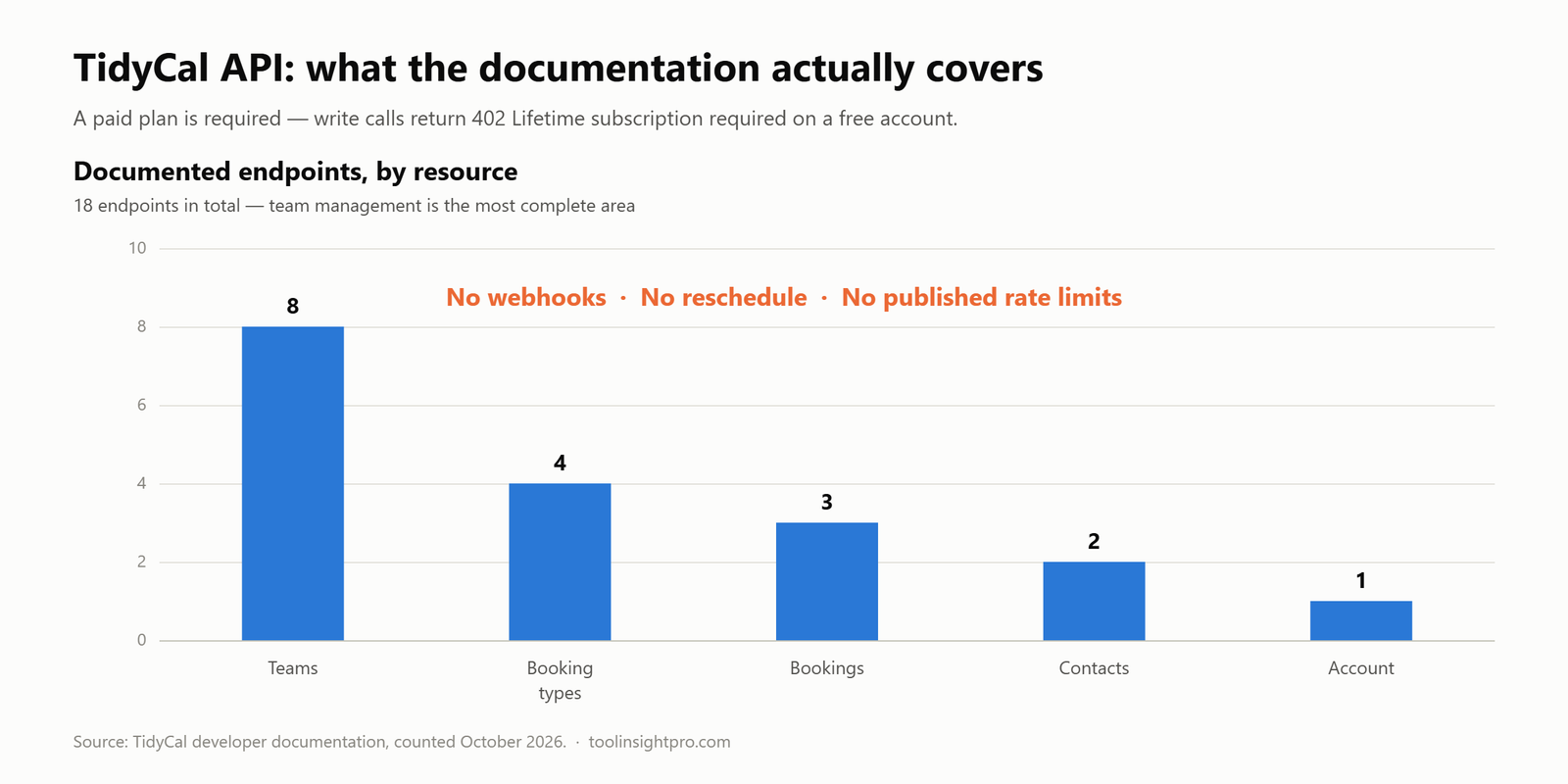
The teams coverage is more complete than the bookings coverage, which is slightly unexpected. You can provision and deprovision team members programmatically — handy if you onboard staff through your own admin panel.
What you can realistically build
Based on the endpoints above, these are achievable without fighting the API:
- A fully custom booking page. Read timeslots, render your own UI, post the booking. No TidyCal branding anywhere in the flow.
- Syncing bookings into your own database or CRM. Poll
/bookingsand store what you need. - Automated team provisioning. Add and remove team members as part of your own onboarding.
- Internal reporting. Pull bookings and booking types and build whatever dashboard you actually want, rather than the one you are given.
- Generating booking types on demand — for example a new one-off consultation type per client.
What will be awkward: anything that needs real-time reaction to a booking. The documentation set above describes no webhooks, so keeping an external system in step means polling /bookings on a schedule. For a low-volume calendar that is fine. For something latency-sensitive it is a genuine constraint.
Gaps in the documentation
Three things I looked for and did not find, stated as unknowns rather than guessed at:
- Rate limits. Nothing published. Build retry-and-backoff handling anyway and do not assume you can hammer it.
- Webhooks. Not present in the documented endpoint set. If TidyCal offers them elsewhere in the product, the developer docs do not cover them.
- Reschedule. Cancel exists; moving a booking does not appear as its own operation.
Check the current TidyCal developer documentation before you build — APIs change, and the endpoint list above reflects the docs as of October 2026.
Frequently asked questions
Does TidyCal have a free API?
No. The documentation states that API access requires a paid plan, and write operations such as creating a contact return 402 Lifetime subscription required on a free account.
What does API access cost?
TidyCal’s paid plan is currently a $29 one-time purchase through AppSumo rather than a subscription, so the API comes with that rather than carrying a separate fee. Compared with scheduling platforms that gate their API behind a monthly business plan, that is the cheapest route to a scheduling API I am aware of — though “cheapest” is about price, not capability.
Can I build a booking page that does not look like TidyCal?
Yes. GET /booking-types/{bookingType}/timeslots gives you availability and POST /booking-types/{bookingType}/bookings creates the booking, so the entire front end can be your own.
Does the API support webhooks?
Not in the documented endpoint set. Plan on polling /bookings if you need to react to new appointments.
Can I reschedule a booking through the API?
There is no documented reschedule endpoint. You can cancel with PATCH /bookings/{booking}/cancel and create a replacement booking, which means two notifications to the attendee rather than one.
Which auth method should I use?
Personal access token for anything touching only your own account. OAuth 2.0 if your software connects to other people’s TidyCal accounts.
The bottom line
The TidyCal API is small but honest. It covers the operations you need to put scheduling inside your own product — read availability, create bookings, manage booking types, manage teams — without pretending to be a platform. The missing pieces are webhooks and reschedule, and both have workarounds that cost you some elegance rather than blocking you.
The deciding factor for most people is the plan requirement. If you were going to use TidyCal anyway, the API is included. If you want a scheduling API and nothing else, a one-time $29 against a monthly business plan elsewhere is a straightforward comparison to make.
See the current TidyCal plan and pricing on AppSumo, or read our full TidyCal pricing breakdown first.
Related reading
- TidyCal pricing explained — what the paid plan actually includes
- TidyCal vs Calendly — including how the two compare on developer access
- TidyCal review — the product as a whole
- TidyCal alternatives — if the API gaps above are dealbreakers
How this was researched: every endpoint, URL and auth detail above comes from TidyCal’s own developer documentation, read in October 2026. This is desk research against primary sources — I have documented what the API says it does rather than benchmarking it in production. Where the documentation is silent, I have said so. See our review methodology.
Disclosure: the AppSumo link in this article is an affiliate link. Your price is unchanged and ToolInsight Pro may earn a commission.


Pingback: TidyCal Review 2026: Is the $29 Lifetime Deal Worth It?
Pingback: How TidyCal Works: Full Setup Guide for 2026