

Contains affiliate links. If you buy through them we may earn a commission at no extra cost to you. This is desk research: we compared each tool’s own pricing page on 11 November 2026 and did not run the tools side by side.
Quick answer: The best Calendly alternatives in 2026 are TidyCal if you want to pay once ($29 lifetime), zcal or Cal.com if you want a free plan without Calendly’s one-event-type limit, Koalendar for a cheap Pro plan, SavvyCal for a polished paid tool, Acuity for client businesses that take payments, and Google Calendar appointment schedules if you already live in Google. Calendly itself costs $10 to $12 per seat a month on Standard.
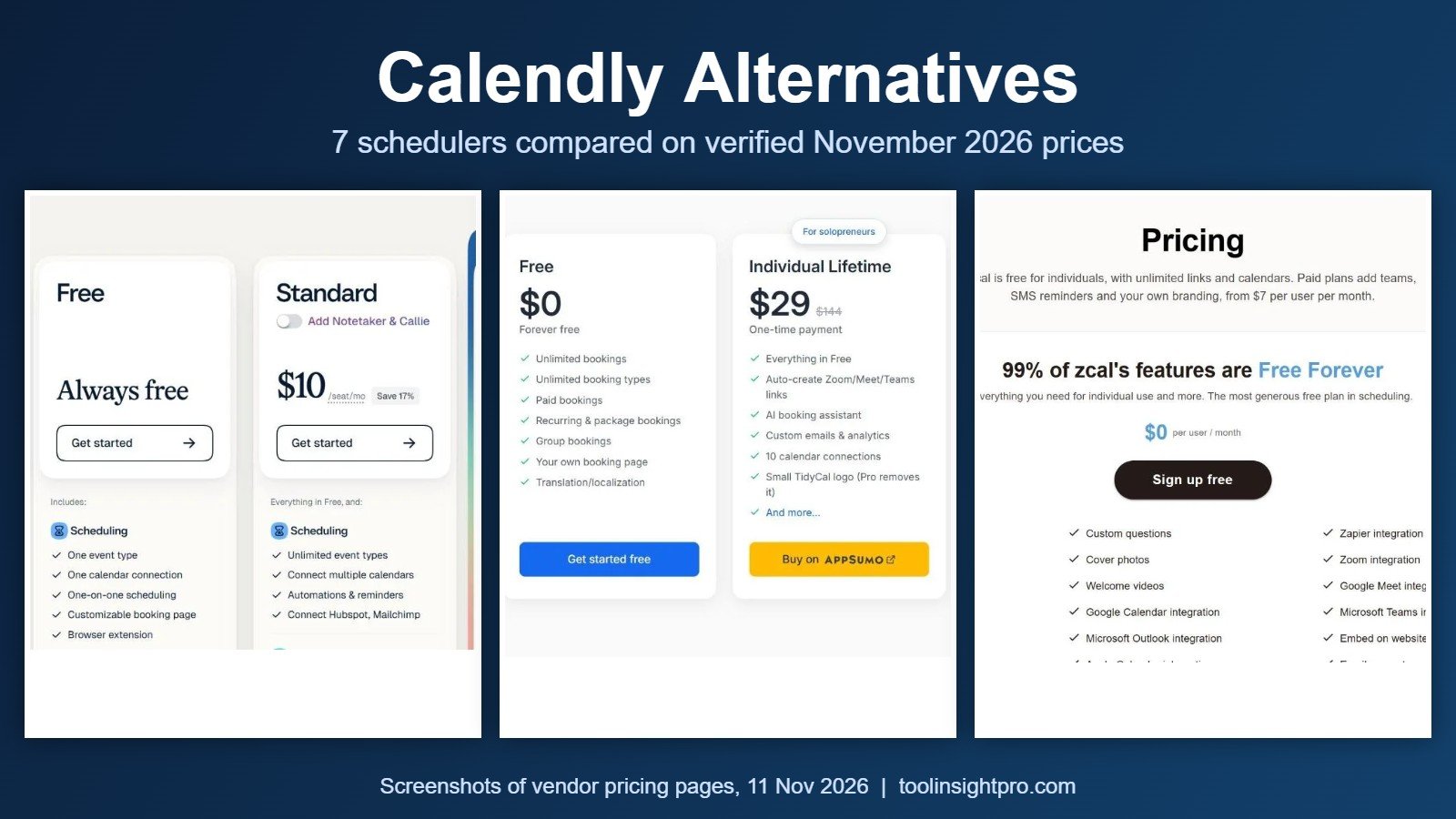
Calendly alternatives at a glance
| Tool | Free plan | Cheapest paid plan | Best for |
|---|---|---|---|
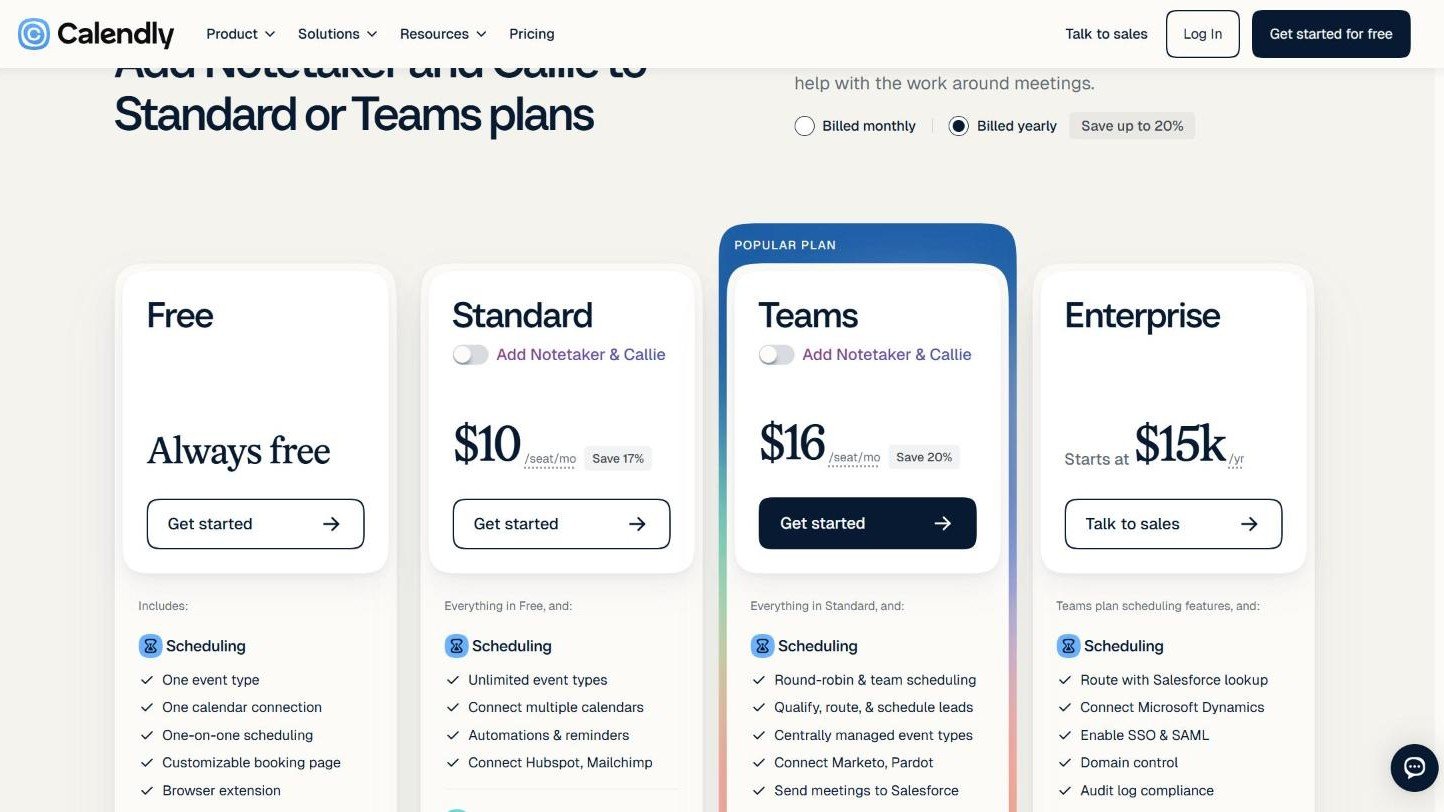
| Calendly (baseline) | Yes: one event type, one calendar connection | Standard $10 per seat a month billed yearly, $12 billed monthly | Teams already built around it |
| TidyCal | Yes: unlimited booking types, 1 calendar connection | $29 one-time (Individual Lifetime, via AppSumo) | Solo users who want to stop paying monthly |
| zcal | Yes: unlimited links and calendar accounts | Pro $7 per user a month billed annually, $10 monthly | A generous free plan |
| Cal.com | Yes: 1 user, unlimited links and calendars | Teams $12 per user a month billed yearly, $16 monthly | Free individual use and open-source fans |
| Koalendar | Yes: unlimited booking pages and bookings | Pro $6.99 per seat a month billed annually, $9.99 monthly | A low-cost Pro plan |
| SavvyCal | No free plan for scheduling links | Basic $10 per user a month billed annually, $12 monthly | A paid tool with unlimited calendars |
| Acuity Scheduling | No, 7-day free trial | Starter $16 a month billed annually, $20 monthly | Client businesses taking payments |
| Google Calendar appointment schedules | Yes: a basic booking page | Paid Google subscription for reminders and paid bookings | People already in Google Calendar |
Prices were read on 11 November 2026. TidyCal, zcal, Calendly, Cal.com and Acuity come from their pricing pages. Koalendar and SavvyCal figures come from each vendor’s own comparison article, because we could not open their pricing pages in our browser. Check the price at checkout before you pay.
Why people look for a Calendly alternative
Calendly is a good scheduler, and its Free plan still exists. The limits are what push people away. On the Free plan you get one event type and one calendar connection. If you want a 15-minute intro call and a 60-minute consultation as separate links, or you need to check both a work and a personal calendar, you are on Standard at $10 to $12 per seat a month.
Team features cost more. Round-robin and team scheduling start on the Teams plan at $16 per seat a month billed yearly, or $20 billed monthly. Enterprise starts at $15,000 a year and 50 seats. For one person that is $120 to $144 a year for a booking link (our arithmetic), which is why one-time and free options get attention.
1. TidyCal: pay once instead of monthly
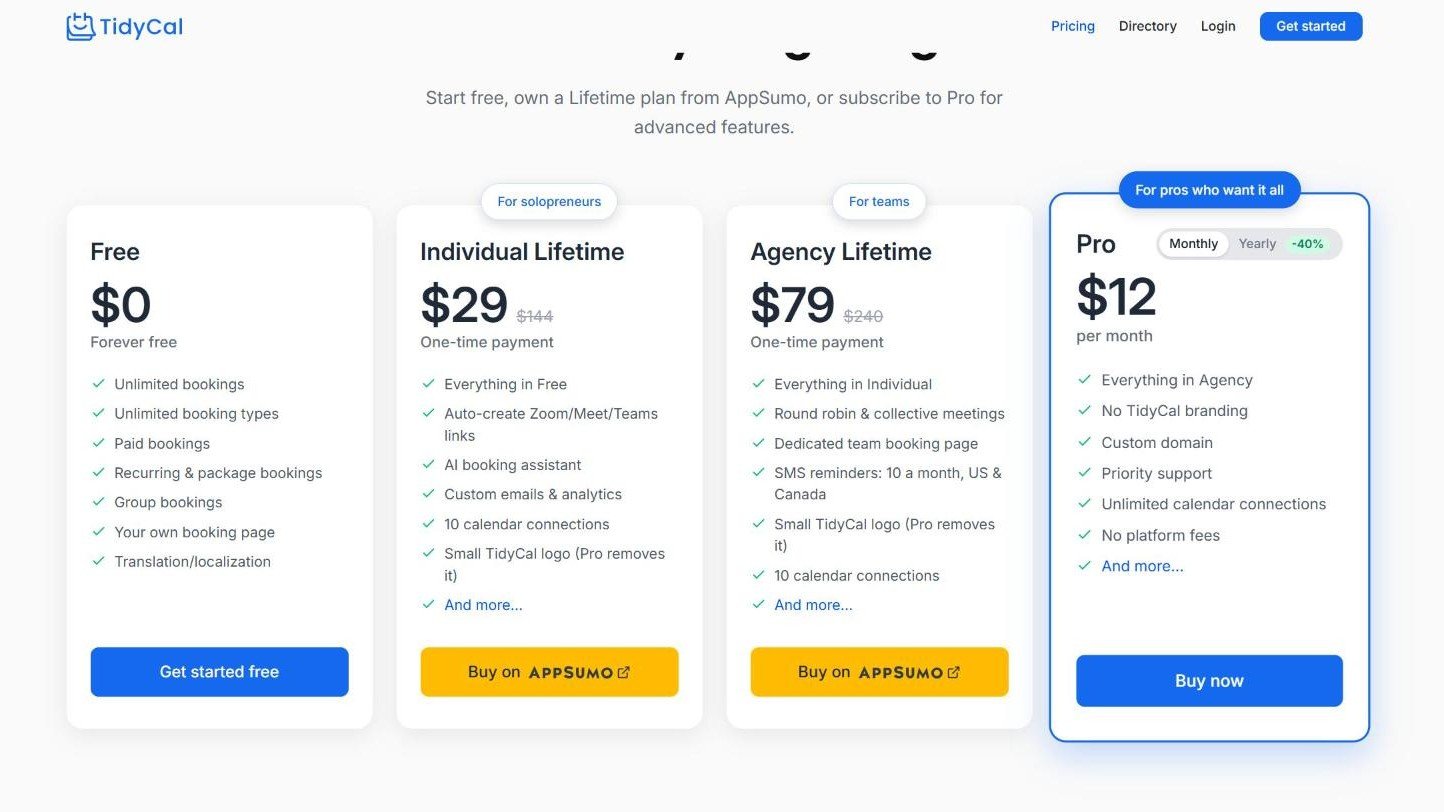
TidyCal is made by AppSumo and is the only tool here with a lifetime plan. The Free plan includes unlimited bookings and booking types, paid bookings, recurring and package bookings, and group bookings, with one calendar connection. That already beats Calendly Free on event types.
- Individual Lifetime, $29 one-time: adds 10 calendar connections, automatic Zoom, Google Meet and Teams links, custom emails, analytics and an AI booking assistant. Bought through AppSumo.
- Agency Lifetime, $79 one-time: adds round robin and collective meetings, a team booking page and 10 SMS reminders a month (US and Canada).
- Pro, $12 a month: removes TidyCal branding and adds a custom domain, unlimited calendar connections and priority support. The yearly option showed a Black Friday price of $59.40 for the first year, then $99 a year.
What to weigh: the lifetime plans keep a small TidyCal logo on your booking page, and TidyCal charges a 1% platform fee on paid bookings on the Free and Lifetime plans, on top of Stripe fees. Pro has no platform fee.
More detail: our TidyCal review, TidyCal pricing breakdown and TidyCal vs Calendly comparison.
2. zcal: the most generous free plan we found
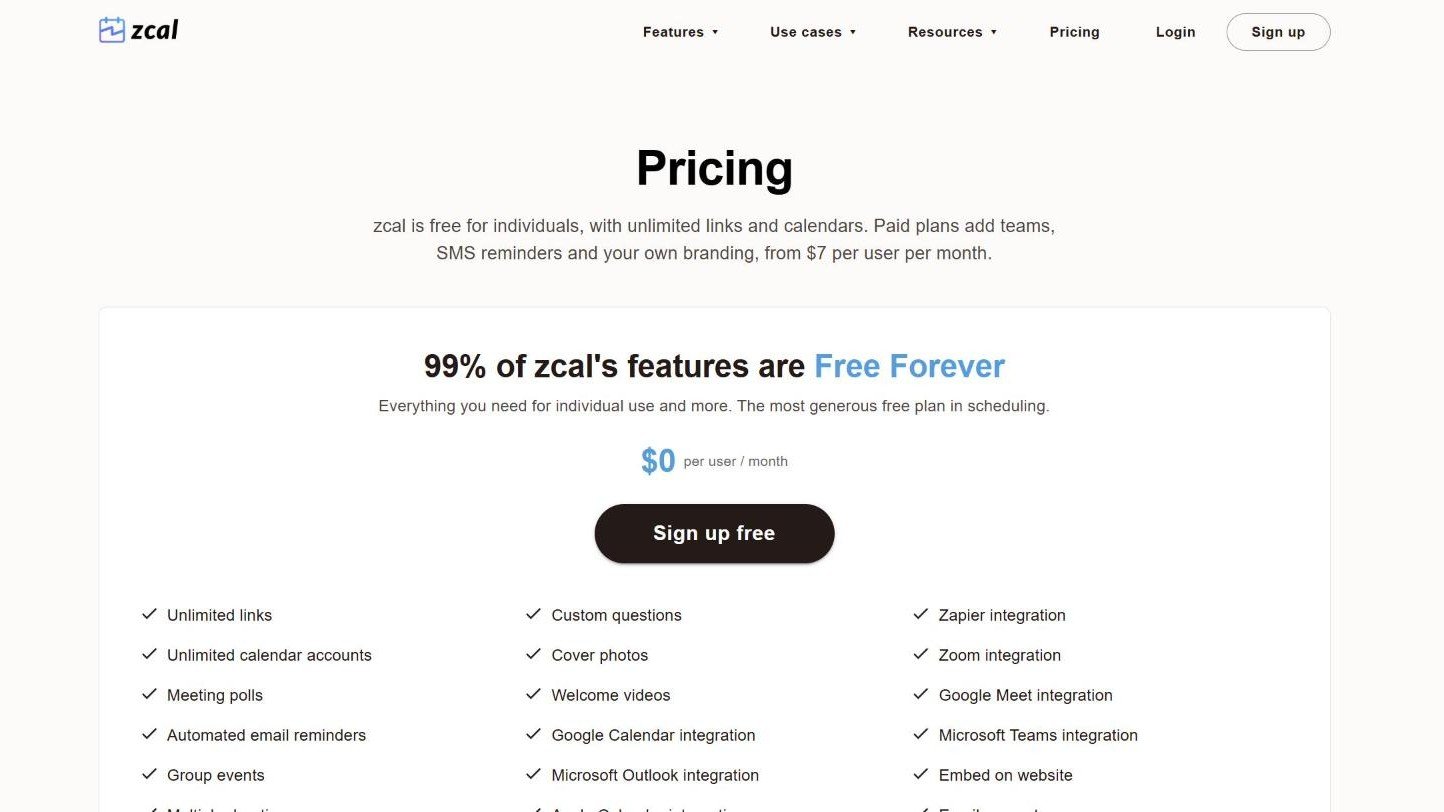
zcal says 99% of its features are free forever, and the pricing page backs that up for individuals: unlimited scheduling links, unlimited calendar accounts, meeting polls, automated email reminders, group events, Stripe payments and Zoom, Google Meet and Teams integrations, all at $0.
Paid plans are for teams and branding. Pro is $7 per user a month billed annually or $10 monthly, with round robin and collective events, branding removal and SMS reminders. Business is $12 billed annually or $18 monthly and adds custom domains. Both have a 14-day trial.
What to weigh: the paid tiers only matter if you need teams, SMS reminders or your own branding, so check that zcal connects to the tools you rely on before moving. We also cover the zcal lifetime deal separately.
3. Cal.com: free for individuals and open source
Cal.com gives one user a free-forever plan with unlimited links and calendars, email and SMS notifications, and Stripe and PayPal payments. It also offers a one-click import of Calendly events, which lowers the cost of switching.
Teams is $12 per user a month billed yearly or $16 monthly, and adds round-robin scheduling, managed and collective links, routing forms and branding removal. Organizations is $28 billed yearly or $37 monthly. Paid plans have a 14-day trial.
What to weigh: Cal.com has more settings than most schedulers. That suits technical users and can feel like a lot if you only want one booking link.
4. Koalendar: a low-cost Pro plan
Koalendar describes its free plan as unlimited events, bookings, calendars and scheduling links. According to its own comparison article, the free plan leaves out group scheduling, multi-host events, payment collection and Zoom. Pro is $6.99 per seat a month billed annually or $9.99 monthly, which is the lowest subscription price in this list.
What to weigh: the same article lists payments as a Koalendar feature in one place and as unavailable on the free plan in another, so confirm which plan includes payments before you rely on it.
5. SavvyCal: paid only, with unlimited calendars
SavvyCal has no free plan for scheduling links. Its own comparison page, dated October 2026, lists Basic at $12 per user a month or $10 billed annually, and Premium at $20 a month or $200 a year. It checks every connected calendar with no limit, and takes payments through Stripe on Premium with no SavvyCal fee.
What to weigh: at the same price as Calendly Standard, SavvyCal is a choice about fit and design, not about saving money.
6. Acuity Scheduling: built for client businesses
Acuity is aimed at businesses that sell appointments. Every plan takes payments through Stripe, Square, PayPal and Venmo and includes client intake forms. Starter is $16 a month billed annually or $20 monthly with 1 calendar. Standard is $27 or $34 with up to 6 calendars, text reminders, memberships and packages. Premium is $55 or $69 with up to 36 calendars.
What to weigh: there is no free plan, only a 7-day trial with no card needed. For a simple meeting link it is the most expensive option here.
7. Google Calendar appointment schedules: already in your account
If you use Google Calendar, you can create a booking page that shows your available times and share it as a link or embed it on a website. Google’s help page says a paid subscription unlocks a professional booking page, email reminders and paid appointment bookings.
What to weigh: it works best when everyone involved lives in Google Calendar, and it has fewer scheduling options than a dedicated tool.
What one user pays over a year
| Tool and plan | Cost for one user, first year |
|---|---|
| TidyCal Individual Lifetime | $29, paid once |
| zcal Free | $0 |
| Cal.com Free | $0 |
| Koalendar Pro, annual billing | $83.88 |
| zcal Pro, annual billing | $84 |
| Calendly Standard, yearly billing | $120 |
| SavvyCal Basic, annual billing | $120 |
| Acuity Starter, annual billing | $192 |
Our arithmetic from the monthly prices above, read on 11 November 2026, before tax. TidyCal is a one-time payment, so its cost does not repeat in year two.
How to choose a Calendly alternative
- You are one person and want to stop paying monthly: TidyCal Individual Lifetime at $29.
- You want free and need several event types or calendars: zcal or Cal.com.
- You run a small team and need round robin: TidyCal Agency Lifetime at $79 one-time, zcal Pro, or Cal.com Teams.
- You sell appointments and take payments daily: Acuity, or TidyCal Pro if the 1% fee on lifetime plans bothers you.
- You only need a basic link and use Google: Google Calendar appointment schedules.
How to switch from Calendly without losing bookings
- Set up the new tool and connect the same calendars first.
- Recreate your event types with the same durations, buffers and questions.
- Replace the Calendly link on your website, email signature and social profiles.
- Leave Calendly active until every existing booking has taken place, then downgrade or cancel.
Frequently asked questions
What is the best free Calendly alternative?
zcal and Cal.com have the strongest free plans we checked on 11 November 2026. Both allow unlimited scheduling links and calendars for one user, while Calendly Free allows one event type and one calendar connection. TidyCal Free also allows unlimited booking types, with one calendar connection.
Is there a Calendly alternative with a one-time payment?
Yes. TidyCal sells an Individual Lifetime plan for $29 and an Agency Lifetime plan for $79 through AppSumo, both one-time payments. The lifetime plans keep a small TidyCal logo and charge a 1% platform fee on paid bookings, which the $12 a month Pro plan removes.
Is Calendly still free?
Yes. Calendly’s pricing page showed an “Always free” plan on 11 November 2026. It includes one event type, one calendar connection, one-on-one scheduling and a customizable booking page. Unlimited event types, multiple calendars, reminders and payments start on Standard at $10 to $12 per seat a month.
What is the cheapest paid Calendly alternative?
For a subscription, Koalendar Pro at $6.99 per seat a month billed annually and zcal Pro at $7 per user a month billed annually were the lowest prices we found. Over several years, TidyCal’s $29 one-time lifetime plan costs less than any monthly plan in this comparison.
Does Google have a Calendly alternative?
Yes. Google Calendar includes appointment schedules, which let you publish a booking page with your available times and share it as a link. According to Google’s help page, a paid subscription adds email reminders, a professional booking page and paid appointment bookings.
Bottom line
If the monthly bill is your reason for leaving Calendly, TidyCal’s $29 lifetime plan is the simplest fix for one person, and zcal or Cal.com cover most individual needs for free. Teams that need round robin should compare TidyCal Agency, zcal Pro and Cal.com Teams. If TidyCal fits, see the TidyCal lifetime deal on AppSumo.
Sources
- Calendly pricing
- TidyCal pricing
- zcal pricing
- Cal.com pricing
- Acuity Scheduling pricing
- Koalendar comparison article
- SavvyCal comparison page
- Google Calendar Help: appointment schedules
Affiliate disclaimer: this guide on ToolInsight Pro contains affiliate links to TidyCal on AppSumo. We do not earn from the other tools listed. All tools are independent products, and prices and limits can change after 11 November 2026.