
Quick answer: Quick answer: Choose Canva if you want the largest template library, easy team collaboration and an all-in-one design workspace. Choose Adobe Express if you already use Adobe apps, want Adobe Fonts and Firefly generative AI, or need tighter brand control across Creative Cloud. In November 2026, Canva Pro was US$144 a year after a September price cut, and Adobe Express Premium was US$9.99 a month. Both have free plans.
Canva and Adobe Express both let non-designers create social posts, flyers, presentations and short videos in the browser. They look similar at first, but they come from different ecosystems and suit different users.
Adobe Express vs Canva at a glance
| Feature | Canva | Adobe Express |
|---|---|---|
| Free plan | Yes | Yes |
| Paid individual plan | Canva Pro US$144/year (after Sept 2026 cut) | Premium US$9.99/month |
| Templates | Very large library across formats | Large library, strong Adobe Stock integration |
| AI tools | Magic Studio AI features | Firefly generative AI |
| Fonts | Canva font library plus uploads on paid | Adobe Fonts |
| Ecosystem | Standalone, many integrations | Works with Photoshop, Illustrator and Creative Cloud |
| Best for | Teams, social media, all-round design | Adobe users and brand-consistent marketing |
Ease of use
Both tools are built for beginners. Canva is widely known for its drag-and-drop editor and huge template choice, which makes it quick to start. Adobe Express offers a similar experience, with quick actions such as background removal and resizing, and a familiar feel for people who use other Adobe products.
Templates and assets
Canva’s template library covers almost every format, from Instagram posts to whiteboards and websites. Adobe Express has a strong library too, and its access to Adobe Stock and Adobe Fonts is a plus for brand-quality typography. If you need extra stock media in either tool, a credit pack can help; the Depositphotos deal on AppSumo gave 100 stock credits per code for $59 during Black Friday 2026.
AI features
Canva bundles its AI tools under Magic Studio, covering text-to-image, writing help and smart editing. Adobe Express uses Adobe Firefly, which Adobe positions as designed for commercial use. If generative AI is central to your work, test both on the free plan with your own prompts.
Brand tools and collaboration
Canva is strong for teams with shared folders, comments and brand kits on paid plans. Adobe Express offers brand kits and libraries that connect with Creative Cloud, useful when designers work in Photoshop or Illustrator and marketers finish assets in Express.
Pricing compared
Canva Pro cost US$144 a year in November 2026, after a September 2026 price cut tracked by PricingSaaS. Adobe Express Premium was listed at US$9.99 a month. Regional prices differ, and both brands run promotions, so confirm on the official pages before buying.
A one-time alternative: VistaCreate
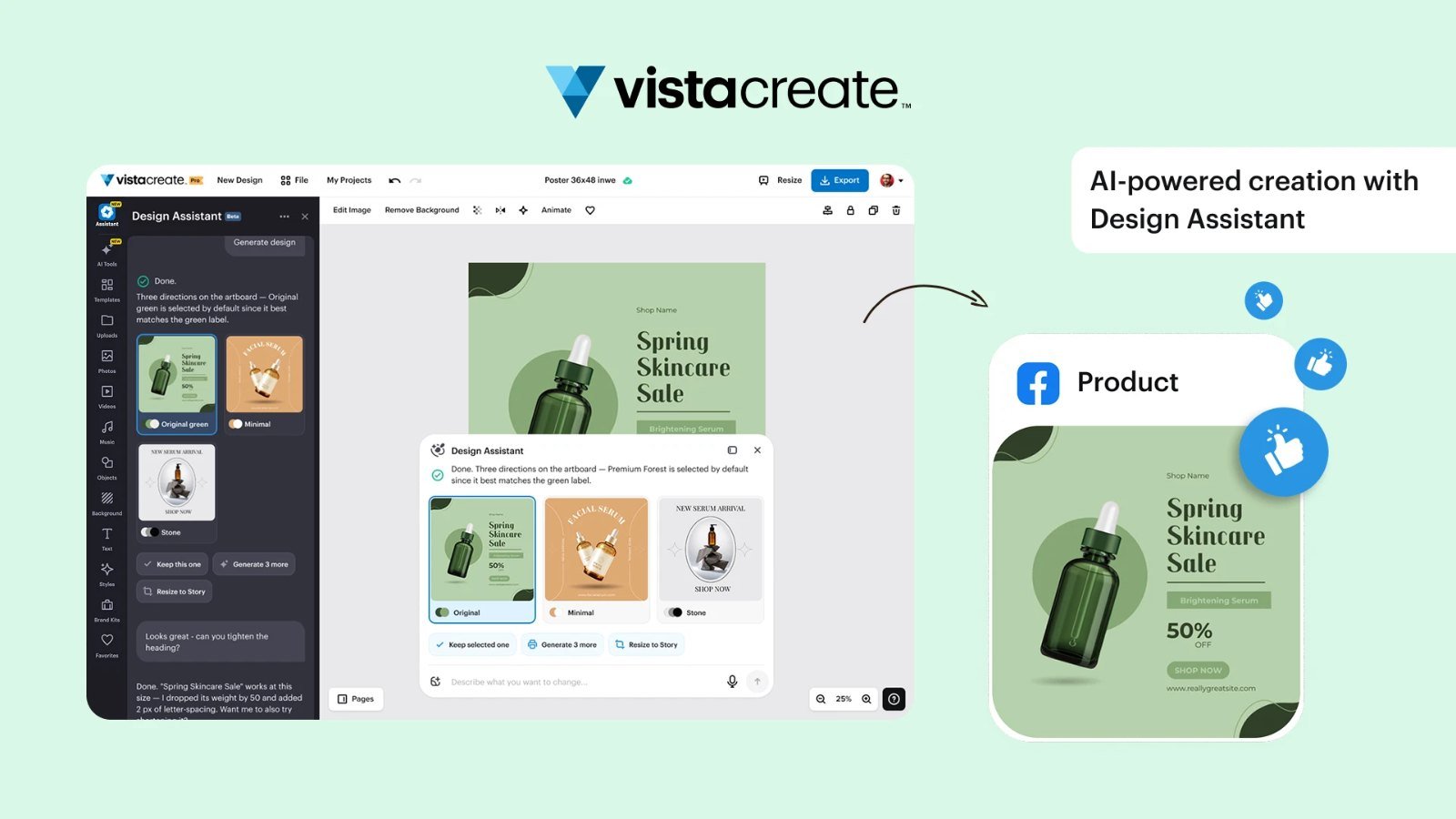
If you prefer not to pay a subscription, VistaCreate offers a Canva-style editor with templates, a 70M+ stock library, background removal, brand kits, a team account and social scheduling. Its AppSumo lifetime deal for the Pro plan was listed at $109, with AppSumo’s extra Black Friday discount bringing it to $98.10 when we checked, and is listed until 1 December 2026. Read our VistaCreate review or check the VistaCreate deal.
Who should choose Canva
- Small businesses and social media managers who want speed.
- Teams that collaborate on many designs.
- Users who want presentations, docs, whiteboards and websites in one tool.
Who should choose Adobe Express
- People already paying for Creative Cloud.
- Marketers who need Adobe Fonts and Adobe Stock.
- Teams that move files between Photoshop, Illustrator and Express.
Exploring more options? See our list of Canva alternatives and our Figma vs Canva comparison.
Final verdict
Canva is the better all-rounder for most small teams thanks to its template range and collaboration. Adobe Express is the smarter pick if you live in the Adobe ecosystem or want Firefly AI and Adobe Fonts. Try both free plans with a real project before paying, and consider VistaCreate if you want a one-time payment instead.
Sources we checked: VistaCreate on AppSumo, Figma pricing, Canva pricing, Adobe Express pricing. Prices and plans change, so confirm on the official page before you buy.
Frequently asked questions
Is Adobe Express better than Canva?
Neither is better for everyone. Canva suits most small teams with its huge template library and easy collaboration. Adobe Express is better for people already using Adobe apps who want Adobe Fonts, Adobe Stock and Firefly AI. Both have free plans, so test each with a real project.
Is Adobe Express cheaper than Canva?
It depends on billing. In November 2026, Adobe Express Premium was listed at US$9.99 a month and Canva Pro at US$144 a year after a September price cut, roughly US$12 a month. Prices differ by country and promotion, so check both official pricing pages.
Is Adobe Express free?
Yes, Adobe Express has a free plan with templates and core editing tools. Premium unlocks more templates, Adobe Stock assets, Adobe Fonts and extra generative AI credits. Canva also has a free plan, and Canva Pro adds premium content, brand kits and more AI features.
Can I use Canva and Adobe Express designs commercially?
Generally yes, within each platform’s content license. Some templates, photos and fonts have restrictions, such as not reselling them as standalone files or using them in trademarks. Read the current Canva and Adobe licensing terms before using designs in products or ads.
What is a cheaper alternative to Canva Pro?
VistaCreate is one option. Its AppSumo lifetime deal for the Pro plan was listed at $109 and dropped to $98.10 with AppSumo’s extra Black Friday discount when checked in November 2026, giving one-time access instead of a yearly subscription. Check the limits before buying.