
Quick answer: CaptionBolt is an AI captioning tool for short vertical videos. Its AppSumo lifetime deal has three tiers, from $39 for 60 processing minutes a month to $229 for 1,200. Tier 1 caps videos at 5 minutes, and the listing and reviews point to a 14-day project retention window.
CaptionBolt generates captions from speech, offers 338 caption styles and exports MP4 files in up to 4K without watermarks. The AppSumo listing shows 7 reviews at 5.0 and 72 buyers. We have not tested it, and the details come from the listing, read on 29 October 2026.
Disclosure: this page contains an affiliate link to AppSumo, and we may earn a commission if you buy through it.
What each CaptionBolt tier includes
| Tier | Price | Processing minutes a month | Max video length | Upload size | Concurrent jobs | Priority |
|---|---|---|---|---|---|---|
| Tier 1 (Starter) | $39 | 60 | 5 min | 500MB | 1 | Standard |
| Tier 2 (Pro) | $129 | 400 | 10 min | 1GB | 2 | Standard |
| Tier 3 (Max) | $229 | 1,200 | 20 min | 3GB | 3 | High |
All three tiers list the full editor, all 338 caption styles, 4K exports and no watermarks. Export formats differ: Tier 1 gives MP4 and TXT, Tier 2 adds SRT and ASS subtitle files, and Tier 3 adds VTT. The REST API, webhook and MCP server for AI agents are listed as Tier 3 features.
The video length cap matters more than the minutes
Tier 1 allows 60 processing minutes a month, but each video can be at most 5 minutes. That works for short clips, and it rules out long interviews or webinars. Tier 2 raises the cap to 10 minutes and Tier 3 to 20 minutes. If you caption anything near YouTube long-form length, even the top tier has a ceiling.
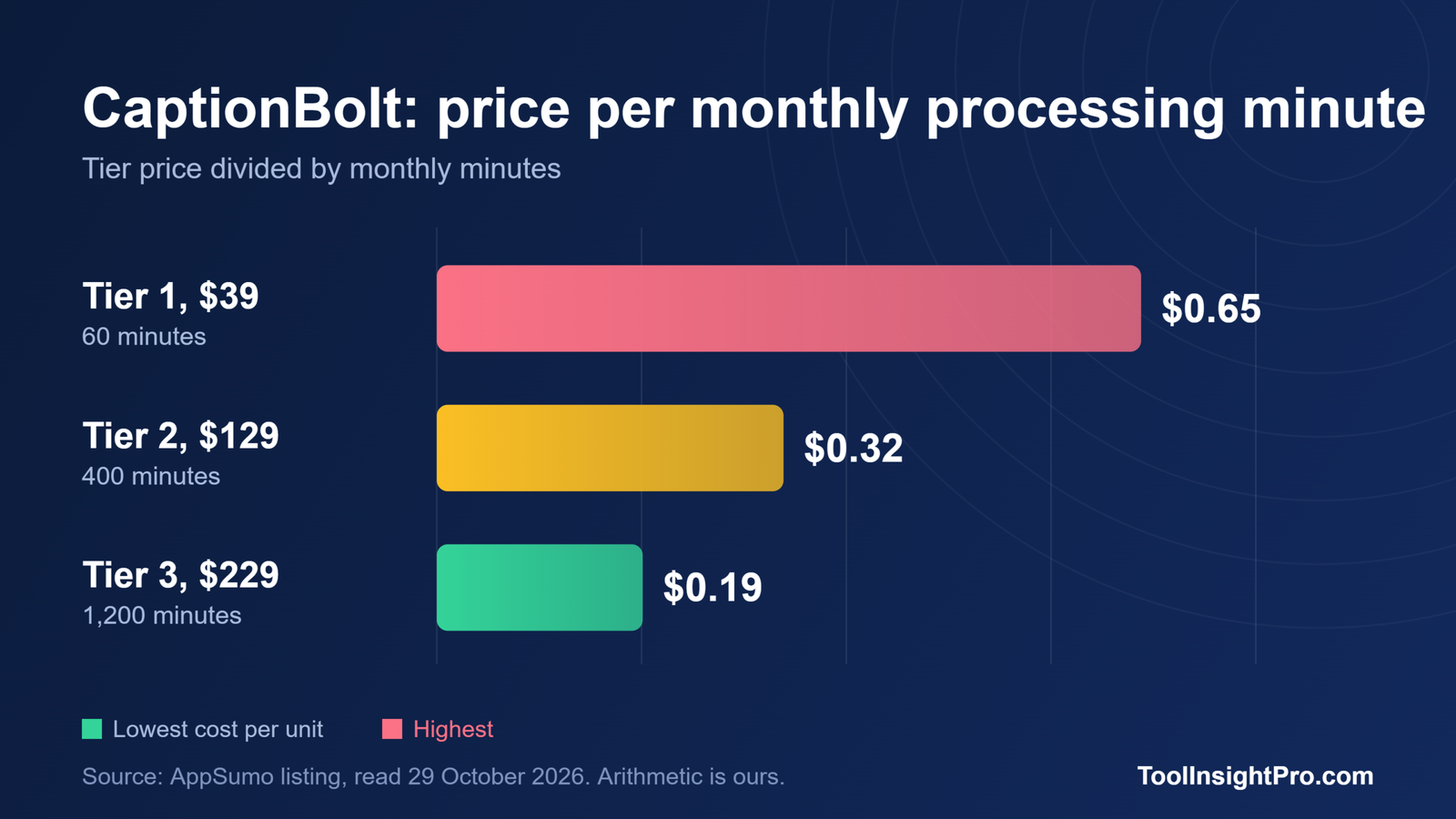
| Tier | Price | Price per monthly processing minute | Minutes added vs previous tier |
|---|---|---|---|
| Tier 1 | $39 | $0.65 | None |
| Tier 2 | $129 | $0.32 | 340 more for $90 |
| Tier 3 | $229 | $0.19 | 800 more for $100 |
This is arithmetic on the listing figures. Tier 3 is cheapest per minute, but it only helps if you process hundreds of minutes monthly. The listing does not say whether unused minutes roll over.
The 14-day project limit
The founder’s update says Deep scan works on projects uploaded in the last 14 days, and an AI summary of reviews on the page flags a 14-day project retention period. For a completed project you click Edit again to make an editable copy. Plan to export and store your finished files rather than treating CaptionBolt as an archive.
The same summary notes missing AI clip-splitting, translation and dubbing. If you need those, compare the listing’s named alternatives, Descript and Kapwing, which we did not price or test.
Deep scan and what the founder says it fixes
In an update the founder says buyers reported missing captions under music or very fast speech, and the team built Deep scan to recover vocals from those passages. It is described as included in every tier without deducting extra minutes. The founder also says it works best on clear voices and can mishear lyrics, so recovered lines may need touch-ups.
What reviewers say
All 7 reviews give five tacos. One review comes from a paid AppSumo product evaluator who received the tool for free and states that the compensation is not tied to the rating. That is disclosed on the page, but it is not independent buyer evidence. Treat the 5.0 average as early feedback on a small base of 72 buyers.
The company was founded in October 2023 in Hong Kong and is bootstrapped, with one to ten staff. See how SaaS lifetime deals work for how vendor risk applies to any lifetime purchase.
CaptionBolt lifetime deal questions
How much is the CaptionBolt lifetime deal?
AppSumo lists three tiers at $39, $129 and $229, each a one-time payment with lifetime access and a refund window of up to 60 days. Plus members are covered by the We Got Your Back guarantee, so confirm your eligibility on the page.
How long can videos be in CaptionBolt?
The listing caps videos at 5 minutes on Tier 1, 10 minutes on Tier 2 and 20 minutes on Tier 3. Upload size limits are 500MB, 1GB and 3GB. Check these limits against your typical clip before choosing a tier.
Does CaptionBolt add watermarks to exports?
No, according to the listing. All tiers list 4K MP4 exports with no watermarks. Subtitle file exports differ by tier, with SRT and ASS from Tier 2 and VTT on Tier 3. We did not test the output quality ourselves.
Does CaptionBolt keep projects forever?
Apparently not. The founder’s update refers to projects uploaded in the last 14 days, and a review summary on the page mentions a 14-day retention period. Download your finished videos promptly, and confirm the exact policy in the Questions tab.
Bottom line
CaptionBolt is a focused tool for short vertical videos, and Tier 2 at $129 is the middle choice with 400 minutes and 10-minute videos. The real limits are the per-video length cap and the 14-day project window, and the review base is small. Test your real clips inside the 60-day refund window before committing.
Check the current CaptionBolt tiers on AppSumo before you decide, since prices, limits and deal dates can change.
Source: AppSumo listing for CaptionBolt, read 29 October 2026. Related reading:
- Best AppSumo AI Tools Worth Buying in 2026: our hub for deals we have checked tier by tier
- What AppSumo Listings Leave Out: nine limits found in the documentation
- SaaS Subscription vs One-Time License: how to calculate your break-even month