

SalesBlink runs a cold email campaign end to end: it writes the sequence with AI, warms the mailboxes so the mail lands, sends and follows up automatically, collects every reply in one inbox, and books the meeting. This walks through that whole flow, and flags the two steps where your licence tier decides whether the feature exists at all.
Everything below reflects the AppSumo listing as it stood in October 2026.
Before you start: what your tier can do
Two capabilities in this guide are missing entirely on the cheapest licence. Check which you have before you plan around them.
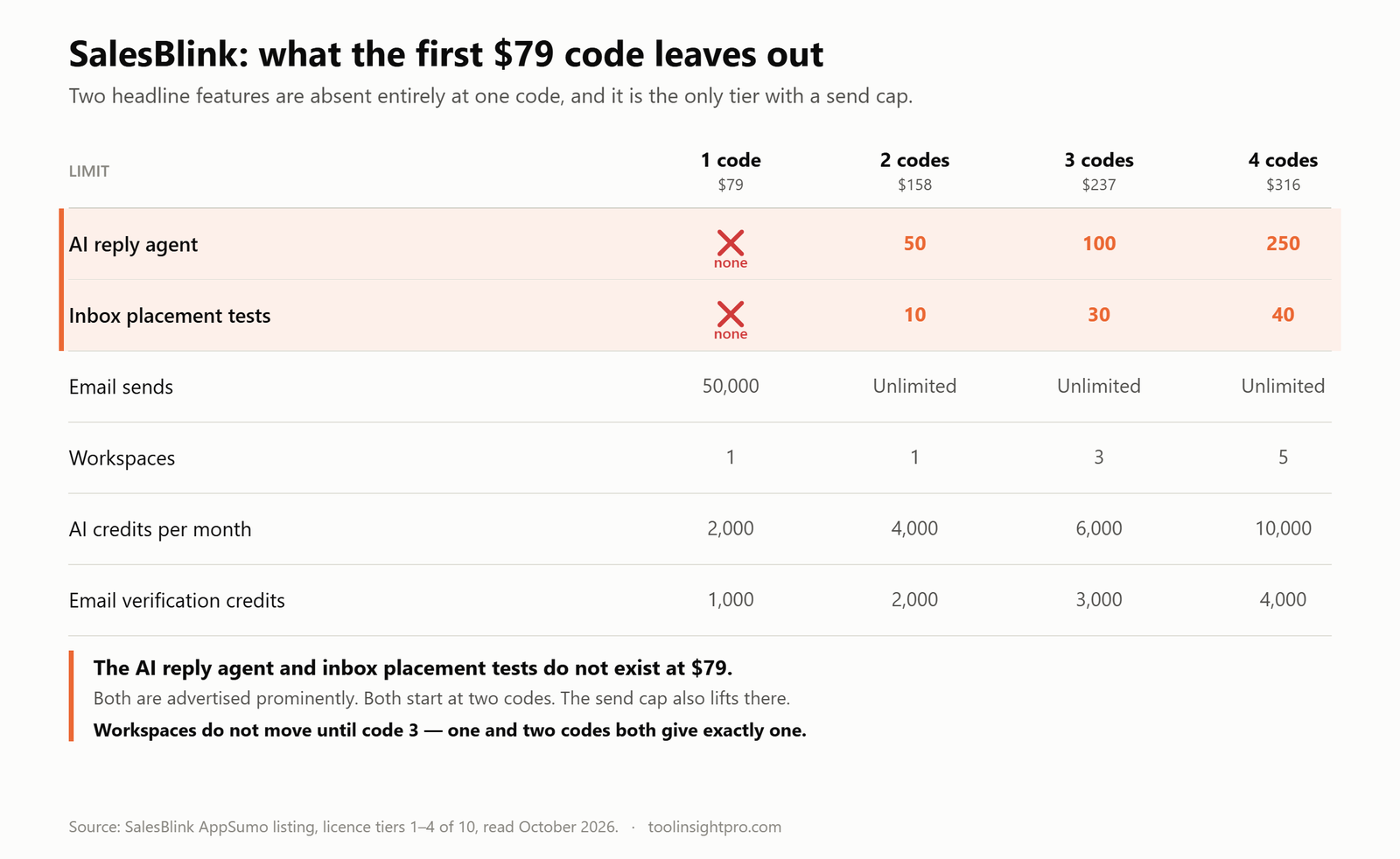
| Step | 1 code – $79 | 2 codes – $158 | 3+ codes |
|---|---|---|---|
| Connect mailboxes | Unlimited | Unlimited | Unlimited |
| Warm up mailboxes | Unlimited | Unlimited | Unlimited |
| Generate sequences with AI | 2,000 credits / mo | 4,000 / mo | 6,000+ / mo |
| Send volume | Up to 50,000 | Unlimited | Unlimited |
| AI reply agent | ✗ none | 50 replies / mo | 100+ / mo |
| Inbox placement tests | ✗ none | 10 | 30+ |
| Verify addresses | 1,000 credits | 2,000 | 3,000+ |
| Separate client workspaces | 1 | 1 | 3+ |
Step 1: Connect your sending mailboxes
SalesBlink allows unlimited mailboxes and unlimited users on every tier, which is unusual — most cold email tools charge per mailbox, and that is where the bill grows.
The practical reason to connect several is volume spread. Sending two hundred cold emails a day from one mailbox is a reliable way to get that mailbox flagged. Spreading the same volume across five mailboxes keeps each one inside normal human sending patterns, and SalesBlink’s sender rotation distributes the campaign across them automatically.
Use a separate domain from your main business one for cold outreach. If a cold domain gets burned, you want the damage contained somewhere that is not the address your customers reply to.
Step 2: Warm the mailboxes, and wait
Unlimited email warm-up is included at every tier. Warm-up sends low volumes of mail between seeded accounts that reliably open and reply, gradually teaching inbox providers that your domain sends mail people want.
This is the step people skip, and skipping it is why cold campaigns land in spam. A new domain with no sending history that suddenly pushes five hundred emails looks exactly like a spammer, because that is what spammers do.
Warm for at least two to three weeks before the first real campaign. On a tier with inbox placement tests — two codes and up — you can verify the warm-up actually worked before committing a list to it. On the $79 licence you cannot, and you are warming blind.
Step 3: Build the sequence with BlinkGPT
Rather than starting from a blank email, you describe your product or service and BlinkGPT AI generates a cold email sequence to fit. It drafts the opening email and the follow-ups together, so the thread reads as one conversation rather than a series of unrelated nudges.
This consumes AI credits — 2,000 a month at one code, rising to 22,000 at ten. Generation and personalisation both draw on that pool, so the credit limit is really a limit on how many distinct campaigns you can build and tailor each month, not on how many emails you send.
Treat the output as a first draft. An AI-written cold email that nobody edits reads like an AI-written cold email, and the recipient has seen forty of them this week. The generated sequence is a structure worth keeping and a voice worth replacing.
Step 4: Personalise and schedule the follow-ups
SalesBlink personalises each outgoing email per lead and sends automatic follow-ups on your schedule. Follow-ups stop when someone replies — which sounds obvious and is the single feature that separates a sequence tool from a mail merge.
Most replies to cold email arrive on the second and third touch, not the first. A sequence that gives up after one send throws away most of its own results.
Step 5: Verify the list before you send to it
SalesBlink includes email verification credits — 1,000 a month at one code, up to 10,000 at ten. Bounces are what destroy a sending domain, and a list bought or scraped six months ago will be full of them.
That allowance is modest. A thousand verifications a month covers a careful, targeted outreach habit; it does not cover cleaning a 50,000-row list you just acquired. For that you want a dedicated verifier — our Reoon pricing guide covers a $79 licence that handles 100,000 addresses plus 500 a day, which pairs naturally with SalesBlink’s sending.
Step 6: Handle replies in the master unibox
Every reply from every connected mailbox lands in one master unibox, included at every tier. Without it, running five sending mailboxes means checking five inboxes, and interested replies go cold while you are looking in the wrong one.
Above one code, the AI reply agent can answer automatically — 50 replies a month at two codes, rising to 5,000 at ten. Point it at the predictable traffic: out-of-office notices, “send me more information”, “who handles this?” Keep buying signals for yourself. An automated reply to a genuinely interested prospect is a worse outcome than a slow human one.
At $79 there is no reply agent at all, so every reply is yours to read and answer.
Step 7: Book the meeting
Connect a Google or Outlook calendar and leads book a slot directly from the email, included at every tier. You can set reminders for upcoming meetings, and — the part most people miss — add anyone who books into another automated sequence, so a booked call rolls straight into a pre-meeting nurture rather than silence.
Removing the “what time suits you?” exchange is worth more than it sounds. Every extra round trip between interest and a booked slot is a chance for the lead to go quiet.
Connecting SalesBlink to the rest of your stack
The listing names HubSpot, Pipedrive, Make, Integrately and Pabbly Connect, plus API and CLI access at every tier. Whitelabel is also included at every tier, which is what makes the three-workspace agency setup usable in front of clients.
It is a real but short list. If your pipeline runs on Salesforce or a CRM not named above, you are connecting it yourself through Make or the API rather than clicking an integration.
A first-campaign checklist
- Buy or set up a separate domain for cold outreach.
- Connect three to five mailboxes on it. There is no per-mailbox charge.
- Turn on warm-up and leave it running two to three weeks. Do not shortcut this.
- On two codes or more, run an inbox placement test to confirm warm-up worked before sending.
- Verify your list before the first send, using a dedicated verifier if the list is large.
- Generate the sequence with BlinkGPT, then rewrite it in your own voice.
- Set follow-ups and confirm they stop on reply.
- Connect your calendar and add a booking link to the sequence.
- Watch the master unibox daily for the first fortnight before automating any replies.
Check the current SalesBlink deal on AppSumo →
Frequently asked questions
How does SalesBlink deliverability work?
Through unlimited email warm-up and sender rotation, both included at every tier. Warm-up builds sending reputation gradually; rotation spreads a campaign across your connected mailboxes so no single one spikes. Inbox placement tests, which confirm whether mail is actually landing, start at two codes.
How many mailboxes can I connect to SalesBlink?
Unlimited, on every tier, along with unlimited users. Neither is metered anywhere on the ten-code ladder.
What is BlinkGPT?
SalesBlink’s AI sequence generator. You describe your product and it drafts the cold email sequence and its follow-ups. It draws on your monthly AI credit allowance, which runs from 2,000 at one code to 22,000 at ten.
Does SalesBlink stop follow-ups when someone replies?
Yes. Automatic follow-ups halt on reply, which is the core behaviour that makes a sequence tool different from a mail merge.
Can SalesBlink answer replies for me?
On two codes and above, through the AI reply agent — 50 replies a month at two codes up to 5,000 at ten. The $79 single-code tier has no reply agent at all.
Does SalesBlink verify email addresses?
Yes, with a monthly credit allowance from 1,000 at one code to 10,000 at ten. For cleaning a large existing list, a dedicated verifier is better value.
Can agencies run separate clients in SalesBlink?
Yes, using workspaces plus the included whitelabel. One and two codes give a single workspace; three codes gives three, five gives ten, and ten gives one hundred.
Related reading
- SalesBlink review
- SalesBlink pricing: all ten tiers
- Reoon Email Verifier pricing
- Email verifier alternatives compared
- SendFox vs Mailchimp
How we checked this: every tier limit and feature above was read from the SalesBlink AppSumo listing in October 2026. Sending advice reflects standard cold-email practice; we have not run campaigns through the product ourselves and make no claim about deliverability rates you will achieve. Full review methodology.
Disclosure: the AppSumo link in this article is an affiliate link. Your price is unchanged and ToolInsight Pro may earn a commission. See our affiliate disclosure.

