
Quick answer: Quick answer: No AI video generator is fully free for serious work. Free plans give you a small batch of credits or limited model access so you can test quality. As of 27 November 2026, Runway gives new free accounts 125 credits, Kling has a $0 Basic plan, Pika has a free plan without a commercial license, and Higgsfield lists a set of free generations on specific models. If you plan to post videos for money, budget for a paid plan.
Search for a free AI video generator and you will find many lists that call every tool “free”. In practice, free usually means a trial pool of credits, watermarks, lower resolution, or no commercial rights. That matters if you make content for YouTube, client work or ads.
This guide compares four popular tools by what their free tier really allows and what the first paid step costs. Every price below was read from the vendor pricing page on the date shown. Prices and promotions change often, so check the live page before you pay.
How we compared the free plans
- Free allowance: credits, free generations, or limited models.
- Commercial use: whether the free output can be used for business.
- Watermark and resolution: what paid plans unlock.
- First paid tier: the cheapest upgrade and what it includes.
We did not run a quality benchmark for this article, so we do not rank output quality. The goal is to help you pick a tool to test, based on plan facts.
Free plan comparison at a glance
| Tool | Free tier (checked) | Cheapest paid plan | Checked on |
|---|---|---|---|
| Higgsfield | Free generations listed on selected models, for example Soul V2 Cinema (300 free gens) and Genjutsu 720p (3 free gens) | Starter $15/mo billed yearly, 200 credits/month | 27 Nov 2026 |
| Kling AI | Basic plan at $0; no commercial use or watermark removal on Basic | Standard $10/mo monthly ($6.50/mo for the first 3 months during a promotion), 660 credits | 27 Nov 2026 |
| Pika | Free plan; no commercial license | Starter $10/mo, 600 credits | 27 Nov 2026 |
| Runway | 125 one-time credits on the free tier | Standard $12/mo billed yearly ($15 monthly) | 18 Nov 2026 |
1. Higgsfield: best for trying many models in one place
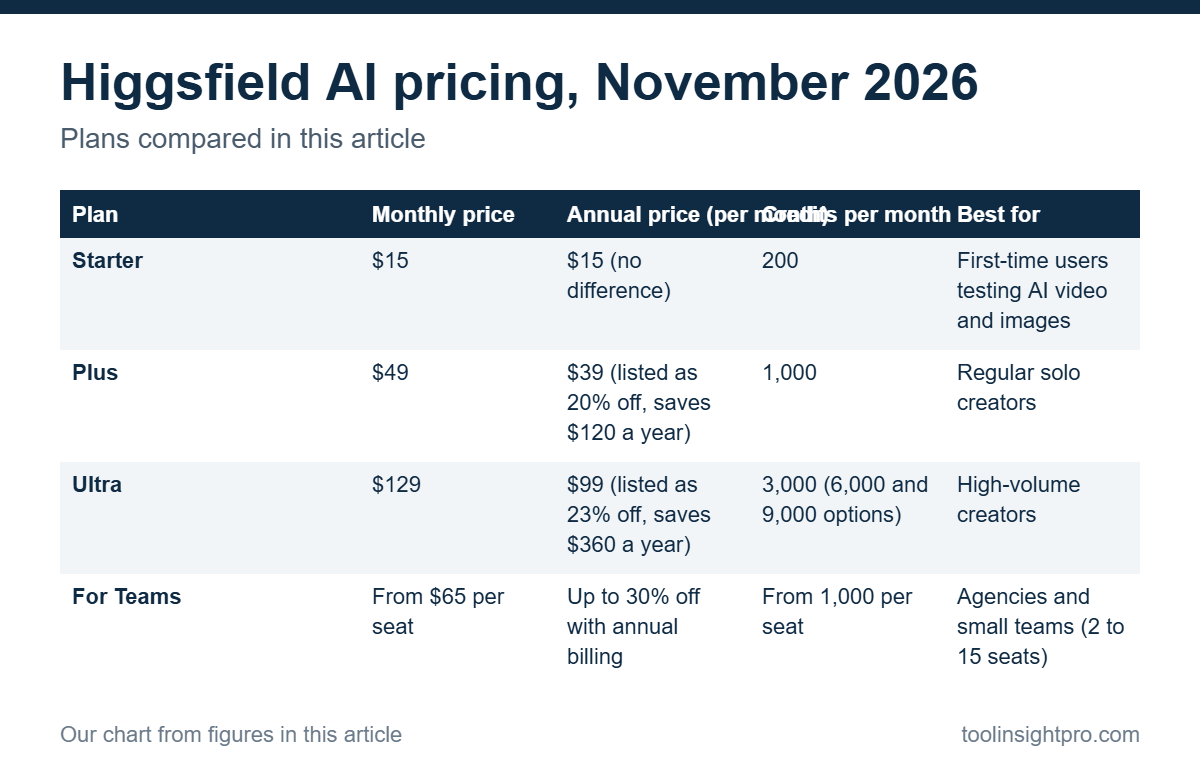
Higgsfield is a creative platform that brings several image and video models into one interface. Its pricing page, checked on 27 November 2026, listed free generations on certain models, such as 300 free gens on Soul V2 Cinema and 3 free gens on Genjutsu 720p. That makes it a good place to try different looks before you commit.
Paid plans on the same date: Starter at $15/month billed yearly with 200 credits per month (about 11 Seedance 2.0 Fast videos, according to the page), Plus at $25/month billed yearly with 1,000 credits, and Ultra at $45/month billed yearly with 3,000 credits. A Black Friday sale labelled “up to 69% off” was running with about two days left on the timer, so these prices may rise after it ends.
- Good for: creators who want to compare models, social clips, and stylised shots.
- Watch out for: credit costs differ by model, so a heavy model drains credits faster.
Want the full breakdown? Read our Higgsfield AI review and the Higgsfield pricing guide. You can also see the current Higgsfield plans here.
2. Kling AI: best free plan for testing text and image to video
Kling offers a Basic plan at $0. Its comparison table on 27 November 2026 showed that Basic does not include commercial use, watermark removal, 1080p/4K generation or subscriber daily credits, and allows one video per generation. That is fine for testing prompts, not for client delivery.
Standard was $10/month on monthly billing (shown at $6.50/month for the first 3 months, then $8.80, under a limited promotion) with 660 credits per month. Pro was $37/month with 3,000 credits, and Premier $207/month with 18,000 credits. Paid tiers add commercial use and watermark removal.
3. Pika: simple free plan for short creative clips
Pika has a free plan, but the pricing page on 27 November 2026 stated that the free plan has no commercial license. Starter cost $10/month for 600 credits and Creator $35/month for 2,600 credits on monthly billing. Pika suits quick, playful clips and effects for social posts.
4. Runway: best known for editing tools plus generation
Runway gives free accounts 125 credits once, which is enough to try a few short generations. When we checked on 18 November 2026, Standard was $12/month billed yearly ($15 monthly), Pro $28 ($35 monthly) and Max $76 ($95 monthly). Runway also includes many video editing tools, which helps if you finish videos inside one app.
Which free AI video generator should you start with?
| Your goal | Start here | Why |
|---|---|---|
| Compare many models | Higgsfield | Several models and listed free gens in one place |
| Test realistic motion cheaply | Kling AI | $0 Basic plan, low-cost Standard |
| Quick fun social effects | Pika | Simple free plan for experiments |
| Generate and edit in one tool | Runway | Free credits plus editing suite |
Limits of free AI video plans you should know
- Commercial rights: Kling Basic and Pika Free did not include commercial use when checked. Read the terms before monetising.
- Watermarks: watermark removal is usually a paid feature.
- Credits run out fast: one high-quality clip can use a large share of a free pool.
- Queues: free users may wait longer at busy times.
If you run a faceless channel, our list of AI tools for faceless YouTube channels shows how video tools fit with voice and script tools. For more options, see Higgsfield AI alternatives.
Tips to get the most from free credits
- Write a detailed prompt with subject, action, camera move and lighting before you generate.
- Test with the shortest duration and lowest resolution first.
- Use image-to-video with a strong starting frame to cut retries.
- Keep a prompt log so you can repeat what worked.
Final verdict
There is no single best free AI video generator for everyone. For trying many models with listed free generations, Higgsfield is a strong starting point. Kling gives the clearest $0 plan, Pika is easy for social clips, and Runway pairs credits with editing. Test two tools with the same prompt, then pay only for the one whose output you would publish.
Sources we checked: Higgsfield pricing, Kling AI membership plans, Pika pricing, Runway pricing. Prices and plans change, so confirm on the official page before you buy.
Frequently asked questions
What is the best free AI video generator in 2026?
It depends on your goal. As of 27 November 2026, Higgsfield lists free generations on selected models, Kling has a $0 Basic plan, Pika has a free plan and Runway gives 125 free credits. Test two of them with the same prompt and compare.
Can I use free AI videos commercially?
Not always. When we checked on 27 November 2026, Kling Basic and the Pika free plan did not include commercial use. Paid plans usually add commercial rights. Always read the current terms of service before you use clips in ads or client work.
Do free AI video generators add a watermark?
Many do. Kling lists brand watermark removal as a paid benefit, and most other tools also reserve it for paid plans. If you need clean exports for YouTube or ads, plan to upgrade to at least the entry paid tier of your chosen tool.
How many videos can I make with free credits?
Very few. Runway gives 125 one-time credits, and Higgsfield says its 200-credit Starter plan covers about 11 Seedance 2.0 Fast videos a month. Credit costs depend on the model, length and resolution, so heavy models use credits much faster.
Is Higgsfield free to use?
Higgsfield has free generations on certain models, such as Soul V2 Cinema and Genjutsu 720p, as listed on its pricing page on 27 November 2026. Full access to more credits starts with the Starter plan at $15 per month billed yearly.