

TidyCal sells a $29 one-time licence on AppSumo instead of a subscription. Calendly’s cheapest paid plan is $10 per seat per month and TidyCal’s own Pro plan is $99 a year, so the headline maths is easy: the licence pays for itself in about three months and then costs nothing.
Except it does not quite cost nothing, and that is the part no other review of this product mentions. Both lifetime licences keep charging a 1% platform fee on every paid booking. Only the $12-a-month Pro subscription removes it. If you sell sessions rather than give them away, that single line changes which plan is actually cheapest for you.
We also found the two licences differ less than the AppSumo listing suggests, and differ in a completely different place.
The verdict in one paragraph
If you book free calls, the $29 Individual licence is the right purchase and there is very little to think about: Zoom, Google Meet and Teams links, API access, group bookings and analytics are all included. If you work with other people, the $79 Agency licence is the only one with team seats, round-robin and a team booking page. And if you take more than roughly $8,900 a year in paid bookings, the 1% fee makes the $99-a-year Pro subscription cheaper than either licence, which is the opposite of what a lifetime deal is supposed to mean.
What actually separates $29 from $79
The AppSumo listing presents this badly. Its feature table lists Integrations: Basic (Google, Office 365, iCal) against the $29 licence, which reads as though Zoom and Microsoft Teams require the $79 tier.
TidyCal’s own pricing table says otherwise. Under Auto-Create Meeting URLs, automatically generate Zoom, Google Meet, or Teams meeting links, the free plan shows a cross and all three paid plans, including $29, show a tick. The integrations row on the same table reads Basic for free and Advanced for Individual Lifetime, Agency Lifetime and Pro, Advanced being defined there as Basic plus Zoom, Teams and Zapier.
Two primary sources from the same company disagree. We are going with the product’s own live pricing table, which is more granular and more current than the marketplace listing, but if conferencing links are the reason you are buying, verify it inside the app within the 60-day refund window rather than taking either page on trust.
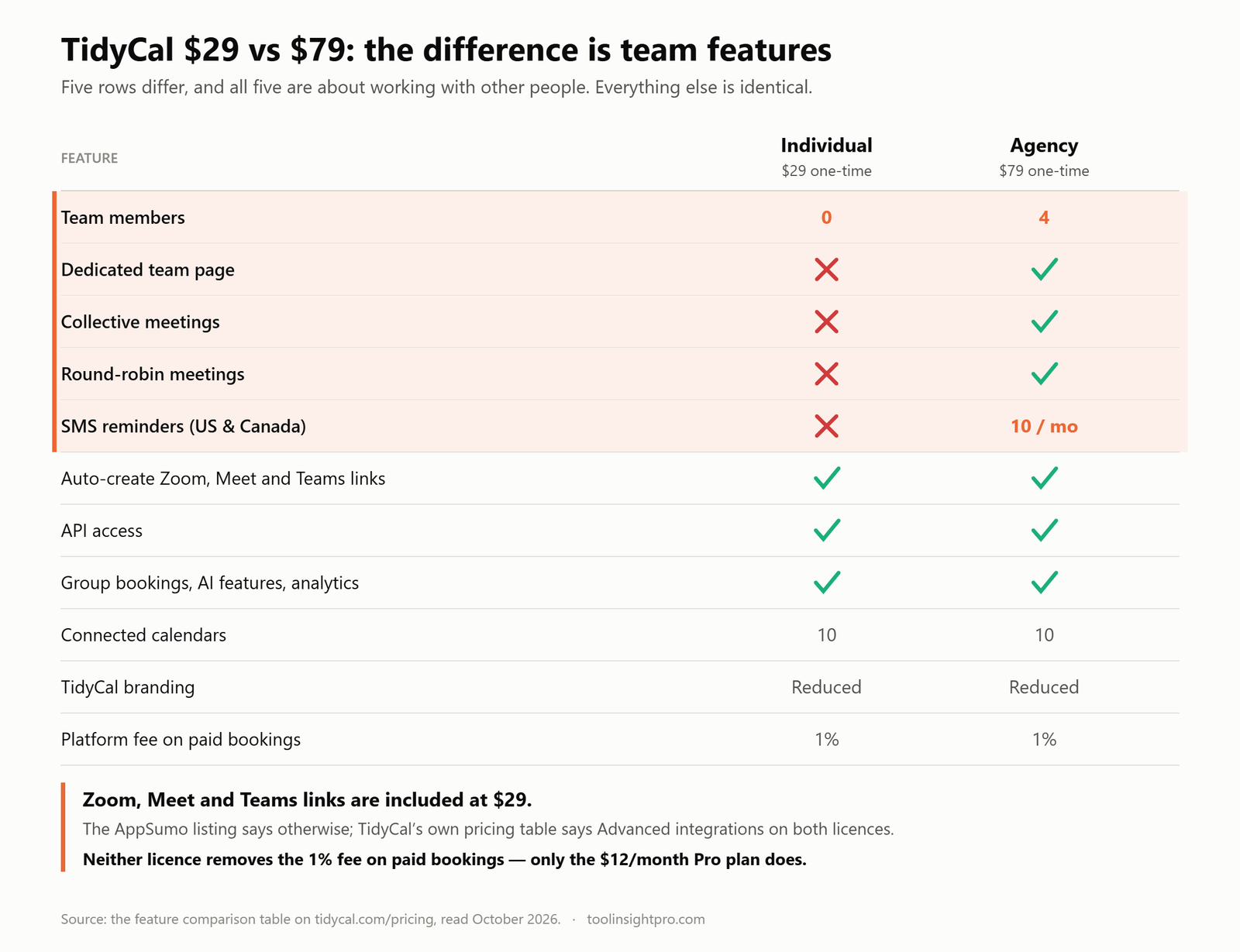
With that settled, here is what genuinely differs:
| Feature | Individual – $29 | Agency – $79 |
|---|---|---|
| Team members | 0 | 4 |
| Dedicated team page | ✗ | ✓ |
| Collective meetings | ✗ | ✓ |
| Round-robin meetings | ✗ | ✓ |
| SMS reminders (U.S. and Canada only) | ✗ | 10 per month |
| Auto-create Zoom, Meet and Teams links | ✓ | ✓ |
| API access | ✓ | ✓ |
| Group bookings, AI features, Google Analytics | ✓ | ✓ |
| Custom emails, CC addresses, custom reply-to | ✓ | ✓ |
| Connected calendars | 10 | 10 |
| TidyCal branding | Reduced | Reduced |
| Platform fee on paid bookings | 1% | 1% |
Every differing row is about working with other people. That is the whole $50. If you are one person, the $79 licence buys you nothing you can use, round-robin has nobody to rotate between on a zero-seat account, with one exception: SMS reminders, which are absent at $29 and capped at ten a month at $79, and only work for U.S. and Canadian phone numbers in any case.
The 1% fee, and why it matters more than the licence price
TidyCal charges a 1% platform fee on payments processed through Stripe, on top of Stripe’s own processing fees. The free plan pays it. The $29 licence pays it. The $79 licence pays it. The only plan that does not is Pro at $12 a month, or $99 a year.
That reverses the usual advice. A lifetime licence is supposed to be the cheap option forever; here it is the cheap option only while your booking revenue is small.
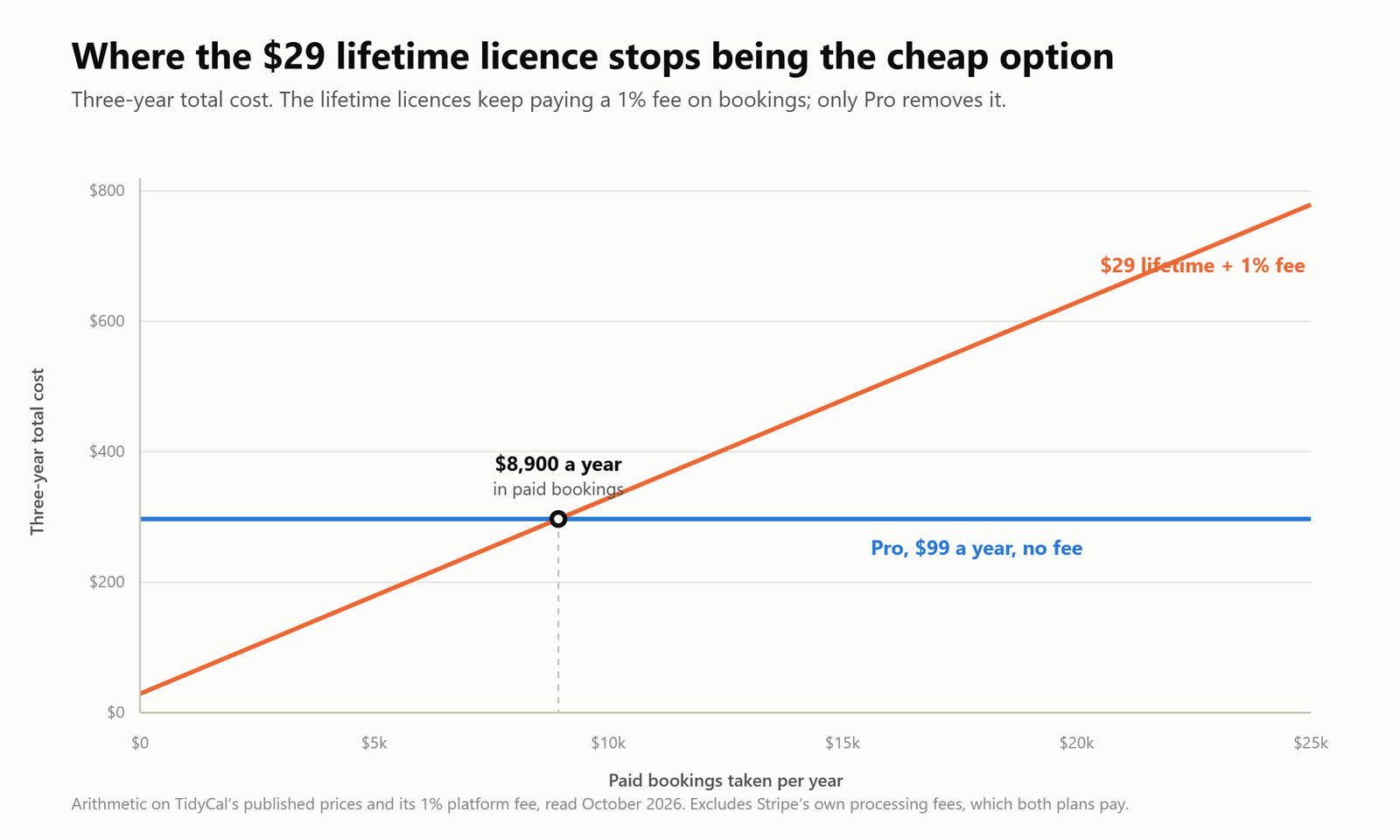
The arithmetic, over three years:
| Paid bookings per year | $29 licence + 1% fee, 3 years | Pro at $99 a year, 3 years | Cheaper |
|---|---|---|---|
| $0, free calls only | $29 | $297 | Licence |
| $2,500 | $104 | $297 | Licence |
| $5,000 | $179 | $297 | Licence |
| $8,900 | $296 | $297 | Break-even |
| $15,000 | $479 | $297 | Pro |
| $25,000 | $779 | $297 | Pro |
So: under about $8,900 a year in paid bookings, buy the licence. Above it, the subscription is cheaper, and it also removes the branding, adds a custom domain and lifts the calendar limit, none of which the licences do.
If you take no payments at all through TidyCal, the fee is irrelevant and the $29 licence is simply the cheapest scheduling tool with this feature set that we are aware of.
What TidyCal is, and who builds it
TidyCal publishes booking types with your availability, lets people pick a slot, and writes the event to your connected calendar with a video link attached. It is an AppSumo Original, AppSumo owns and develops it rather than merely distributing it. The company lists Austin, Texas, April 2017 as its founding, and a team of 1–10. The AppSumo listing carries 933 reviews.
That ownership is why the lifetime deal is not a disappearing launch promotion from a third-party vendor. It is also why lifetime plans exist only on AppSumo, tidycal.com sells the subscription instead.
What the free plan actually gives you
TidyCal’s free plan is better than Calendly’s by a distance. It allows unlimited bookings and unlimited booking types, where Calendly’s free plan caps you at one event type and one calendar connection. It also includes paid bookings, recurring and package bookings, a digital storefront, discount codes, ratings and reviews, guest invites and date polls.
What you give up on free:
- One connected calendar rather than ten.
- No auto-created Zoom, Meet or Teams links. This is the real free-plan limit, and it is where the $29 licence earns its money.
- No API access, no CSV export, no custom emails, no group bookings, no booking limits, no custom reply-to.
- Normal TidyCal branding rather than reduced.
- The same 1% platform fee, which the $29 licence does not remove.
If you book unpaid calls and can paste a meeting link manually, the free plan may genuinely be all you need. The moment you want TidyCal generating the video link for you, you are buying a licence.
Where TidyCal is thin
A review with no criticism is an advertisement. These are the limits we found, all checked rather than assumed.
The 1% fee survives the lifetime purchase
Covered above, and it is the most consequential one. Buying a licence does not buy you out of the fee, only the subscription does. Every other review of this product we read states or implies the opposite.
SMS reminders barely exist
They are absent on the $29 licence entirely, capped at ten a month on the $79 licence, and work only for U.S. and Canadian phone numbers. For a European, UK or Australian audience the feature is unavailable at any lifetime price, and your reminder strategy is email. That is workable, a second email an hour before the call does most of the job, but plan for it rather than discovering it.
The API has real gaps
API access is included on both licences, which is generous at this price. The API itself is thinner than its endpoint count suggests: no webhooks, so event-driven work has to poll; no reschedule endpoint, so a booking can be created and cancelled but not moved; and no published rate limits. Zapier is listed as an integration and is the practical route for most automation. Details in our TidyCal API guide.
“Reduced branding” is not “no branding”
Both licences say Reduced. Only Pro says None. TidyCal’s mark stays on the booking page in a smaller form on either lifetime tier. If you send booking links under an agency brand, look at the live page before promising a client a clean one, and note that the custom domain is also Pro-only.
The two official sources disagree with each other
The AppSumo listing and tidycal.com do not describe the $29 licence the same way, on the single question most buyers care about. That is AppSumo’s own product on AppSumo’s own marketplace. It is not a reason to avoid the tool, but it is a reason to test the thing you are buying it for before the refund window closes.
TidyCal vs Calendly
Calendly is the better product; TidyCal is the better deal. That summary survives the corrections above.
| TidyCal | Calendly | |
|---|---|---|
| Free plan | Unlimited bookings and booking types, 1 calendar, no auto meeting links | 1 event type, 1 calendar connection |
| Entry paid price | $29 one-time | $10 per seat per month |
| Subscription option | $12 a month or $99 a year | N/A |
| Team tier | $79 one-time, 4 members | $16 per seat per month |
| Enterprise | N/A | From $15,000 a year, 50-seat minimum |
| Integration depth | Calendars, Zoom, Teams, Zapier | Large ecosystem including CRM and marketing tools |
| Webhooks | No | Yes |
| Fee on paid bookings | 1% unless you are on Pro | None |
If your scheduling stops at “publish a link, protect my calendar, take a payment”, the gap between the two is mostly invisible and Calendly is $10 a month for things you never open. If your scheduling routes leads to the right rep and writes meetings back into Salesforce, that gap is the entire point and TidyCal does not compete. Our full TidyCal vs Calendly comparison goes feature by feature.
How fast the licence pays for itself
Ignoring the platform fee for a moment, which is fair if you take no payments through TidyCal, these are the payback periods against the subscriptions you would otherwise buy.
| If you would otherwise pay… | Annual cost | $29 pays back in | $79 pays back in |
|---|---|---|---|
| TidyCal Pro, billed yearly | $99 | 3.5 months | 9.6 months |
| TidyCal Pro, billed monthly | $144 | 2.4 months | 6.6 months |
| Calendly Standard, one seat | $120 | 2.9 months | 7.9 months |
| Calendly Teams, four seats | $768 | N/A | 1.2 months |
The last row is the strongest case on the page. If you genuinely need four people scheduling, $79 once is less than six weeks of Calendly Teams at the same headcount.
The weakest case is the opposite. If Calendly’s free plan and one event type would do, nothing here pays back, because you were never paying anything.
Who should buy what
- $29 Individual, one person, any video platform, under about $8,900 a year in paid bookings. This is the common case and it is a good buy.
- $79 Agency, you need up to four people on the account, a shared team booking page, or round-robin distribution. Buy it for the seats, not for the integrations, which you already get at $29.
- Pro at $99 a year, you take serious money through TidyCal, or you need the branding gone and a custom domain. Above roughly $8,900 of annual bookings this is cheaper than the licence, lifetime or not.
- The free plan, unpaid calls, one calendar, and you do not mind pasting a meeting link by hand.
- Stay on Calendly, your scheduling feeds a CRM, needs webhooks, or supports more than four people.
Pros and cons
Pros
- A one-time price in a category that is otherwise entirely subscription-based.
- Zoom, Google Meet and Teams links, API access, group bookings and analytics all included at $29.
- Unlimited bookings and booking types even on the free plan.
- Paid bookings through Stripe and PayPal, plus packages, subscriptions and discount codes.
- Reviews collected automatically after each booking and displayed on your page.
- A 60-day refund window through AppSumo, long enough to test properly.
Cons
- Neither lifetime licence removes the 1% platform fee on paid bookings. Only the Pro subscription does.
- No SMS at $29; ten a month at $79; U.S. and Canadian numbers only in either case.
- No team seats at all on the $29 licence.
- Branding is reduced, never removed, and the custom domain is Pro-only.
- No webhooks and no reschedule endpoint in the API.
- The AppSumo listing and tidycal.com describe the $29 tier’s integrations differently.
Is TidyCal worth it?
Yes, for most people reading this, and the reasoning is unglamorous. Scheduling is a solved problem: every tool here publishes a link, reads your calendar and sends a reminder, and the differences show up in edge cases a solo operator hits roughly never. What differs enormously is the price, and TidyCal is the only serious option in the category selling a licence rather than a subscription.
Buy it with one number in hand. Work out what you take through TidyCal in paid bookings each year. Under about $8,900, the licence is the right answer and the 1% fee is noise. Over it, buy the Pro subscription and ignore the lifetime deal entirely, which is an odd sentence to write about a lifetime deal, and exactly why it is worth writing.
Check the current TidyCal deal on AppSumo →
Frequently asked questions
Is TidyCal really a lifetime deal?
Yes. The $29 and $79 licences are one-time payments with no renewal, sold through AppSumo, which owns TidyCal. Lifetime pricing is not available on tidycal.com, which sells a $12-a-month or $99-a-year subscription instead.
Does the $29 TidyCal plan include Zoom?
TidyCal’s own pricing table says yes: Auto-Create Meeting URLs covering Zoom, Google Meet and Teams is ticked for Individual Lifetime, Agency Lifetime and Pro, and the integrations row reads Advanced for all three. The AppSumo listing describes the $29 tier’s integrations as Basic, which contradicts that. If this is why you are buying, confirm it in the app inside the 60-day refund window.
What is the real difference between $29 and $79?
Team features, and nothing else. The $79 Agency licence adds four team members, a dedicated team page, collective meetings, round-robin distribution and ten SMS reminders a month. Everything else, calendars, integrations, API, group bookings, branding level, the 1% fee, is identical.
Does TidyCal charge a fee on payments?
Yes. A 1% platform fee on payments processed through Stripe, on top of Stripe’s own charges. It applies to the free plan and to both lifetime licences. Only the Pro subscription removes it.
At what point is Pro cheaper than the lifetime licence?
At roughly $8,900 a year in paid bookings, over a three-year horizon. Below that the $29 licence plus the fee costs less than $99 a year; above it, Pro does, and Pro also removes the branding and adds a custom domain.
Does TidyCal have a free plan?
Yes, and it is more generous than Calendly’s: unlimited bookings and booking types, one connected calendar, paid bookings, packages, discount codes and date polls. It does not auto-create meeting links, has no API access and carries normal TidyCal branding.
Does TidyCal send SMS reminders outside North America?
No. SMS reminders cover U.S. and Canadian phone numbers only, are unavailable on the $29 licence, and are capped at ten a month on the $79 licence. Everywhere else, reminders are email.
Does TidyCal remove its branding?
Not on a lifetime licence. Both describe branding as reduced. Only Pro removes it entirely, and only Pro offers a custom domain.
Can I get a refund?
AppSumo lists the TidyCal licence as refundable up to 60 days, long enough to connect your calendars, run real bookings and check the integration question for yourself.
What are the best TidyCal alternatives?
Cal.com’s free plan is the strongest free offer in the category; Calendly is the closest feature-for-feature competitor. We compare six options on verified prices in TidyCal alternatives.
Related reading
- TidyCal AppSumo deal: $29 vs $79 compared
- TidyCal pricing explained
- TidyCal vs Calendly
- How TidyCal works, step by step
- TidyCal FAQ
- TidyCal alternatives
- TidyCal API guide
How we checked this: every price, limit and feature above was read in October 2026 from the feature comparison table on tidycal.com/pricing, the TidyCal AppSumo listing and calendly.com. Where those two sources disagree, we say so rather than picking the convenient one. All payback and break-even figures are arithmetic on those published prices. Full review methodology.
Disclosure: the AppSumo link in this article is an affiliate link. Your price is unchanged and ToolInsight Pro may earn a commission. See our affiliate disclosure.
Comparing deals? See all 14 AppSumo tools we have checked tier by tier, with the one thing each listing does not make obvious.