
Disclosure: This article contains affiliate links. If you buy through one of them, ToolInsight Pro may earn a commission at no extra cost to you. See our Affiliate Disclosure for details.
Most comparisons of these two schedulers stop at the obvious point: TidyCal is a one-time payment and Calendly is a subscription. That is true, and it is also the least useful thing you can know, because it tells you nothing about whether the cheaper tool will still do the job in a year.
This comparison goes after the details that actually decide it — how many calendars each plan connects, what the team limits really are, what happens to money you take through your booking page, and what TidyCal quietly changed about its own plans on 1 September 2026 that almost no other article mentions.
Pricing and plan details checked: October 2026. Figures come from TidyCal’s official help centre and Calendly’s pricing page. We have not tested either tool hands-on, and this article is desk research against both vendors’ published documentation rather than a hands-on review. Our full process is in How We Review Tools.
Quick verdict
Choose TidyCal if you are one person or a very small team, you book meetings in a straightforward way, and a recurring scheduling bill annoys you more than the missing features will. At $29 once, it pays for itself against Calendly Standard in under three months.
Choose Calendly if you need routing forms, a Salesforce connection, a native mobile app, or more than four team members. These are not gaps you can work around — TidyCal simply does not have them.
If you are undecided, start on TidyCal’s free plan rather than Calendly’s. TidyCal’s free tier gives you unlimited booking types; Calendly’s gives you one event type. That single difference makes TidyCal far more useful to try before you spend anything.
| TidyCal | Calendly | |
|---|---|---|
| Cheapest paid plan | $29 one-time (Individual Lifetime) | $10/seat/month, billed yearly (Standard) |
| Where you buy it | AppSumo for lifetime plans; TidyCal for Pro | Calendly |
| Free plan | Unlimited booking types, 1 calendar | 1 event type, 1 calendar |
| Calendar connections, entry paid plan | 10 | 6 |
| Native mobile app | No | Yes |
| Routing forms | No | Teams plan |
| Salesforce | No built-in integration | Teams plan |
| Lifetime option | Yes | No |
Already decided? Check the current TidyCal price on AppSumo. Otherwise the detail is below.
What each one costs
TidyCal pricing
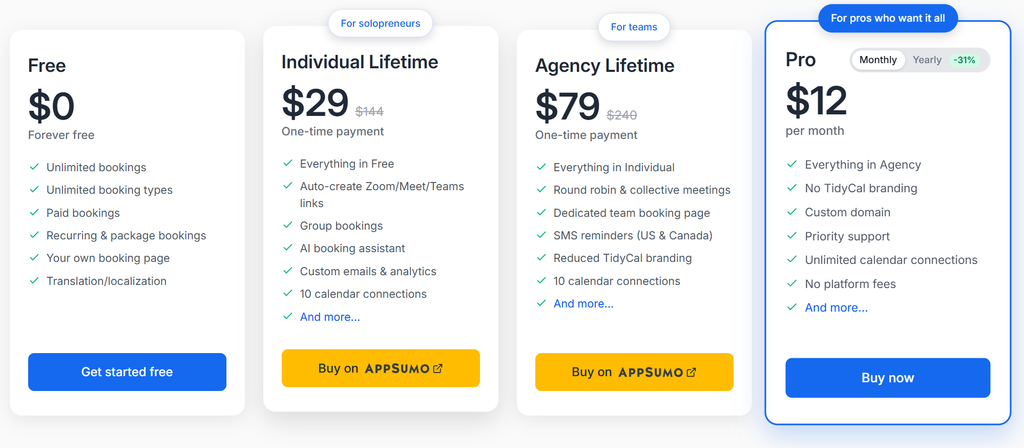
| Plan | Price | 1 year | 3 years |
|---|---|---|---|
| Free | $0 | $0 | $0 |
| Individual Lifetime | $29 one-time | $29 | $29 |
| Agency Lifetime | $79 one-time | $79 | $79 |
| Pro | $12/month or $99/year | $144 or $99 | $432 or $297 |
Both lifetime plans are sold through AppSumo. Pro is a subscription bought directly from TidyCal and billed through Stripe, and Pro has no free trial — worth knowing before you plan an evaluation around one.
Calendly pricing
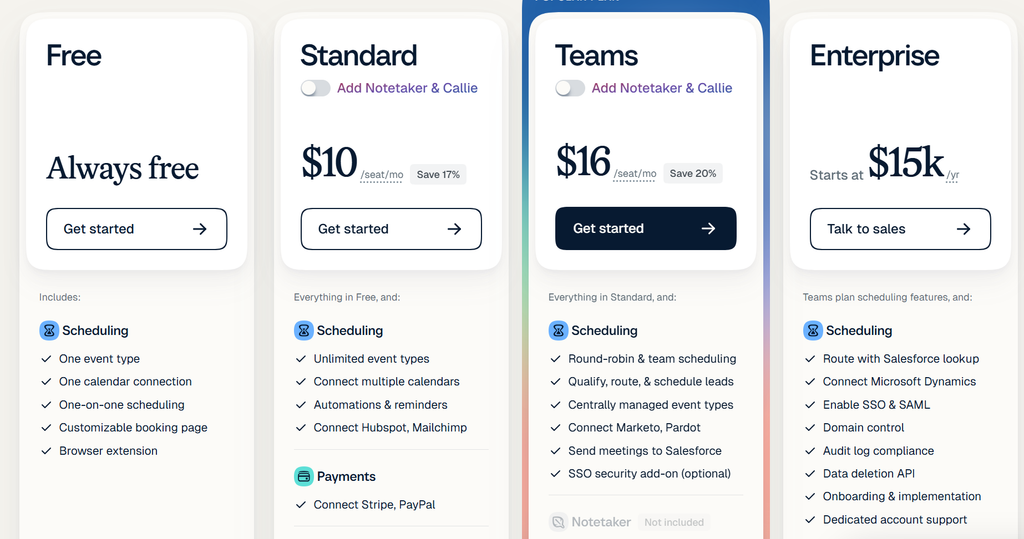
| Plan | Price (billed yearly) | Per seat, 1 year | Per seat, 3 years |
|---|---|---|---|
| Free | $0 | $0 | $0 |
| Standard | $10/seat/month | $120 | $360 |
| Teams | $16/seat/month | $192 | $576 |
| Enterprise | Starts at $15,000/year | — | — |
Enterprise starts at 50 seats, so for most readers the real choice is Free, Standard or Teams. One detail that is easy to miss: Calendly’s Notetaker and Callie AI features are add-ons on Standard and Teams, not included features. If you are comparing on AI capability, budget for them separately.
The cost gap in plain numbers
Over three years, one person pays:
- $29 on TidyCal Individual Lifetime
- $297 on TidyCal Pro, billed yearly
- $360 on Calendly Standard
- $576 on Calendly Teams
So TidyCal’s lifetime plan runs roughly $330 cheaper than Calendly Standard over three years for a single user. For a four-person team on Calendly Standard, that gap widens to about $1,440 over the same period.
That is the strongest argument for TidyCal, and it is a real one. But a price gap only matters if the cheaper tool does the job, which is what the rest of this comparison is about.
Free plans: TidyCal’s is more generous
This is the most lopsided part of the comparison, and it gets glossed over surprisingly often.
| TidyCal Free | Calendly Free | |
|---|---|---|
| Booking / event types | Unlimited | 1 |
| Calendar connections | 1 | 1 |
| Date / meeting polls | Yes | Yes |
| Payments at booking | Yes (Stripe or PayPal, 1% fee) | No |
| Recurring & package bookings | Yes | No |
| Translation / localization | Yes | Not listed |
| Branding on booking page | Full TidyCal branding | Calendly branding |
| Mobile app | No | Yes |
| Auto-created video links | No | Yes |
One event type is a hard ceiling. On Calendly’s free plan you get a single bookable meeting type — a 30-minute intro call, and that is it. If you also want a 15-minute follow-up and a 60-minute paid session, you are on Standard.
TidyCal’s free plan has the opposite shape: unlimited booking types, and you can take payments through Stripe or PayPal, though you carry TidyCal branding and get no automatic Zoom or Google Meet links.
Read practically: TidyCal’s free plan is a usable product for a solo coach or freelancer. Calendly’s free plan is closer to a demo.
Calendar connections: the limit most people miss
Here is a detail worth pausing on, because the numbers run against the usual assumption that the subscription tool is the more generous one.
| Plan | Calendar connections |
|---|---|
| TidyCal Free | 1 |
| TidyCal Individual Lifetime | 10 |
| TidyCal Agency Lifetime | 10 (25 if purchased before 1 September 2026) |
| TidyCal Pro | Unlimited |
| Calendly Free | 1 |
| Calendly Standard | 6 |
| Calendly Teams | 6 |
| Calendly Enterprise | 6 |
A $29 one-time TidyCal plan connects 10 calendars. A $120-per-year Calendly Standard seat connects 6. If you juggle a work calendar, a personal calendar, a side-project calendar and a partner’s calendar, that difference is more practical than most of the feature list.
Worth noting on Calendly’s own pricing page: the Standard plan card says only “Connect multiple calendars”. The specific figure of six appears further down, in the detailed feature comparison table on the same page.
TidyCal also connects Apple (iCloud) Calendar on every plan. Calendly stopped accepting new iCloud Calendar connections in August 2024, though existing connections keep working. If you live in Apple Calendar, this is close to decisive.
What TidyCal changed on 1 September 2026
This is the part you will not find in most comparisons, and it matters if you are buying today.
TidyCal reduced the limits on its Agency Lifetime plan for purchases made on or after 1 September 2026:
| Agency Lifetime limit | Bought before 1 Sep 2026 | Bought on or after 1 Sep 2026 |
|---|---|---|
| Calendar connections | 25 | 10 |
| Team members | Unlimited | 4, including the owner |
| SMS segments per month | 20 | 10 |
| Custom domain | Included | Not included |
If you read an older review praising Agency Lifetime for unlimited team members, that review is describing a plan you can no longer buy. Anyone purchasing today gets the four-member version.
Why this changes the comparison: the “unlimited team members for $79” argument that made TidyCal look unbeatable against per-seat pricing no longer applies to new buyers. At four people it is still $79 once against $480 a year for four Calendly Standard seats — a large gap, but a different one than the older articles describe.
Features: what each one has that the other does not
Only Calendly has
- Routing forms. The Teams plan can screen invitees with a form and route them to the right person. TidyCal has no equivalent.
- Salesforce. Available on Teams. TidyCal has no built-in Salesforce or HubSpot integration, though paid TidyCal plans connect other apps through Zapier or the TidyCal API.
- A native mobile app. Calendly has iOS and Android apps plus a browser extension. TidyCal runs in a browser with a mobile layout, but there is no app to install.
- Marketo and Pardot connections, and HubSpot or Salesforce assignment-based routing on higher plans.
- 24/7 chat support on paid plans.
Only TidyCal has
- A genuine one-time purchase. Calendly lists no lifetime option at any tier.
- Apple (iCloud) Calendar on all plans, as covered above.
- Payments on the free plan. Calendly requires Standard before you can collect money at booking.
- Import from Calendly on every plan, including free.
- An AI booking assistant from Individual Lifetime upward, for booking type descriptions and questions.
- Translation and localization on the free plan, useful if your clients do not read English.
Both have
Unlimited one-to-one bookings, date or meeting polls, Stripe and PayPal payments on paid plans, Google Analytics tracking, Zapier, group or multi-person meeting types on paid plans, and round-robin distribution — on TidyCal’s Agency Lifetime and Pro, and on Calendly’s Teams.
The 1% fee nobody mentions
If you take paid bookings, read this before deciding.
TidyCal charges a 1% platform fee on Stripe payments on the Free Plan, Individual Lifetime and Agency Lifetime. TidyCal Pro has no platform fee. Lifetime owners can choose to absorb the fee from their payout instead of adding it to the customer’s total.
Calendly’s pricing page lists no comparable platform fee on its payments feature.
So the maths shifts if payments are central to your business. On $2,000 a month in bookings, TidyCal’s 1% comes to $240 a year — which puts the $99/year Pro plan ahead of the $29 lifetime plan on fees alone, before counting any of Pro’s other benefits. One-time pricing is not automatically the cheapest option once money moves through the tool.
Switching from Calendly to TidyCal
TidyCal includes a Calendly importer on every plan, including the free one, which removes most of the friction from trying it.
It brings across your booking types (name, description, duration, custom questions and the weekly hours from your default Calendly availability), your upcoming, past and cancelled bookings, and your contacts. Booking types active in Calendly arrive enabled; inactive ones arrive disabled. Running the import again does not create duplicates.
Two things to know before you switch:
- Nothing on your Calendly account is changed. With “Follow changes made on Calendly” enabled, TidyCal checks Calendly every 15 minutes and mirrors reschedules and cancellations, but imported bookings stay managed in Calendly and show a “Lives on Calendly” label.
- Turn off Calendly’s reminders first if you enable TidyCal’s, or your invitees receive two of everything.
This importer is a quiet advantage. It means the cost of testing TidyCal is close to zero — move your setup across, run both for a week, and keep whichever you prefer.
Who should use TidyCal
- Solo coaches, consultants, freelancers and creators booking straightforward calls
- Anyone who wants to stop paying monthly for scheduling
- People who rely on Apple Calendar
- Teams of up to four needing round-robin or collective booking on a budget
- Anyone who wants to take payments at booking without paying for a subscription first
Who should avoid TidyCal
- Sales teams that need routing forms or lead qualification
- Anyone whose workflow runs natively through Salesforce or HubSpot
- People who genuinely need a phone app rather than a browser
- Teams larger than four, unless you move to TidyCal Pro
- Businesses taking high payment volumes, where the 1% fee outweighs the subscription saving
- Anyone needing SMS reminders outside the US and Canada
Refunds
TidyCal Pro: a full refund is available within 7 days of purchase by contacting support. After 7 days, subscription payments are non-refundable.
TidyCal lifetime plans: bought on AppSumo, so AppSumo’s refund policy applies. Check the current terms on the deal page before buying.
Calendly: refund terms are not stated on the pricing page. Check Calendly’s own terms or ask their support before purchasing.
Frequently asked questions
Is TidyCal actually a one-time payment?
The Individual Lifetime ($29) and Agency Lifetime ($79) plans are genuine one-time purchases sold through AppSumo. TidyCal also sells Pro as a $12/month or $99/year subscription, so not every TidyCal plan is one-time.
Can TidyCal replace Calendly completely?
For straightforward one-to-one and small-team scheduling, yes. For routing forms, Salesforce workflows or a mobile app, no — those have no TidyCal equivalent.
Does TidyCal have a free trial?
There is a free plan, but TidyCal Pro has no free trial. The free plan is the way to test the product.
How many calendars can I connect?
TidyCal: 1 on Free, 10 on Individual Lifetime, 10 on Agency Lifetime bought today, unlimited on Pro. Calendly: 1 on Free, and 6 on Standard, Teams and Enterprise.
Does either tool work with Apple Calendar?
TidyCal connects Apple Calendar on all plans. Calendly has not accepted new iCloud Calendar connections since August 2024, though existing connections continue to work.
Which is better for a small team?
Up to four people, TidyCal Agency Lifetime at $79 once is dramatically cheaper than four Calendly seats. Beyond four you need TidyCal Pro or Calendly, and the decision becomes about features rather than price.
Final verdict
TidyCal wins on price, and it is not close — $29 once against $360 over three years settles most solo decisions on its own. It also wins on three things people rarely check: a free plan you can actually use, 10 calendar connections instead of 6, and Apple Calendar support.
Calendly wins on everything that scales. Routing, Salesforce, a mobile app, larger teams, proper automation. If your scheduling feeds a sales process, Calendly is not the expensive option — it is the only one of the two that does the job.
Our suggestion: try TidyCal’s free plan first. It costs nothing, and the Calendly importer means switching back is easy. If you hit a wall within two weeks, you have learned something concrete about your own requirements, and Calendly will still be there.
Sources checked
- TidyCal Help Centre — TidyCal vs Calendly (last updated 29 September 2026)
- Calendly — Pricing (checked October 2026)
Pricing and plan limits change. Confirm current figures on the vendor’s own page before you buy.


Pingback: TidyCal Pricing 2026: All Plans & Hidden Fee