SPF lists the servers allowed to send for your domain, DKIM signs each message so tampering is detectable, and DMARC tells receiving servers what to do when either check fails. All three are DNS TXT records, and all three are free.
Authentication is not a nice-to-have. Since February 2024 it has been a delivery requirement at Gmail and Yahoo.
The short version
- SPF authorises sending servers. DKIM signs the message. DMARC decides the outcome when one of them fails.
- SPF allows a maximum of ten DNS lookups. Exceed it and the record fails outright.
- DMARC needs alignment, not just a pass. The visible From: domain has to match what SPF or DKIM authenticated.
p=nonesatisfies the Gmail requirement but changes nothing about delivery. It only turns reporting on.
What each record actually does
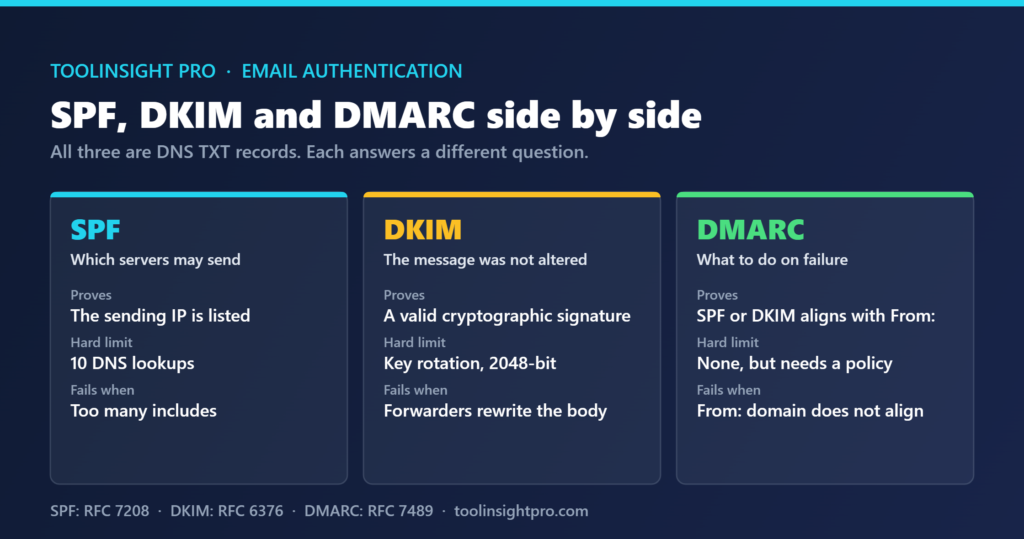
The three are often described as a set, which hides the fact that they answer separate questions. SPF answers “was this server allowed to send?” DKIM answers “was this message altered in transit?” DMARC answers “the From: address claims to be you — does the authentication back that up, and what should I do if it does not?”
| Record | Question it answers | Record type | Published at | Typical failure |
|---|---|---|---|---|
| SPF | Is this sending IP authorised for the domain? | TXT | The root domain | Too many DNS lookups, or a missing include |
| DKIM | Was the message altered after signing? | TXT | selector._domainkey.yourdomain.com | A forwarder rewrites the body or headers |
| DMARC | Does the From: domain align, and what now? | TXT | _dmarc.yourdomain.com | Alignment fails even though SPF or DKIM passed |
Only DMARC looks at the address your recipient can see. SPF checks the envelope sender, which is invisible in most mail clients, and DKIM checks the signing domain. That gap is the whole reason DMARC exists: without it, a message can pass both checks while displaying someone else’s domain in the From: field.
The SPF ten-lookup limit, and why it breaks quietly
SPF is evaluated by following your record and every record it references. The specification caps that at ten DNS lookups. Each include:, a, mx, ptr and redirect mechanism counts, and nested includes count too.
Three or four services is usually enough to hit it. A help desk, a CRM, a marketing platform and Google Workspace can consume the budget between them without anything looking wrong in the record itself. Past ten lookups the evaluation returns permerror, and most receivers treat that as a failure rather than ignoring it.
The symptom is confusing: mail that delivered last month starts failing after someone adds one more service to the record. Nothing in your sending changed. Flattening the record, or removing services that no longer send, is the fix. Checking the lookup count after every change is the habit worth building.
Choosing a DMARC policy
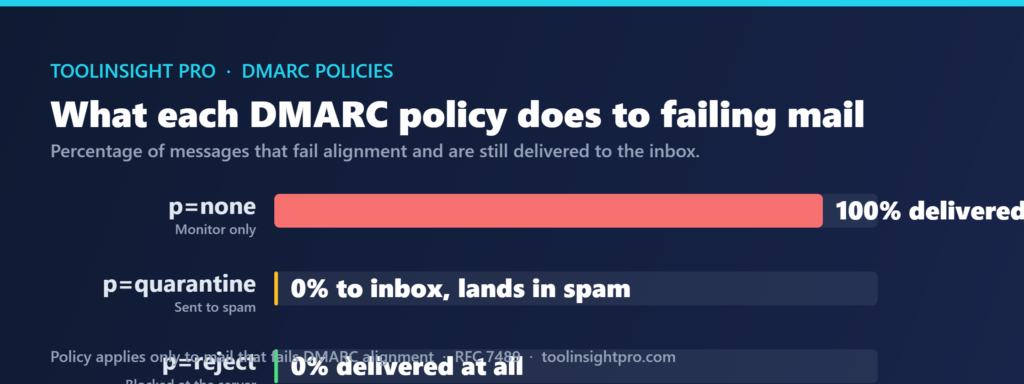
DMARC has three policies, and the gap between the first and the other two is larger than the names suggest.
| Policy | What happens to failing mail | What it protects | Sensible when |
|---|---|---|---|
p=none | Nothing. It is delivered as before | Nothing, but reports start arriving | You are starting out and need to see who sends as you |
p=quarantine | Delivered to the spam folder | Most spoofing, with a recovery path | Reports have been clean for several weeks |
p=reject | Refused at the receiving server | Spoofing outright | Every legitimate sender is confirmed aligned |
Moving straight to p=reject is the mistake that costs the most. If a billing system or a support tool is sending as your domain without alignment, that mail stops arriving and no one finds out until a customer asks. Starting at p=none, reading the aggregate reports for a few weeks and then tightening is slower and considerably safer.
It is worth being clear about what the bulk sender rules require, because the two things get conflated. The Google and Yahoo requirements ask that a DMARC record exists and that alignment passes. They do not ask for enforcement. p=none with alignment satisfies them.
The mistakes that leave authentication half-finished
Publishing two SPF records is the most common. A domain may have only one. Two records is a permerror, and it usually happens when a second service is added by a different person. Merge the mechanisms into one record instead.
Signing with the platform’s domain rather than your own is the second. Most sending tools let you publish a DKIM selector on your domain, and until you do, DKIM authenticates them. That passes DKIM and fails DMARC alignment at the same time, which is the most confusing failure mode of the three.
The third is treating authentication as the whole of deliverability. It gets you admitted; it does not make you welcome. List quality decides what happens next, and the tier structure in our Reoon Email Verifier review is worth reading alongside this. For cold outreach, where domains are newer and reputation is thinner, our SalesBlink review covers the sending side.
Frequently asked questions
Do I need all three of SPF, DKIM and DMARC?
Yes, if you send more than 5,000 messages a day to Gmail. Below that, SPF or DKIM plus valid reverse DNS is the minimum. DMARC is still worth adding at any volume, because without it nothing reports failures to you.
What is the SPF ten-lookup limit?
Ten. SPF allows a maximum of ten DNS lookups when evaluating your record, counting every include, a, mx and redirect. Exceed it and the record returns permerror, which most receivers treat as an SPF failure rather than ignoring it.
Is p=none enough for the Gmail bulk sender rules?
Yes. Google requires that a DMARC record exists, and p=none satisfies that. It changes nothing about delivery, though. Stricter policies protect your domain from spoofing, but they are not what the bulk sender requirements ask for.
Why does my email pass SPF but still fail DMARC?
Alignment. DMARC requires the domain in the visible From: header to match the domain SPF or DKIM authenticated. A platform sending on your behalf often passes SPF against its own domain, which authenticates the platform rather than you.
How long do DNS changes take to work?
Up to 48 hours, though most resolvers pick up a TXT record within an hour. The delay is the TTL on the old record, not the new one. Lower the TTL before making changes if you expect to iterate.
Bottom line
Publish all three, check the SPF lookup count after every change, and confirm alignment rather than assuming a pass is enough. Start DMARC at p=none and tighten once the reports are clean, not before.
Related reading
- Google and Yahoo Bulk Email Sender Requirements — where authentication stops being optional and becomes a delivery condition.
- Hard Bounce vs Soft Bounce — what happens after authentication passes and the list quality takes over.
- Reoon Email Verifier Review 2026 — verification is the other half of keeping mail out of the spam folder.
- SalesBlink Review 2026 — the cold outreach side, where new domains make these records matter sooner.