
Quick answer: Quick answer: An email deliverability test checks whether your messages reach the inbox instead of spam. A complete test covers seven things: SPF, DKIM and DMARC records, blacklist status, a spam score of your actual email, inbox placement across providers, sender reputation in Google Postmaster Tools, and the quality of your list. Bad addresses are the most common cause of bounces, so verify your list before every campaign.
Deliverability is not the same as delivery. An email can be accepted by the receiving server and still land in spam or the Promotions tab. Testing tells you where messages actually end up and why.
Since 2024, Gmail and Yahoo have required bulk senders to authenticate mail, offer one-click unsubscribe and keep spam complaints low. Our guide to Google bulk sender guidelines explains the rules. The checks below help you meet them.
The 7-point email deliverability test
| Check | What it tells you | Free way to test |
|---|---|---|
| 1. SPF | Which servers may send for your domain | DNS lookup tools such as MXToolbox |
| 2. DKIM | Whether messages are signed and unaltered | Send a test to Gmail and view “Show original” |
| 3. DMARC | Your policy for failed messages and reporting | DNS lookup of _dmarc.yourdomain |
| 4. Blacklists | Whether your IP or domain is listed | Blacklist check tools |
| 5. Spam score | Content, links and headers of one real email | Seed test services such as mail-tester |
| 6. Inbox placement | Inbox vs spam across providers | Seed lists or paid placement tools |
| 7. List quality | How many addresses will bounce | An email verifier such as Reoon |
Step 1: Check SPF, DKIM and DMARC
These three DNS records prove you are allowed to send for your domain. SPF lists approved servers, DKIM adds a cryptographic signature, and DMARC tells receivers what to do when checks fail. Open any email you sent to a Gmail account, choose “Show original”, and look for PASS next to SPF, DKIM and DMARC. Full setup steps are in SPF, DKIM and DMARC explained.
Step 2: Look for blacklist listings
If your sending IP or domain appears on a major blocklist, many providers will reject or filter your mail. Run a blacklist lookup on your domain and on the IP address of your sending server. If you are listed, fix the cause (often a spike in bounces or complaints) before requesting removal.
Step 3: Test the spam score of a real email
Seed test services give you a unique address. You send your real campaign email to it and get a report on authentication, broken links, image-to-text balance and spam trigger patterns. Test the exact email you plan to send, not a blank message.
Step 4: Measure inbox placement
Inbox placement tests send your email to seed mailboxes at Gmail, Outlook, Yahoo and others and report where it landed. This is the closest thing to a true deliverability test. Run it before big sends or after changing domains or tools.
Step 5: Monitor reputation in Google Postmaster Tools
Google Postmaster Tools is free and shows spam rate, authentication results and delivery errors for mail sent to Gmail users, once your domain has enough volume. Keep the user-reported spam rate low; Google advises bulk senders to stay well under 0.3%.
Step 6: Verify your email list
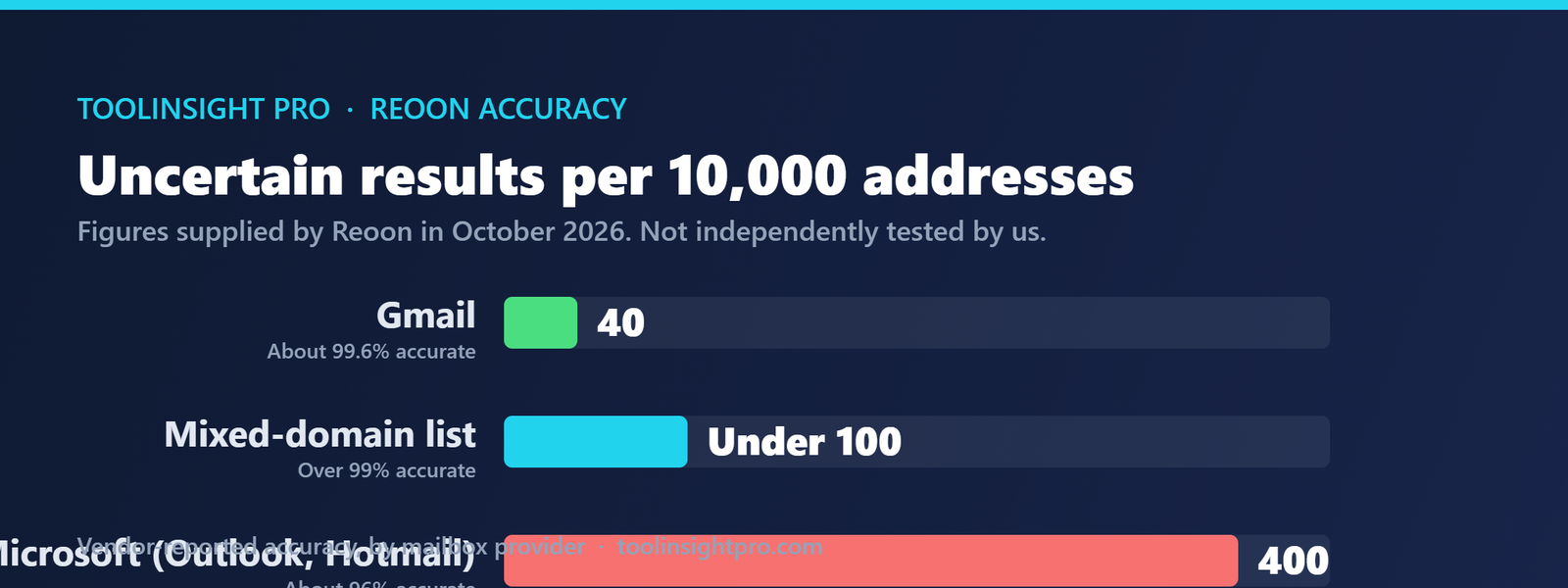
Hard bounces are the fastest way to damage reputation. An email verifier checks each address for syntax, domain, mailbox existence and risky types such as catch-all and disposable emails. Reoon Email Verifier was available on AppSumo for $79 once, with 100,000 lifetime credits plus 500 credits a day (checked 19 November 2026). Read our Reoon review or see the Reoon deal.
Learn more about risky addresses in what is a catch-all email address.
Step 7: Warm up new domains and mailboxes
New domains have no sending history, so providers treat them with caution. Warmup tools gradually raise volume and generate positive engagement. WarmySender bundles warmup, verification and sequences in a one-time AppSumo plan. See our list of the best cold email software for more.
What a good result looks like
- SPF, DKIM and DMARC all show PASS, with DMARC aligned to your From domain.
- No listings on major blacklists.
- Bounce rate kept low, ideally under 2% per campaign.
- Spam complaint rate well below 0.3% in Postmaster Tools.
- Most seed mailboxes place the email in the inbox.
How often should you test deliverability?
Test before every large campaign, after any DNS or sending tool change, when open or reply rates suddenly drop, and at least monthly for regular senders. Verify lists each time you import new contacts. For list strategy, see small engaged list vs large unengaged list.
Final checklist
Authenticate your domain, stay off blacklists, test real emails, check placement, watch Postmaster Tools, verify every list and warm up new mailboxes. Doing these seven checks regularly is the most reliable way to keep your emails in the inbox.
Sources we checked: WarmySender on AppSumo, RFC 7208 (SPF), RFC 6376 (DKIM), RFC 7489 (DMARC), Google email sender guidelines. Prices and plans change, so confirm on the official page before you buy.
Frequently asked questions
What is an email deliverability test?
An email deliverability test checks whether your emails reach the inbox rather than spam. It usually combines DNS authentication checks for SPF, DKIM and DMARC, blacklist lookups, a spam score of a real email, inbox placement across providers, and a review of how clean your list is.
How can I test email deliverability for free?
You can check SPF, DKIM and DMARC by viewing the original message in Gmail, use free blacklist lookup tools, send a real email to a free seed test service, and monitor Gmail reputation in Google Postmaster Tools. Paid tools add wider inbox placement testing.
Why are my emails going to spam?
Common causes are missing or failing SPF, DKIM or DMARC, high bounce rates from old lists, spam complaints, a new domain with no history, and spammy content or links. Fix authentication first, verify your list, then warm up and send to engaged contacts only.
What is a good email bounce rate?
Lower is better. Many senders aim to keep bounces under 2% per campaign. A higher rate signals a stale or unverified list and can harm sender reputation. Verifying addresses before each send with a tool such as Reoon is the easiest way to keep bounces down.
Does email verification improve deliverability?
Yes. Verification removes invalid, disposable and risky addresses before you send, which cuts hard bounces. Fewer bounces protect your sender reputation with Gmail, Outlook and Yahoo, so more of your remaining emails reach the inbox instead of being filtered as spam.