
A bounce reading 554 5.7.5 Permanent error evaluating DMARC policy means the receiving server could not get a usable answer from your DMARC record, and it refused the message. The fault is almost always in the record you published, not in the recipient’s setup. Most cases come down to a duplicate record, a syntax slip or a sender that does not align.
What the 554 5.7.5 bounce is telling you
The leading 554 and the 5.x.x class both mean permanent failure, and the 7 in the middle marks a security or policy rejection. Retrying the same message will fail again, which is the same logic as a hard bounce. Our guide to hard and soft bounces explains why that matters for your sender reputation.
The sentence after the code is the receiving server’s own wording, not a fixed standard. Courier’s error guide attributes this exact message to Google’s mail servers, while PowerDMARC’s guide does not name a provider. Both place the cause on the sending side, because the receiver is evaluating the record you published for your own domain.
The five causes, and how to check each one
| Cause | What it looks like | How to check | Fix |
|---|---|---|---|
| Two DMARC records | More than one TXT entry at _dmarc beginning with v=DMARC1 | Query the TXT record, for example with dig, and count entries | Merge into one record and delete the rest |
| Syntax error | Colons instead of equals signs, commas instead of semicolons, curly quotes, missing p= tag | Paste the record into a DMARC lookup tool | Rewrite with v=DMARC1 first, a p= tag second, semicolons between tags |
| Wrong DNS name | Record published at the bare domain instead of _dmarc | Query _dmarc on the exact From domain | Publish it at _dmarc.yourdomain |
| Misaligned SPF or DKIM | A sending tool signs with its own domain, so nothing aligns with your From address | Read the Authentication-Results header on a test message | Set up custom DKIM so the d= domain is yours |
| Provider cannot align | The service handles SPF internally and never aligns | Check the provider documentation for custom domain authentication | Change its settings or switch provider |
Courier notes that receivers do not merge duplicate records or pick one of them, so with two entries no policy applies at all. That is why the duplicate is the first thing to look for.
Fix it in this order
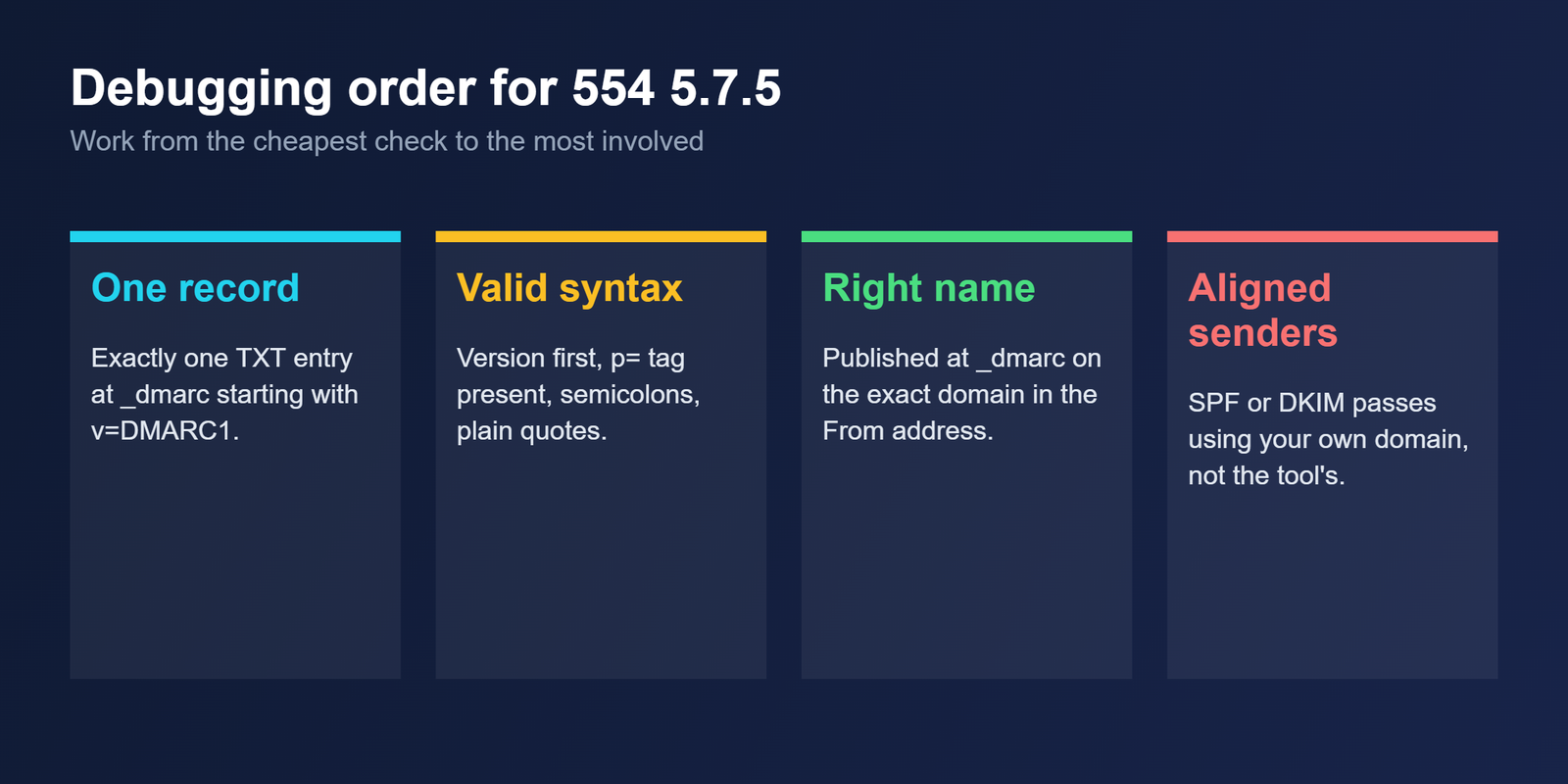
Query the record first and count the entries. If there are two, merge the tags into one record and delete the other. Then check the syntax: v=DMARC1 at the start, a valid p= value, semicolons between tags and plain straight quotes. PowerDMARC lists a trailing period, stray spaces and a colon in place of an equals sign as common slips.
Next confirm the record sits at _dmarc on the exact domain in your From address. A record on the wrong label looks like no record at all. Allow time for DNS to propagate before you test again.
Only then look at alignment. Send a message to a mailbox you control, open the original headers and read the Authentication-Results line. If the record is valid but mail still fails, the problem is a sender that does not pass SPF or DKIM in alignment with your domain.
| Result in the header | What it usually means | What to do |
|---|---|---|
| dmarc=pass | SPF or DKIM passed in alignment with the From domain | Nothing |
| dmarc=fail | The record was read, but neither check aligned | Fix the sender that failed |
| dmarc=permerror | The record could not be evaluated, such as a duplicate or malformed entry | Fix the record itself |
| dmarc=temperror | A temporary problem, often DNS | Retry later and check your DNS provider |
If you need mail flowing while you work, a temporary p=none policy stops enforcement from rejecting anything. It does not rescue a malformed record, because the receiver still cannot read a valid policy from it. Once you have fixed the cause, move back toward enforcement in small steps, as described in our guide to the DMARC policy not enabled warning.
Why deleting the DMARC record is the wrong fix
Removing the record does stop this particular bounce, but it also removes your reports and your protection against spoofing. It can also put you out of step with Google’s bulk sender rules, which expect a DMARC record from anyone sending more than 5,000 messages a day to Gmail addresses. Our bulk sender checklist has the details. Repair the record rather than remove it.
Questions about the 554 5.7.5 error
Is 554 5.7.5 a temporary error?
No. Both the 554 and the 5.x.x class mean permanent failure, so retrying the same message will fail again. Fix the DMARC record or the sender alignment first, then send a fresh message and read the result.
Can the recipient fix this for me?
Rarely. The receiving server is evaluating the DMARC record you published for your own domain, so the cause is almost always on the sending side. Asking the recipient to whitelist you does not repair a malformed or duplicated record.
How do I know if I have two DMARC records?
Query the TXT records at _dmarc on your domain, for example with dig, and count the entries that begin with v=DMARC1. More than one is a fault. Receivers do not merge them, so combine the tags into a single record and delete the rest.
Will p=none stop the bounce?
Often, when the cause is enforcement rejecting a failing sender. It will not help if the record itself is malformed or duplicated, because the receiver still cannot read a valid policy. Repair the record first, then choose the policy you want.
Does this error affect mail sent to me?
No. It appears when you send mail from your domain. The receiving server checks the DMARC record of the domain in your From address, so the fix sits in your own DNS and in the tools that send on your behalf.
Bottom line
Treat 554 5.7.5 as a record problem until proven otherwise. Count the records, check the syntax, confirm the name, then check alignment. That order finds the cheap causes first, and it is rarely the recipient who needs to change anything.
Related reading
- DMARC quarantine/reject policy not enabled: how to move from p=none to enforcement
- SPF, DKIM and DMARC explained: how the three records work together
- Hard bounce vs soft bounce: what each bounce costs your domain