
A DMARC checker has told you the quarantine/reject policy is not enabled. Your record exists, but it is set to p=none, which tells receiving servers to report failures and do nothing about them. That is a valid starting point, not an error. It becomes a gap when you stay there, because anyone can still send mail that claims to be your domain.
The short version
The warning means your DMARC record uses p=none. It does not stop your own mail from being delivered, and it is not what sends legitimate email to spam. It only means you have asked for reports without asking receivers to act. The fix is to move to p=quarantine in small steps, after the reports show that every legitimate sender passes.
What p=none, quarantine and reject each tell receivers
A DMARC record carries a policy in its p= tag. Receivers follow it when a message claiming your domain fails authentication, meaning it passes neither SPF nor DKIM in alignment with your From address. If you need the groundwork first, our explainer on SPF, DKIM and DMARC covers how the three fit together.
| Policy | What a receiver does with a failing message | Protection against spoofing | Main risk |
|---|---|---|---|
| p=none | Delivers it normally and sends you reports | None | You can still be impersonated |
| p=quarantine | Treats it as suspicious, usually the spam folder | Partial | A forgotten legitimate sender lands in spam |
| p=reject | Refuses it during the SMTP conversation | Strongest | A forgotten legitimate sender is bounced |
Is a policy that is not enabled hurting your delivery?
Usually not. Google has required a DMARC record, at p=none or stricter, from senders above 5,000 messages a day to Gmail addresses since February 2024, which we cover in the bulk sender checklist. A p=none record satisfies that requirement. What it does not give you is protection.
The real cost of staying at p=none sits on the other side. A scammer who sends mail pretending to be you is not blocked by your record, and the complaints that follow can attach to your name. Where your own mail is concerned, spam folder problems usually come from unaligned SPF or DKIM, high complaint rates or a cold domain, not from the policy value.
How to move to enforcement without breaking your own mail
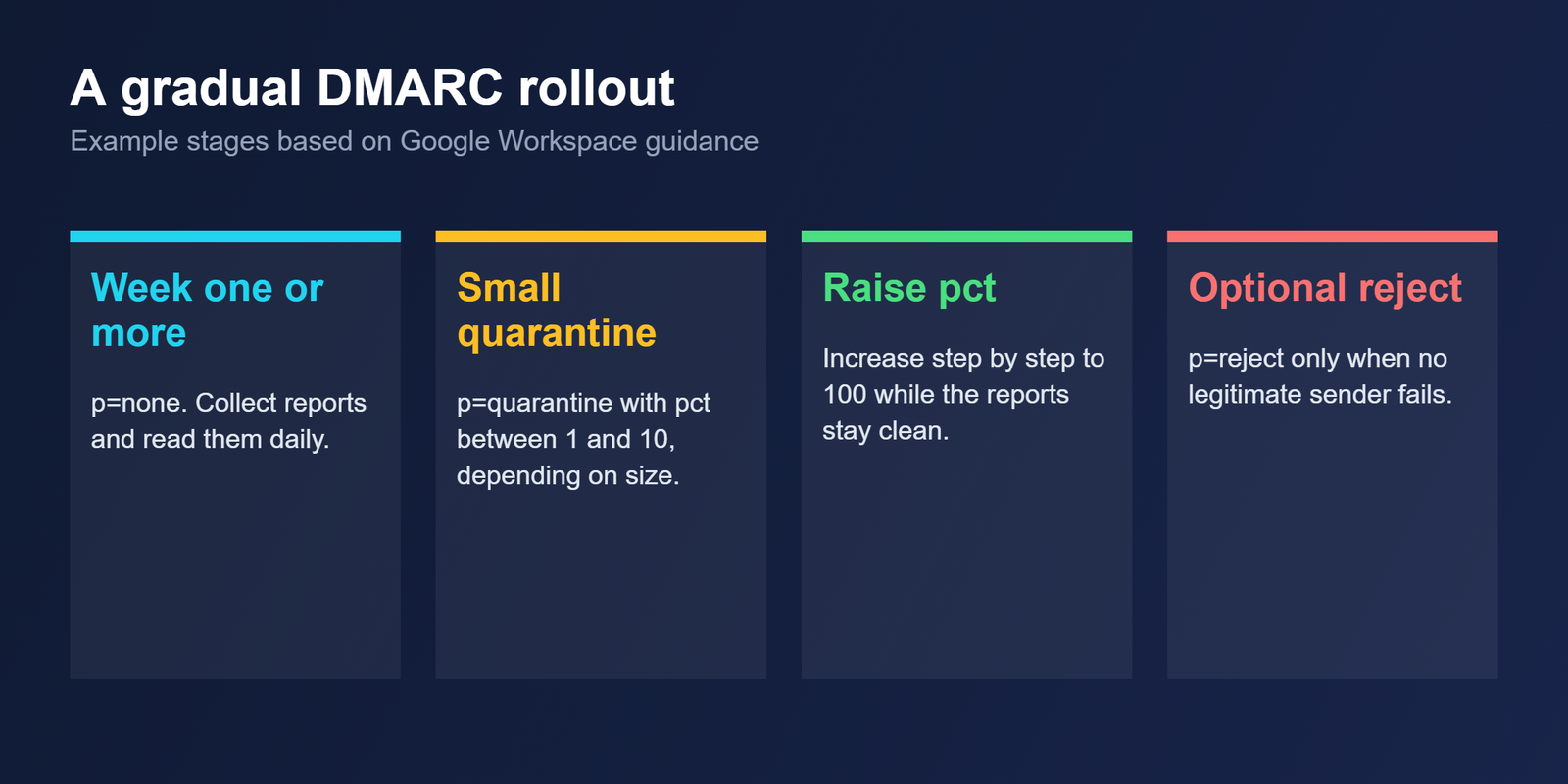
Google’s recommended rollout for Workspace is gradual, and the figures below come from its published guidance, checked 27 October 2026. Set up SPF and DKIM at least 48 hours before you publish DMARC.
| Stage | Example record | What to do |
|---|---|---|
| 1 | v=DMARC1; p=none; rua=mailto:dmarc@example.com | Collect reports for at least a week and review them daily |
| 2 | v=DMARC1; p=quarantine; pct=5; rua=mailto:dmarc@example.com | Quarantine a small share of failing mail. Google suggests 10% for a small organization and 1% for a large one |
| 3 | The same record with pct raised step by step to 100 | Read the reports after every increase |
| 4 | p=reject, optional | Use it only when reports show no legitimate failures, because rejected mail is never delivered |
Google treats one week at p=none as usually enough for the daily reports to show all your mail streams, but that is a minimum rather than a rule. One DMARC vendor’s guide advises at least 90 days at p=none. If you send from several tools, such as a CRM, a billing system and a cold email platform, take the longer view. A forgotten sender is exactly what quarantine punishes.
What to check in the reports before raising the percentage
Each aggregate report lists the sources sending as your domain and whether they passed SPF, DKIM and alignment. Check three things before every increase.
- Every source you recognize passes alignment.
- Every source you do not recognize is either fixed and added to your setup, or confirmed as abuse.
- Volume from failing sources is falling, not rising.
If a legitimate tool still fails, fix its authentication first. Raising the percentage over a known failure only moves your own mail into the spam folder.
When to stay at p=none on purpose
Some domains should wait. A ten-year-old domain with twelve sending tools carries more risk than a new domain with one platform, because every tool has to be found and aligned before enforcement. Volume limits are a separate matter, and our piece on how many cold emails per domain are safe covers them. The authentication side is simply easier to get right when each domain has few senders.
Questions about the DMARC policy warning
Does policy not enabled mean my emails are failing?
No. It means your record is set to p=none, so receivers are told to report failures but not act on them. Your mail can still pass authentication and reach the inbox. The warning describes missing enforcement, not a delivery fault in your own sending.
Should I go straight to p=reject?
No. Reject refuses failing mail permanently, so a forgotten legitimate sender, such as a billing tool, is bounced and never delivered. Start with p=none, move to p=quarantine at a low percentage, and read the reports before you consider reject at all.
What does pct do in a DMARC record?
It sets the percentage of failing messages the policy applies to. With p=quarantine and pct=5, about five percent of failing mail is quarantined, and the rest is treated under the next lower policy. Raise it gradually while you keep reading the reports.
Do I need DMARC if I only send a few emails?
Yes, it is still worth publishing. A p=none record costs nothing, gives you reports on who sends as your domain, and already meets Google’s minimum if you later pass 5,000 messages a day to Gmail addresses.
Will p=quarantine put my own emails in spam?
Only if they fail DMARC. Mail that passes SPF or DKIM in alignment is unaffected. That is why you check the reports first: a legitimate tool that fails alignment is exactly what quarantine would catch.
Bottom line
A DMARC policy not enabled message is a prompt to finish a job you started, not a fault in your email. Keep p=none while you collect reports, move to quarantine at a low percentage, raise it as the reports stay clean, and treat reject as optional. The order matters more than the speed.
Related reading
- SPF, DKIM and DMARC explained: how the three records work together
- Google and Yahoo bulk sender requirements: the checklist behind the 5,000 a day threshold
- Small engaged list vs large unengaged list: what else decides inbox placement