
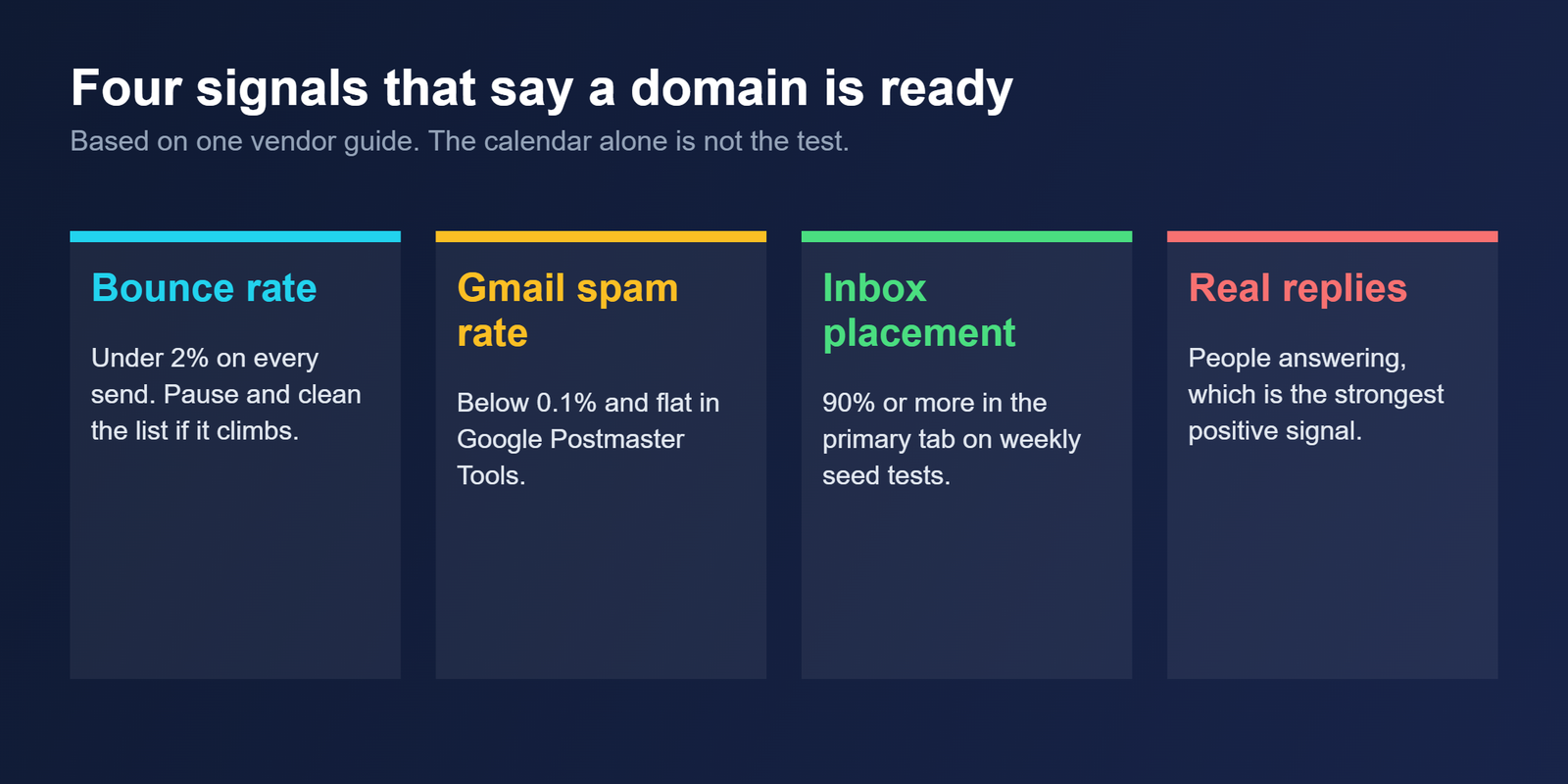
Vendors disagree on how long a new email domain needs before a cold campaign. Instantly gives a hard minimum of two weeks, with three to four typical. Inbound Labs says thirty days. The calendar is a proxy, and what actually decides readiness is a handful of signals you can measure: bounce rate, spam rate, inbox placement and real replies.
The short version
Plan on three to four weeks for a brand-new domain. Treat two weeks as a floor you can only use if every signal is clean when you test it. Start at 5 to 20 emails per inbox per day, raise volume in steps, and hold where you are if bounces or spam complaints rise.
What three vendor guides say
The guides we reviewed cite no warm-up schedule published by Google or Microsoft, so every figure below is vendor guidance. At least two of the three companies sell warm-up tools, which is a reason to read the ranges as estimates rather than rules.
| Source | Time before cold outreach | First week, per inbox | After warm-up, per inbox |
|---|---|---|---|
| Instantly | 3 to 4 weeks typical, 2 weeks as a hard minimum | 5 to 10 warm-up emails a day | Campaign sends at or below 30 a day |
| MailReach | About 14 days with its tool, 3 to 4 weeks manually | 5 to 10 a day in days 1 to 5 | 75 to 100 on Google Workspace or Outlook, under 50 elsewhere |
| Inbound Labs | A 30 day floor, 3 to 8 weeks to full volume | 5 to 20 a day in days 1 to 7 | Holding at 50, slowly above only if metrics stay clean |
They agree that volume must rise gradually and that early sends should go to people likely to reply. They disagree most about the ceiling afterwards, from 30 to 100 messages per inbox per day. The lowest figure is the safer starting point. Our guide to how many cold emails per day per domain covers the volume side in more detail.
A ramp you can use as an example
Inbound Labs publishes the most specific ramp of the three, and it assumes two to three mailboxes per domain. The numbers are an example of the shape, not a prescription.
| Days | Emails per inbox per day | Who to send to |
|---|---|---|
| 1 to 7 | 5 to 20 | Colleagues, partners and friendly contacts |
| 8 to 14 | 20 to 40 | Strongest-fit real prospects |
| 15 to 21 | 40 to 50 | Mostly real prospects, best lists first |
| 22 to 30 | 50, holding | Full cold campaigns |
| After 30 | Slowly above 50 | Only if metrics stay clean. Otherwise add domains |
How to read the readiness signals
Gmail’s spam rate is the one most senders can check directly in Google Postmaster Tools. Google’s published guidance sets 0.1% as the target and 0.3% as the ceiling, which we cover in the bulk sender checklist. Inbound Labs advises staying under 0.1% while a domain is still young.
Bounce rate depends mostly on your list. Inbound Labs wants it under 2% on every send, and MailReach says to pause and clean the list above 3%. Verify addresses before you send, as described in our guide to B2B email verification, because a bad list can undo weeks of warm-up in one send.
Inbox placement needs seed tests, meaning test addresses on Gmail, Outlook and a business domain that you check weekly. Replies are the strongest signal, because they show that real people want the message.
When warm-up can be shorter or skipped
MailReach says that sending fewer than 20 cold emails per inbox per day, consistently, may not need warm-up at all. Instantly notes that pre-warmed accounts can send from day one. Low volume and a clean list reduce the need, but not the setup. SPF, DKIM and DMARC have to be right before the first message, and our explainer shows how.
What resets the clock
MailReach advises never raising volume by more than 20% in a single day. A drop in engagement is a reason to cut volume at once, not to push through it. A single unverified list can push bounces past the thresholds above, and then the right move is to pause, clean the list and resume at a lower level.
Questions about warming up a domain
Is two weeks enough to warm up a new domain?
Only as a floor. Instantly gives two weeks as a hard minimum and three to four as typical, while Inbound Labs says thirty days. Two weeks is reasonable when bounce, spam and reply signals are all clean at the time you test them.
How many emails per day should a new inbox send?
Vendor ranges start at 5 to 20 per inbox in the first week. Ceilings after warm-up run from about 30 to 50 per inbox per day, and one vendor allows 75 to 100 only on high-trust providers such as Google Workspace or Outlook.
Do I need warm-up if I send under 20 emails a day?
Possibly not. MailReach says consistently sending under 20 cold emails per inbox per day may not need warm-up. Authentication and list quality still matter, so confirm SPF, DKIM and DMARC and verify the list before the first send.
What Gmail spam rate should I aim for?
Google’s guidance sets 0.1% as the target and 0.3% as the ceiling for the user-reported spam rate, which you can check in Google Postmaster Tools. Inbound Labs advises staying below 0.1% while a domain is still being warmed up.
Can I warm up faster by sending more?
No. Inbound Labs argues that reputation builds from positive signals such as replies, which accrue at a limited rate, and that sending faster does not compress that history. MailReach advises against raising volume by more than 20% in a day.
Bottom line
Warm a new domain for three to four weeks, start small, and move up only when bounces, spam rate, placement and replies all look clean. If the numbers are bad at day thirty, the answer is to diagnose rather than wait longer, and the calendar never overrides the signals.
Related reading
- How many cold emails per day per domain: the volume ceiling once warm-up ends
- B2B email verification: cleaning a list before it can hurt your bounce rate
- SPF, DKIM and DMARC explained: the setup every warm-up depends on