
A consumer list goes stale slowly. A B2B list goes stale every time somebody changes job, and roughly a quarter of the people on it will have moved within a year. Verification is how you find out before the send rather than after it.
The short version
Run the list through a verifier, then treat the results in three groups rather than two. Safe addresses go on the send. Invalid ones get suppressed. Catch-all and role addresses sit in the middle, and what you do with them depends on how much a bounce costs you. Deleting that middle group is the mistake most people make, because on a B2B list it can be a third of the file.
Why a B2B list decays faster than a consumer one
Personal addresses follow the person. Work addresses follow the job. When somebody leaves, the mailbox is usually disabled within weeks, and the address becomes a hard bounce the next time you mail it. Some companies go further and turn old staff addresses into traps to catch senders who never clean their lists.
The practical consequence is that a B2B list has a shelf life measured in months. A file you verified in March and are mailing in October is not a verified file any more.
What verification settles, and what it leaves open
This matters because sales teams tend to treat a verifier as a yes or no machine, and it is not one.
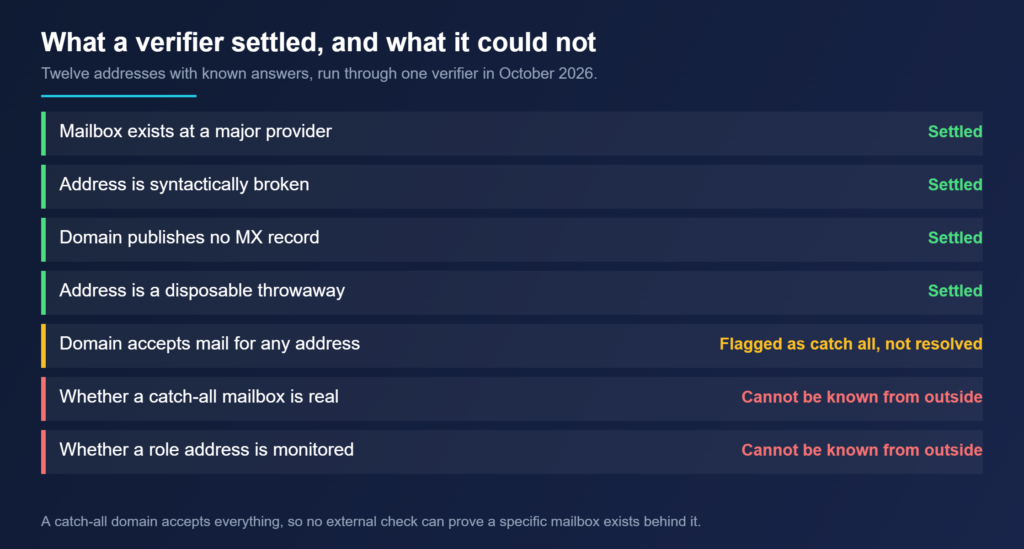
We put twelve addresses through a verifier in October 2026, choosing each one because the answer was already known, either from mail we had actually sent and received or from a DNS lookup anyone can repeat. It got eleven right. The useful part was not the score. It was watching which questions it refused to answer.
The catch-all problem is mostly a B2B problem
A catch-all domain accepts mail addressed to anything at all. Send to a name that does not exist and the server takes it rather than rejecting it. That is a deliberate configuration, and it is far more common on company domains than on consumer providers.
When our test hit one, the verifier returned catch all with a middling score rather than a confident valid. That was the correct answer. Nobody outside the company can tell whether a specific mailbox exists behind a catch-all, so a tool that returns valid there is guessing and charging you for it.
For B2B work this is the group that decides your bounce rate, because guessed addresses in the pattern first.last@company.com land on catch-all domains constantly.
A sequence that holds up
Verification is one step in a sequence rather than the whole job. The order matters because each step removes work from the next.
| Step | What it removes | Why it comes here |
|---|---|---|
| 1. Deduplicate and fix formatting | Repeats, stray spaces, obvious typos | Costs nothing and shrinks what you pay to verify |
| 2. Drop addresses older than your shelf life | Contacts gathered too long ago | Verifying a three year old file mostly buys you bad news |
| 3. Verify what is left | Invalid mailboxes, dead domains, disposables | This is the only step a tool can do for you |
| 4. Split out catch-all and role results | Nothing yet | They need a decision, not deletion |
| 5. Send to safe first, in small batches | Risk | Early complaint signals arrive before the bulk of the send |
What to do with the middle group
Catch-all and role addresses are worth keeping if a bounce is cheap and losing a real buyer is expensive. They are worth dropping if you are already close to a complaint threshold or your domain is new and has no sending history to absorb a bad day.
A reasonable compromise is to mail them separately and later, after the safe segment has gone out and the numbers look normal. If the catch-all batch bounces hard, the damage is contained to a send you can stop.
| Verifier result | What it means | Sensible action |
|---|---|---|
| Safe or valid | Mailbox answered and accepted | Send |
| Invalid | No mailbox, or no mail server on the domain | Suppress permanently |
| Disposable | Throwaway address built to expire | Suppress permanently |
| Catch all | Domain accepts everything, so nothing is proven | Hold back, send in a separate later batch |
| Role account | Shared inbox such as info@ or sales@ | Keep for B2B, but expect lower engagement |
| Unknown | The check could not complete | Re-run later, do not guess |
Frequently asked questions
How accurate is email verification?
Accurate on mailboxes that can be checked, and honest tools say so when a mailbox cannot be. In our twelve address test one verifier got eleven right and misfiled one role address. Treat any single result as evidence rather than proof.
Should I delete catch-all addresses?
Not automatically. On a B2B list they can be a large share of the file, and many are real people at real companies. Mail them in a separate, later batch so a bad result stays contained.
How often should a B2B list be re-verified?
Before any large send, and at least every few months for a list you mail regularly. Job changes are what break B2B data, and they happen continuously rather than on a schedule you control.
Is verification enough on its own?
No. Verification removes addresses that cannot receive mail. It does nothing about people who can receive it and do not want it, and complaints from that group are what damage sender reputation.
Bottom line
Verify before every significant B2B send, and read the output as three groups rather than two. The addresses a verifier refuses to confirm are the ones worth thinking about, because on company domains that group is large and deleting it quietly removes real prospects.
Related reading
- What a catch-all address is: why an SMTP check cannot see past one.
- Hard bounce vs soft bounce: what the reply code tells you.
- Google’s bulk sender rules: the thresholds a bad list pushes you past.